Give your WordPress site its first task.
Connect the site you already have, add your agent to Slack or Telegram, and tell it what you need.
Connect your siteStart with 500 free credits. No credit card needed.
Most WordPress sites can build a landing page with the editor or builder they already have, and a new plugin is worth adding only for a specific missing feature. The plugin also matters less than the settings around the page. Permalinks, the Reading screen, caches, noindex and checkout setup are what usually stop a landing page from working.
Search for a WordPress landing page plugin and you get lists of ten tools, each called the best. None of them can tell you whether you need one. On most sites you don’t. The page you need is an ordinary WordPress Page with the header removed, one clear action and a working form. The editor or builder already on the site can make that.
The bigger risk comes after launch. Landing pages tend to fail for boring reasons: a URL that returns a 404, a homepage that still shows blog posts, a cache serving last week’s headline, a noindex left over from staging. This article covers how to choose a route and how to stop those failures. For the build itself, see our guide on how to build a landing page in WordPress.
Start with what you already run. A landing page is a focused page with one job: collect a lead, register someone for a webinar or sell a product. WordPress gives you three ways to build one, and two of them are probably installed already.
Liquid Web’s guide to creating landing pages makes the same point a careful developer would: if a builder is already on the site, use it instead of adding another system. Each extra builder brings its own assets, update cycle and ways to conflict with the theme. Our explainer on what a landing page builder really is covers the block-template route in detail.
Add a plugin when you need a specific feature the site lacks, not because a list said “high-converting templates.” The situations where a dedicated tool makes sense are narrow and easy to recognize.
| Your situation | Sensible route | The tradeoff |
|---|---|---|
| Block theme, one campaign page, a simple form | Site Editor template plus a form block or form plugin | Fewer ready-made marketing widgets |
| Site already built in a page builder | Same builder, blank or Canvas layout | The page stays tied to that builder |
| Non-designer launching many short campaigns from templates | A dedicated landing-page plugin | Another plugin to update, license and test |
| A/B testing, popups or funnel steps | A plugin or service built for that job | Usually paid, and adds scripts to the page |
Two caveats apply to any choice. Check what renewal costs at full price, because introductory pricing often ends after the first year. And check what the page looks like if the plugin is ever deactivated. A page built from core blocks still renders. A page built from a builder’s own elements usually does not.
The popularity numbers are real, but they measure different things. On WordPress.org’s “landing page” tag, Elementor lists 10+ million active installs and SeedProd 600,000+. Those figures count sites with the plugin active. They don’t count landing pages built, and they say nothing about fit.
Market studies disagree too, because they use different denominators. W3Techs reports Elementor on 31.5% of WordPress sites as of October 2026. HTTP Archive’s 2025 Web Almanac says about 60% of WordPress sites use a page builder, and that Elementor’s share among those builders fell from about 56% in 2024 to 43% in 2025. Both can be true. One measures all WordPress sites and the other measures only sites that use a builder. Neither shows that Elementor is “growing” or “declining” in general.
Speed comparisons are less reliable still. Published benchmarks rank the same builders in different orders depending on hosting, caching and test pages, and some are run by the vendors being compared. The only test that counts is your own page on your own hosting, measured before and after. In one r/webdev thread, a developer called switching builders “the absolute last thing” likely to speed up a slow site. Images, plugin count and hosting usually matter more.
Most landing-page problems come from configuration, not from a bad plugin. The causes below are ranked by how often they come up in support threads and official docs. That ranking is a pattern people report, not a measured rate.
This is the complaint people raise most often. Confirm the page is published and that you’re testing its current URL. Then go to Settings > Permalinks and click Save Changes without touching anything. That rebuilds WordPress’s rewrite rules. WP Engine’s support docs recommend this reset and warn that changing the permalink structure on an established site can cause widespread 404s and hurt SEO.
Elementor’s special “Landing Page” type has its own history here. In 2021, Elementor 3.4.3 sent every Landing Page to a 404 on sites with a custom date-and-name permalink, according to GitHub issue #16244. Rolling back to 3.4.2 fixed it in the reported test. The durable workaround is to save the design as a template, then use it on an ordinary WordPress Page with the Canvas layout. Ordinary Pages also appear in the homepage selector, and some builder-specific landing types do not.
If the 404 survives a permalink save, test for a plugin conflict on staging, one plugin at a time (our guide to fixing plugins that stop working walks through it). After that, ask your host about rewrite rules. Don’t deactivate the builder itself to test, because every page built with it will break while it’s off.
Publishing a page doesn’t make it the homepage. WordPress’s Reading settings documentation says the front page shows your latest posts unless you go to Settings > Reading > Your homepage displays > A static page and pick the page. The Homepage and Posts page must be different pages. Our walkthrough on editing your WordPress homepage covers the theme files that can still override this.
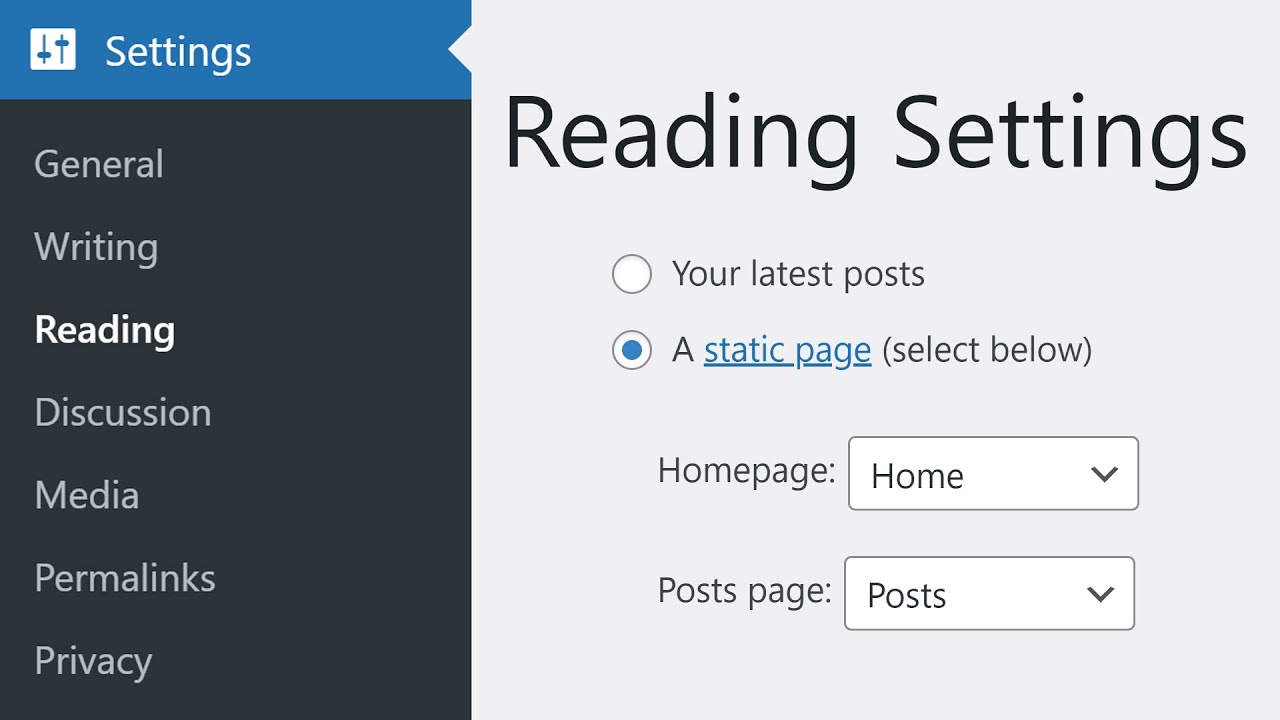
Landing-page plugins with site-wide “modes” add a second trap. A Coming Soon or Maintenance mode is a separate switch from publishing a page. Check the public URL while logged out, because logged-in admins often bypass those modes and see a site that visitors don’t.
A cache is serving an old copy. There are usually three layers: the caching plugin, the host’s server cache and the browser. A CDN makes four. Purge them in that order, then load the page in a private window. The usual mistake is clearing only the browser and deciding the edit failed. If the page still looks wrong, check for mixed content, meaning images or scripts loaded over http on an https page.
A noindex left on from staging keeps a public campaign page out of search. Check both the page’s own SEO setting and any site-wide rule in your SEO plugin. The opposite mistake is using robots.txt to hide a private or test page. Google’s robots meta tag documentation explains that if robots.txt blocks a page, Google never reads its noindex, and the URL can still be indexed. Use noindex or a password for private pages and robots.txt for neither. Our guide to doing SEO on WordPress covers the per-page settings.
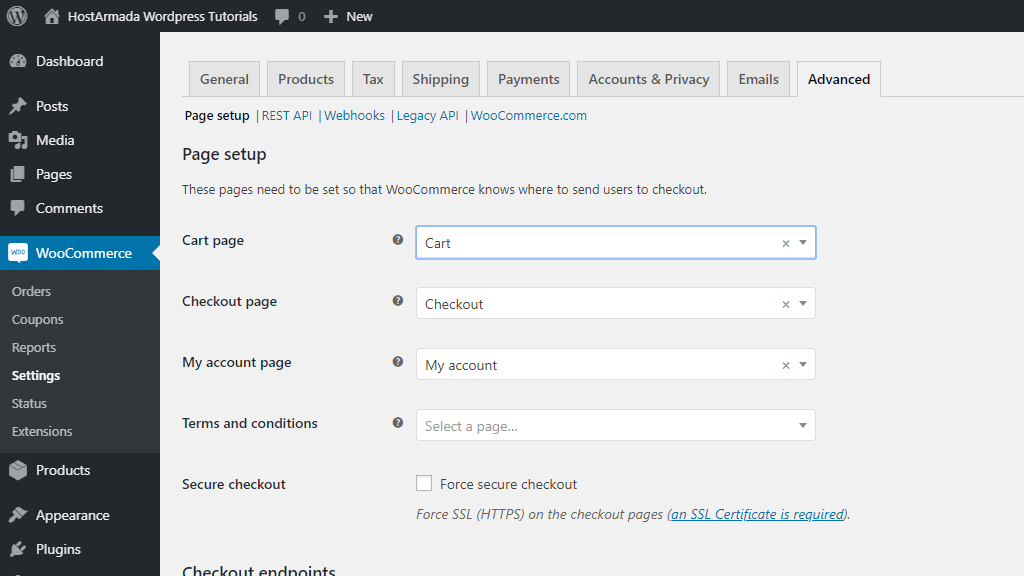
A designed product landing page isn’t the checkout. WooCommerce’s docs say the Cart and Checkout pages must be assigned under WooCommerce > Settings > Advanced > Page setup. If either page is missing, recreate it with the Cart or Checkout block. WooCommerce also says to exclude both pages from caching, because their content is specific to each visitor’s session. Before you send ad traffic, place a test order from the landing page all the way through.
Template forms often use placeholders as labels, and those vanish as soon as someone types. The W3C’s Web Accessibility Initiative says each field needs a real label tied to it, with the label’s for matching the field’s id:
<label for="email">Work email</label>
<input type="email" id="email" name="email" required>
Show required fields and errors in words, not only in red. Then submit the form yourself on the live URL while logged out, and confirm the entry reaches the inbox or CRM it’s meant for.
The plugin decision is a one-time choice. The changes after launch keep coming: a new headline for this week’s ads, a button that should say something else, a form field to remove, a header to hide on one page. Each change is small. The process around each one, with a ticket, a queue, someone to make the edit and someone to check it, is not small.
Agencies handle this with reusable templates, staging and a QA pass on forms, devices and redirects before launch. That works when you have a team. An agent shortens the queue for the routine part.
Example request: “On the spring webinar page, change the headline to ‘Fix your checkout in 30 minutes’, change the button from ‘Learn more’ to ‘Save my seat’, and hide the site header and footer on that page only.”
Before making the change, SiteSelf says what it’s about to change and whether you can undo it. It first checks which editor owns the page. If it’s a block-editor page, the agent edits the headline and button in the page content, then gives that one page a template without the header and footer parts, leaving every other page alone. Next it fetches the live page and reports in chat what changed and what it checked. The work is recorded.
Access depends on the layer. Content and settings work goes through the SiteSelf Connector plugin from the WordPress.org directory. Changes to theme files or speed work need hosting (SSH) access. You can see how this works for layout and style requests on our page about design changes to your existing site.
The limits are worth knowing before you rely on it. A page owned by Elementor, Divi or Beaver Builder is refused at the moment of work, with the reason given, so builder-made landing pages still need the builder. The check is a fetch of the changed page, not a full device test, so view the result on your phone yourself. Nothing is written to your analytics or ad platforms, so update the ad’s destination URL there if it changed. And the agent works on request. It won’t notice on its own that a page went down overnight. Cost is credit-based, and the pricing page has the details.
Yes. The block editor and Site Editor are part of WordPress and cost nothing. Free versions of builders and landing-page plugins also exist, though popups, testing and some form features usually sit behind paid plans.
In a builder, choose its blank or Canvas layout for that page. On a block theme, create a template in the Site Editor without the header and footer template parts and assign it to the page. Editing the shared header template instead changes every page on the site.
Yes. Go to Settings > Reading, choose “A static page” and select it as the Homepage. If your builder’s landing-page type doesn’t appear in that list, rebuild the design on an ordinary Page and select that.
It depends on your setup, and published benchmarks disagree. Measure your landing page before and after installing anything. Large images, extra scripts and tracking pixels often cost more speed than the builder does.
For a page that receives paid traffic and has one goal, most teams remove it so visitors aren’t pulled away. Keep it if the page also has to work as a normal entry point to the rest of the site. No published data settles this either way, so it’s a judgment call based on where the traffic comes from.
Only if you get enough traffic to reach a clear result. WordPress builders have limited built-in testing, and the dedicated tools that offer it are usually paid. A clear headline, a single call to action and a form that works matter more than a test run on a few hundred visits.
Tips & Strategies
On a WordPress site, Apache security comes down to a few targeted, tested rules: block sensitive files, turn off directory listings, stop PHP running in uploads, and get HTTPS in the right order. First check that your server reads those rules at all. When hardening breaks a site, the error log almost always shows the rule that did it.
Read article ›Tips & Strategies
Managing many WordPress sites starts with picking the right setup. Then it depends on a routine for checking each site after an update. For independent sites, that usually means separate installs connected to one management dashboard. Running the updates is quick. The real work is confirming afterwards that every site still works.
Read article ›Tips & Strategies
Theme customization in WordPress is not one task. It is a choice about which layer holds the change: theme settings, CSS, a child theme, or a plugin. Pick the wrong layer and the change either disappears at the next update or takes the site down with it.
Read article ›Connect the site you already have, add your agent to Slack or Telegram, and tell it what you need.
Connect your siteStart with 500 free credits. No credit card needed.