Give your WordPress site its first task.
Connect the site you already have, add your agent to Slack or Telegram, and tell it what you need.
Connect your siteStart with 500 free credits. No credit card needed.
A WordPress template gives a business site its design and setup to start from. It is not a finished site. Choose one based on the pages you need, the person who will edit the site and the builder the template depends on, then install it on a fresh copy before it touches anything live.
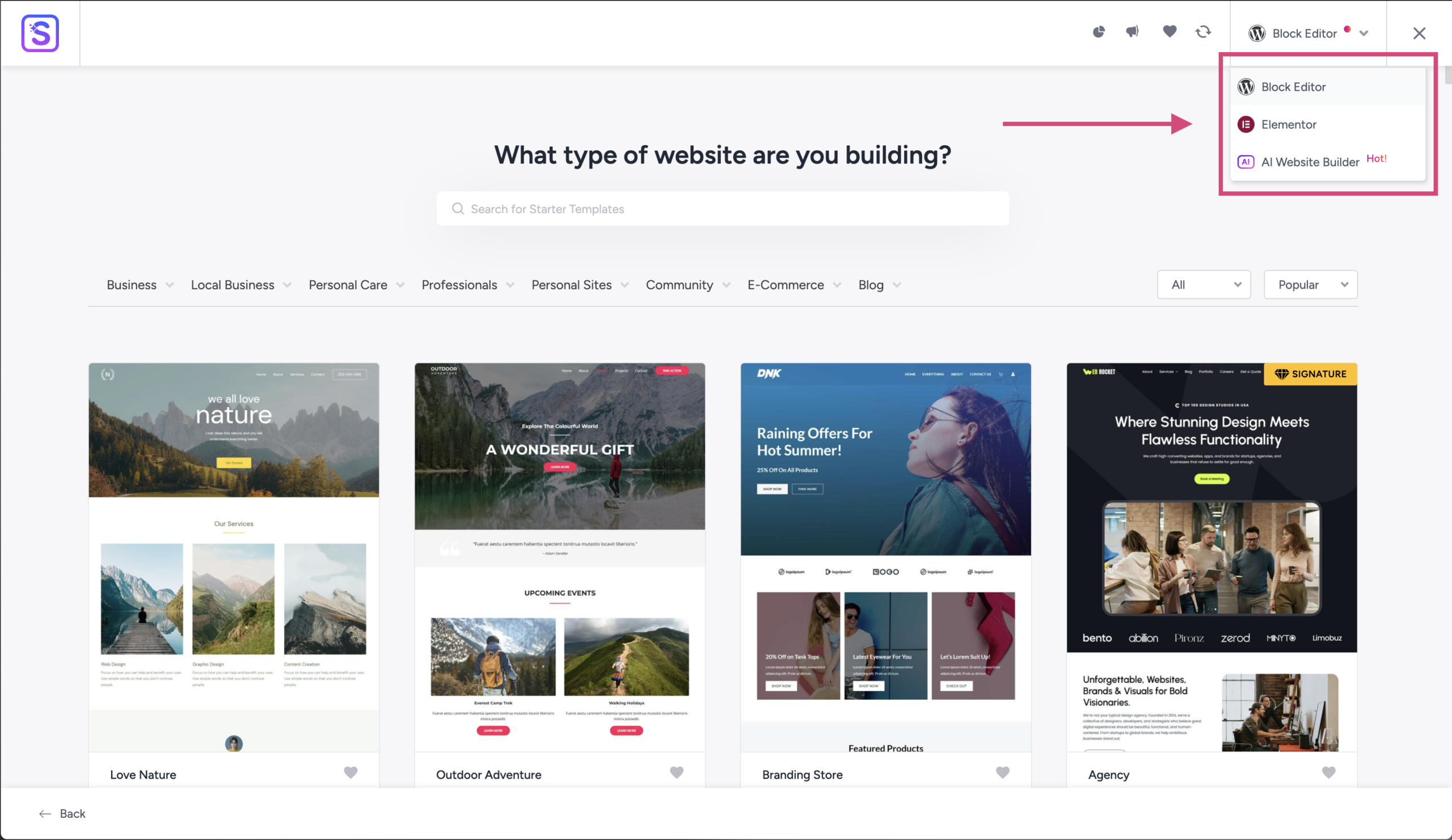
The WordPress.org listing for the Starter Templates plugin offers more than 300 ready-made website designs you can import. Every business template makes the same pitch: pick a design you like, and the site is mostly done.
Mostly done is where the trouble starts. “Template” covers at least four different things. The demo is built from someone else’s content. And the template price is the smallest number in the project. This article covers what you are actually getting, how to choose a template for the site you will run (not the one in the demo), and how to install it without overwriting a site you already have. If you are still deciding whether WordPress suits your business at all, start with whether WordPress fits a business website.
The word can mean four different things, and each one installs in a different place. Most first-day problems come from mixing them up.
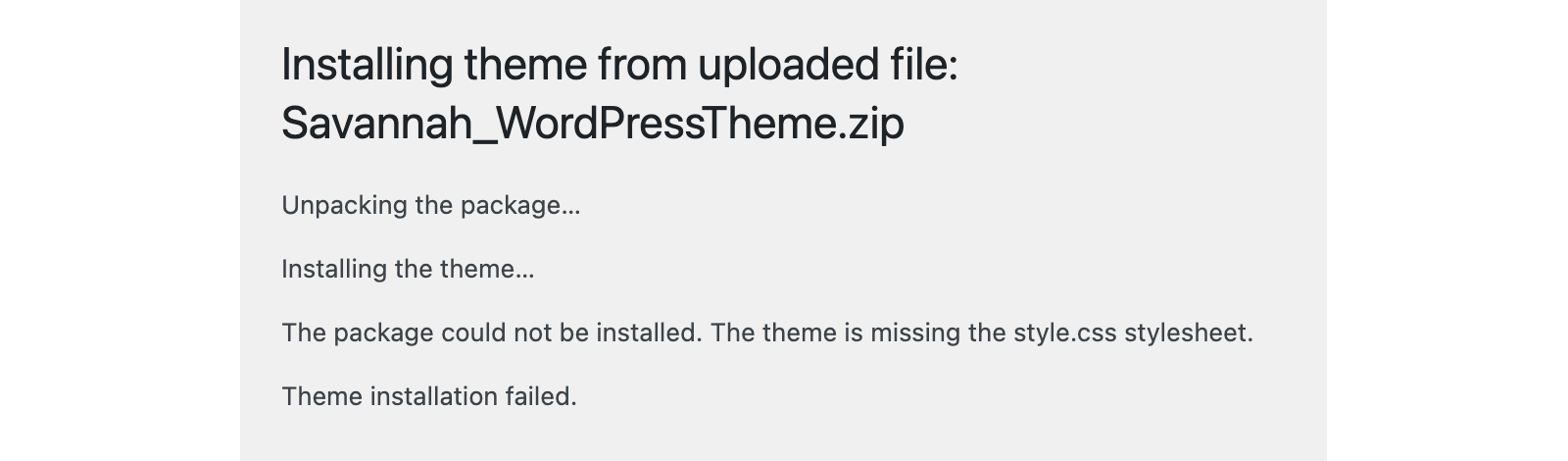
Upload the wrong one and you get the most common first-day error. If you push a marketplace download bundle, a builder kit or a plugin through the theme installer, WordPress replies: “The package could not be installed. The theme is missing the style.css stylesheet.” The fix is to unzip the download and find the installable theme ZIP inside. It is usually the file named after the theme. Upload that file. Kits and starter sites go through their own importers.
A template is the right call when the site is standard: a handful of service pages, an about page, a contact form, maybe a blog or a small shop. Automattic’s guidance for agencies (May 2025) puts the line in a sensible place. Ready-made themes suit simpler sites, tight budgets and short deadlines. Custom builds earn their cost when you need unusual features, specific branding or integrations.
Practitioners on r/Wordpress give consulting and local service businesses the same advice. Start from a business starter template, replace every piece of content, and change the colours and fonts. Don’t redesign the structure.
A template stops paying off when you have to fight it on every page. If your booking flow, quote form or product logic is something neither the template nor a common plugin does, you will pay for custom work anyway. On top of that, you will pay to work around a layout you never needed.
The demo is a finished site with someone else’s content in it: professional photos, copy written to fit each box, menus already built. Install the bare theme and you get the design with nothing in it. Import the starter site and you get the sample content, which you then replace piece by piece. Copy that is longer or shorter than the placeholder text changes the layout.
The second cause is a missing dependency. Many starter designs need a specific page builder. On the Starter Templates support forum, one user found that their favourite template had become Elementor-only. It would not import as a block-editor design. That is common: W3Techs detects Elementor on 31.5% of WordPress sites as of October 2026, so plenty of templates assume you have it. Some builder kits also need the paid version of the builder for certain layouts.
The third cause is caching. If your changes don’t show, clear the caching plugin, the host’s cache and your browser cache before you decide the import failed.
Start from the work the site has to do, not from the screenshot. Go through these checks in order. Each one rules out more than the one before.
Price is not a quality signal. A free theme is often enough for a brochure site. Pay when you need a specific feature or real support, and check that the feature is in the tier you are buying, not the one above it.
Import onto a fresh install or a staging copy, never straight onto a live site that already has content. This is the step most people skip, and skipping it is how a quick refresh turns into a rebuild.
Here is a real case. A user on the WordPress.org forums imported a restaurant starter template into an existing Elementor site. Colours, fonts, layouts and responsive breakpoints changed across pages they had already built. Support explained that the import does not delete content, but the Customizer settings it brings apply to the whole site. The way back is a Customizer backup if you have one, or redoing the settings by hand. Support’s advice for next time was to import on a new install.
Any code changes after that belong in a child theme, so that a parent theme update doesn’t wipe them. The guide to customizing a WordPress template safely covers which layer to edit.
The template is cheap. Folio3’s 2026 cost guide puts a premium theme at $40 to $200, paid once. Add any builder licence or add-ons, which are often billed yearly.
The site is not cheap. Freshy’s 2026 rate guide prices a 5 to 15 page small-business site at $2,000 to $5,000 from a freelancer and $5,000 to $10,000 from an agency. Folio3 estimates 30 to 50 hours for a freelancer-built brochure site, about $3,000 to $5,000. The gap between those numbers is content, images, setup and testing. A template shortens the design work. It does not write your service pages or take your photos.
Freelancers should price with that in mind. A template site sold at template prices leaves out the discovery and content work, and that is the part that takes the time.
Check that the structure underneath is as good as the surface. A polished template can hide headings that are really bold paragraphs, or headings picked for their size rather than their order. W3C’s accessibility tips for developers include keyboard access and setting the page language. Both are worth rechecking after any template change.
A quick pass takes ten minutes. Tab through each main page without a mouse. Confirm that each page has one main heading and that the rest follow in order. Check the site language under Settings > General. Then delete the demo pages, the sample posts and any theme you aren’t using.
After that, the work is ordinary edits and updates. Read up on how theme updates work and fail, especially for themes bought outside WordPress.org. If you would rather describe those edits than make them yourself, SiteSelf handles small-business site updates through chat on the site you already have, though it refuses pages owned by Elementor, Divi or Beaver Builder, which is one more reason to know what your template runs on.
A theme controls the design of the whole site and installs under Appearance > Themes. “Template” is looser. It can mean a starter site imported by a plugin, a page-builder kit, or a layout for a single page. Business buyers usually mean a whole pre-designed site, which in practice is a theme plus imported starter content.
Usually not. Your posts and pages stay. What changes is the global design: colours, fonts, layout and breakpoints can switch across the whole site. That is why the import belongs on a fresh install or a staging copy.
There is no measured answer. Multipurpose themes with large starter libraries tend to get updates for longer, which is why some agencies have moved to them. They also carry features you won’t use. Whichever you choose, the maintenance record and the dependency list matter more than the niche on the label.
Yes, and your content comes with you. Layouts built with the old theme’s builder, shortcodes or custom widgets don’t, so expect to rebuild the homepage and any designed landing pages. Do the switch on staging first.
It is one factor. Plugins, image sizes, scripts and hosting count just as much. Feature-heavy themes load more CSS and JavaScript than a simple site needs, so a lighter base gives you more room. Test your real pages, not the theme’s demo.
Check that the theme declares WooCommerce support, then test the product, cart and checkout pages with your own products on staging. Back up the database before any theme change, because orders and products live there.
Explainers
On WordPress, a site’s layout and design don’t live in one setting. What you see comes from the theme, global Styles, templates, page content, any page builder and the caches in front of them. Good layouts come from clear structure that works on a phone. Most layout trouble comes from editing the wrong layer or from stale CSS.
Read article ›Explainers
A WordPress care plan is a label, not a standard. Most plans list the same things: updates, backups, monitoring and some support hours. The value is in how that work gets done: staged updates, backups you have proven by restoring them, and checks that the forms and checkout still work afterwards.
Read article ›Explainers
A WordPress maintenance package is a sales label wrapped around a documented routine: back up, test significant updates on staging, update, then check that the site still works. Plans differ in how much of that routine a person actually does, who pays when an update breaks something, and what they leave out. Read the scope line by line and ignore the plan name.
Read article ›Connect the site you already have, add your agent to Slack or Telegram, and tell it what you need.
Connect your siteStart with 500 free credits. No credit card needed.