Give your WordPress site its first task.
Connect the site you already have, add your agent to Slack or Telegram, and tell it what you need.
Connect your siteStart with 500 free credits. No credit card needed.
WordPress suits most business websites as long as someone owns the upkeep. The software is free, but the build, hosting, plugins and maintenance cost money. Most WordPress horror stories come from plugin sprawl, untested updates and nobody being in charge, not from WordPress itself.
W3Techs says WordPress runs 40.2% of all websites as of October 2026. That share has fallen from 43.6% in January 2025, but WordPress is still far ahead of every other system. For a business, those numbers answer one thing: you will always find someone who knows how to work on the site. They don’t tell you whether you should build on it.
The real question is who keeps the site working after launch. WordPress gives you ownership, flexibility and a huge plugin directory. In return, someone has to handle updates, backups, testing and the occasional broken page. If that job has an owner, WordPress is a strong default. If it doesn’t, the site will slowly get worse, whatever platform it’s on. If you run a business without a web team, our page on website updates for small businesses shows another way to cover that work.
WordPress suits a business whose site will keep changing. Think new services, case studies, landing pages for campaigns, a blog, a booking form or a store added later. Each of those is a page, a block or a plugin on the site you already have, so you never rebuild from scratch to grow.
It suits a business badly when the site is a brochure that nobody will touch for years and nobody will pay to look after. On Reddit’s r/webdev, an agency owner said their biggest WordPress problem was plugins that sometimes break a site. That risk never goes away. A hosted builder is simpler because the vendor owns the upkeep, and you pay for that simplicity in flexibility.
Practitioners also make a point that comes before any platform choice. Decide what the site is for and how a visitor becomes a customer, then pick the theme or builder. A redesign that starts from a theme tends to look dated within months. A site built in an afternoon and never touched again is worse.
The software costs nothing. The site has four costs: the build, hosting, any premium plugins, and someone’s time to maintain it. Most of the confusion about price comes from people mixing those four together.
The build is the cost with the best data. The Admin Bar surveyed 1,144 WordPress freelancers and agency owners in March 2024, and 72% said their average project price was under $5,000. Even so, a five-page marketing site and a WooCommerce store with custom shipping rules aren’t the same project. Compare quotes on scope, not on the total.
Maintenance is the cost people forget. In the 2023 State of Enterprise WordPress report, 56% of respondents said the initial price didn’t include maintenance. Small sites run into the same thing on a smaller scale. One maintenance provider, Freshy, publishes these typical ranges:
| Maintenance model | Typical range (Freshy’s guide) | What you usually get |
|---|---|---|
| Freelancer retainer | $50 to $150 a month | Updates and backups. Response time depends on one person’s schedule. |
| Agency plan, small business | $100 to $300 a month | Staging, backups, uptime checks, reports |
| Agency plan, store or membership site | $300 to $500+ a month | The same, plus testing of checkout and accounts |
| One-off troubleshooting | $50 to $250 an hour | A fix, with no ongoing care |
Freshy sells maintenance, so read these as one provider’s view of the market. Still, a quote far outside these ranges should come with an explanation of what’s included.
Most business-site failures happen while the site is being run, not because of the software. The list below follows how often practitioners report each problem. Nobody has measured this across all of WordPress, but the order is the same in support forums, agency write-ups and WordPress’s own documentation.
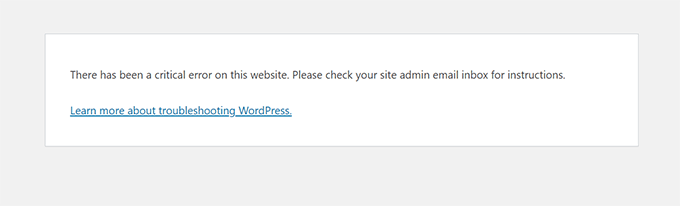
This is the most common report. An update ships, and the site shows “There has been a critical error on this website.” Or a single feature stops working while the rest of the site looks fine. The fix starts with isolation: deactivate plugins and turn them back on one at a time, or switch to a default theme such as Twenty Twenty-Five. The WordPress support handbook recommends the Health Check plugin’s troubleshooting mode because it does this only for your logged-in session, so visitors keep seeing the normal site. Our guide to fixing plugins that stop working walks through the full routine.
Slowness almost always has more than one cause: heavy plugins, oversized images, a bloated theme, caching that isn’t doing much, and cheap hosting. Roakon, an agency, describes inheriting a site with 43 plugins and a nine-second homepage. Cutting to 17 plugins brought load time down to 3.7 seconds. That’s a vendor’s own case study. It’s useful as a pattern, not as a promise.
The wider picture is improving. HTTP Archive’s 2024 Web Almanac found that 40% of WordPress sites passed all three Core Web Vitals on mobile, up from 28% in 2023. The median mobile Lighthouse score was still only 38. Measure your key pages while logged out, change one thing, then measure again. Stacking several speed plugins at once is a common way to make things worse.
WordPress’s Advanced Administration Handbook documents the error messages: “Error Establishing Database Connection”, 500 Internal Server Error, memory exhausted, and the white screen. The usual causes are wrong credentials in wp-config.php, a damaged .htaccess file, a memory limit that’s too low, or the host’s database being down. Ask the host first. Don’t edit files or repair database tables without a backup, because that can add damage on top of the original problem.
These are the failures that cost money, and nobody sees them. A contact form can show its thank-you message while the email never arrives. Roakon also describes a WooCommerce update that removed the checkout button. Sending site email through an authenticated SMTP service fixes most delivery problems, though some messages can still land in spam. After every update, submit the form yourself and run a test order. A “sent” status doesn’t prove anything reached an inbox.
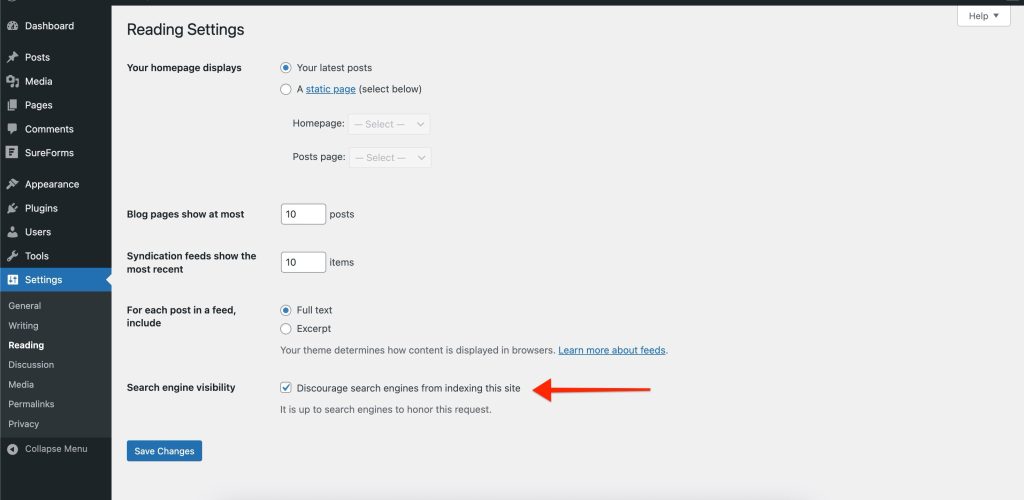
Settings, then Reading, has a checkbox labelled “Discourage search engines from indexing this site”. WordPress’s documentation explains that when it’s ticked, WordPress adds a noindex instruction to every page. Developers often tick it during the build and forget to untick it at launch. Other common causes are an SEO plugin set to noindex a whole content type and a robots.txt file left over from staging. Our WordPress SEO walkthrough covers the checks in order.
Pick the model based on how often the site changes and what an hour of downtime costs you.
You, with a routine. This works for a stable site that changes a few times a month, with an owner who will actually follow the routine: take and check a backup, update, then test the form and the key pages. Our explainer on what backup plugins actually cover is worth reading before you rely on one. This model breaks down when every update notice feels risky, or when the site takes orders.
A freelancer. A freelancer is cheaper and more personal. The weak spot is availability, and some freelancers push updates straight to the live site without testing them first. Ask how they test and how quickly they respond.
An agency care plan. You get staging, scheduled updates, uptime checks and reports, plus a written response time. Freshy suggests same-day response as the minimum for a business site. The cost is the retainer, plus a ticket queue for anything outside the plan.
All three run into the same problem. Most website changes are small, and the process around them isn’t. Changing the opening hours in three places shouldn’t need an email, a quote, a wait and an invoice.
An agent working on the live site turns that small-change backlog into requests you make in chat. SiteSelf joins the WordPress site you already have. You describe the change through chat or from Telegram. The agent makes the change, fetches the changed page to check it, and reports what it changed and what it checked. The SiteSelf page for small businesses covers the kinds of updates owners usually send.
Example request: “We now open Saturdays 9 to 1 and we’ve added gutter cleaning as a service. Update the hours on the contact page and in the footer, add a short gutter cleaning section to the services page, and add it to the service dropdown on the quote form.”
What the agent would do: find each place the hours appear, tell you what is about to change and whether it can be undone, then make the edits. Every change is recorded, so you can see later what changed and when.
What it would check: it fetches each changed page and confirms the new hours, the new section and the new dropdown option are there. Then it reports back in plain language. It doesn’t take screenshots or test on different devices, and it doesn’t send a test enquiry. Submit the quote form once yourself.
Access it needs: the SiteSelf Connector plugin from the WordPress.org directory covers content and settings work like this. If the work involves code, files or speed, it also needs hosting (SSH) access.
What it cannot do: if Elementor, Divi or Beaver Builder owns the services page, the agent refuses that edit when it gets to it and tells you why. It works only when you ask, so it won’t notice a failed SSL renewal or a broken form overnight. You still need uptime checks from your host or a care plan for that. It doesn’t write to Search Console, analytics or your CRM. For costs, see the pricing page.
That depends on upkeep, not on the platform. Most risk comes from outdated plugins and themes, shared or weak logins, and extensions nobody uses but nobody removed. Keep everything updated, give each person their own account with the lowest role that works, and keep backups you have actually tested restoring.
WordPress.org is where you download the open-source software to install on hosting you choose, so you control plugins and files. WordPress.com is a hosted service built on the same software, where what you can install depends on your plan. Before you move to it, check whether your plan supports the plugins and store features your site uses.
Yes. The block editor handles text, images and layout without code, and most service-page edits never need more than that. Page builders such as Elementor make design changes easier, but your pages then depend on that builder, which makes a later migration or redesign harder.
There’s no safe number. Duplicates and abandoned plugins matter more than the total. Two plugins doing the same job, such as two caching or two SEO plugins, cause conflicts. A plugin with no update in years is a risk. Remove what you don’t use, then retest your forms and checkout.
Yes. WooCommerce is listed on WordPress.org with more than 7 million active installations. A store adds payments, shipping, tax and transactional email to look after, so test a full order after every update.
Treat any migration as a project, not a quick fix. Owners report losing search rankings, having to rebuild page-builder pages, and re-uploading images by hand after moving platforms. If the real problem is slow pages or a missing maintenance owner, fix that first. Migrating rarely fixes either one.
Explainers
There is no single WordPress theme updater. Your theme updates through the built-in dashboard updater, a ZIP replacement or a vendor’s license channel, and each one fails in its own way. The error message usually tells you which cause you have, and the green success message doesn’t tell you whether the site still works.
Read article ›Explainers
A WordPress case study tells you how one problem was fixed on one site at one moment. It doesn’t tell you what is wrong with your site. Before you borrow its fix, check the date, the versions and the cause it names, and don’t take one story as a sign of how common a problem is.
Read article ›Explainers
Almost any backup plugin can make a backup. The hard part is making sure that backup is complete, stored off the server, still running on schedule and able to restore a working site. Pick a plugin by how you will need to recover, test the restore, and keep the plugin itself updated.
Read article ›Connect the site you already have, add your agent to Slack or Telegram, and tell it what you need.
Connect your siteStart with 500 free credits. No credit card needed.