Give your WordPress site its first task.
Connect the site you already have, add your agent to Slack or Telegram, and tell it what you need.
Connect your siteStart with 500 free credits. No credit card needed.
On WordPress, a landing page builder is a choice between four kinds of tools, and for a single campaign page the block editor you already have is often enough. Whichever builder you pick, it will matter less than what happens after you publish: the Reading setting, caches, store pages, indexing, and who keeps the page up to date.
About 60% of WordPress sites run a page builder, according to HTTP Archive’s 2025 Web Almanac. Most of those builders were picked in an afternoon to get one page live. The site then keeps them for years, along with their renewals and updates, and a page format that only that builder can read.
So “which WordPress landing page builder should I use?” is really two questions. Do you need a builder for this page at all? And what will you be maintaining once the page is live? This article answers both. If you want the ground-level version first, our guide on what a landing page builder really is covers the basic idea.
The phrase covers four kinds of tools. They lock you in to very different degrees.
| Kind of tool | What you get | What you take on |
|---|---|---|
| The block editor, optionally with a block toolkit | Native WordPress pages, patterns and templates. Toolkits add more layout blocks. | Fewer moving parts. Clients may find the editor less intuitive. |
| A general visual page builder | Drag-and-drop layout, template libraries, often forms and popups | A second editing system, its updates, and layouts stored in its own format |
| A dedicated campaign or coming-soon plugin | Standalone pages with no theme header or footer, plus campaign templates | One more plugin. It can also clash with other coming-soon or maintenance plugins. |
| A hosted landing-page platform outside WordPress | Fast duplication and A/B testing | Another subscription and another login. The page does not live on your site. |
Marketers who use both kinds describe a sensible split. They use a hosted platform when they run many short campaigns and test constantly. They use WordPress for evergreen pages, and for pages that need the site’s existing forms and plugins or that get handed back to a client.
Often you don’t. A landing page is a normal WordPress Page with a focused layout and usually no main navigation. The block editor can build that. HTTP Archive’s 2025 data puts the plain Block Editor on 18% of WordPress sites. Plenty of people already work this way.
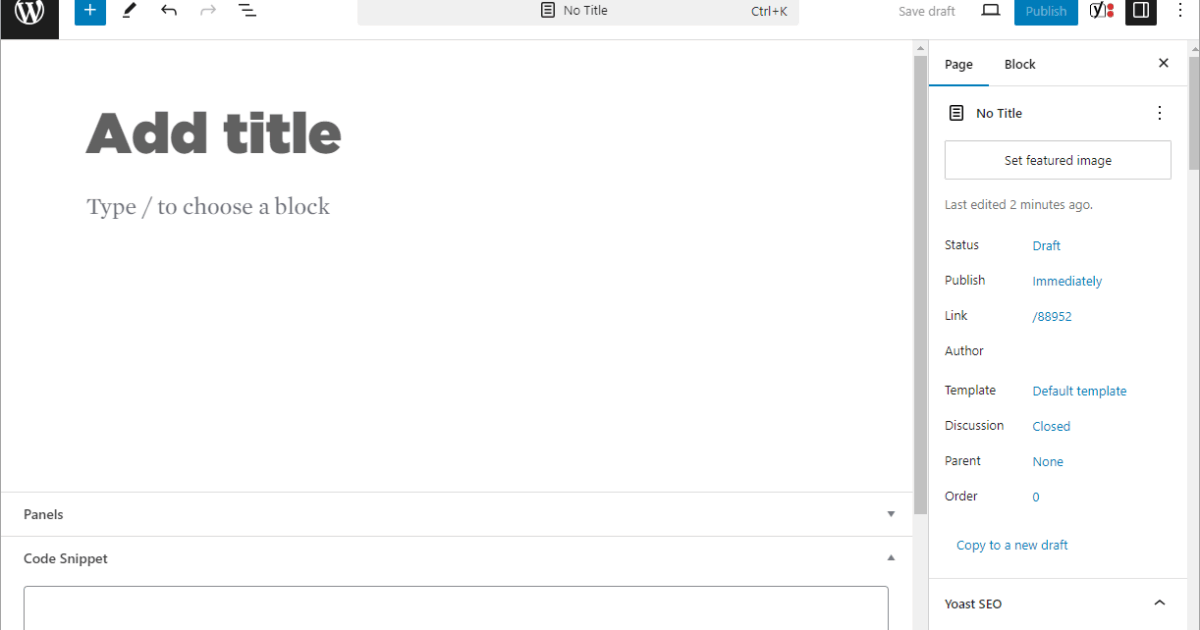
The steps are short. Create a Page. Open the Template panel in the page settings sidebar. Pick a template without a header or footer, if your theme has one. Block themes often include a blank or no-title template. Classic themes sometimes offer a “Full width” or “Blank” option. If yours has neither, you can create one in Appearance > Editor > Templates. Then build the sections from patterns. Our walkthrough on building a landing page in WordPress goes through it screen by screen.
A builder earns its place in three situations:
Popularity is a weak reason on its own. Elementor’s WordPress.org listing shows 10+ million active installs, more than any other builder. That gets you more tutorials and freelancers. It also gets you more conflict reports, because more sites are running it.
Less than people expect. The Admin Bar audited more than 150 live agency sites in 2025 and reported median Lighthouse scores of 77 for Bricks, 70 for Beaver Builder, 69 for Gutenberg and 66 for Elementor. Those groups were small, six sites in the Gutenberg case, and no two sites were built the same way. That is a spread, not a ranking.
The page decides most of it: hero image size, how many widgets and third-party scripts it loads, and whether caching is set up. Practitioners do complain that heavy builders load unused CSS and JavaScript on every request, and a bigger hosting plan won’t fix that. Others point out that many “the builder is slow” threads turn out to be heavy pages. Both are true. Test the real page, with its form, tracking and images, before you blame the tool or buy a new one.
Most failures reported on WordPress.org and in builder docs come from settings, caches and conflicts. Check these first, roughly in order of how often they come up.
Publishing a page does not make it the front page. WordPress only shows it as the homepage once you choose it under Settings > Reading > A static page. In a block theme, a Front Page template can override that setting. If the homepage still looks wrong, check Appearance > Editor > Templates. Our guide on setting a page as the front page covers the edge cases.
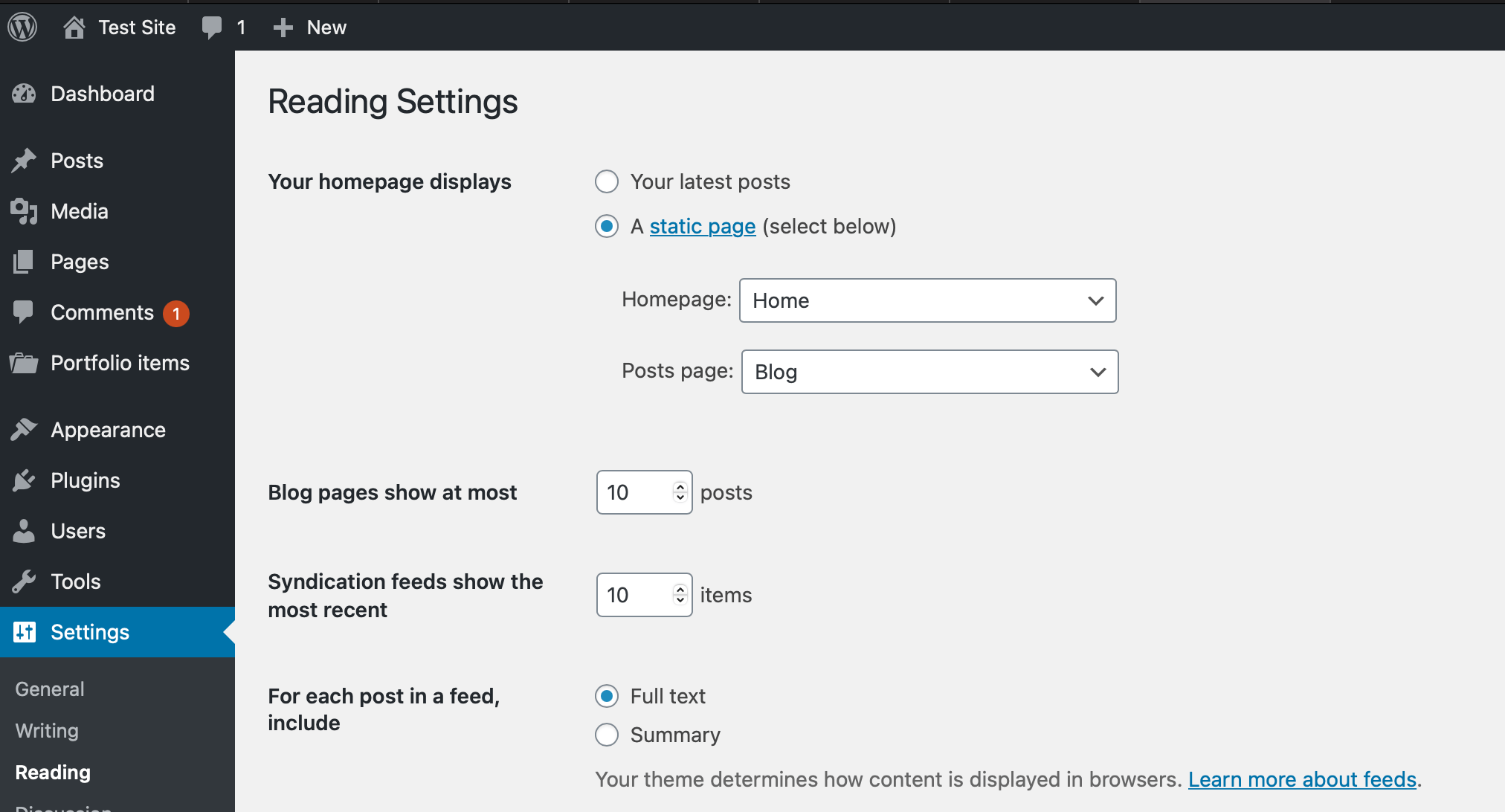
Elementor users hit one extra trap. Its separate Landing Pages feature created a custom post type, and the Reading setting only lists regular Pages, so those landing pages could never be the homepage. Elementor’s help center now says the feature was deprecated in Pro 3.27 and is no longer supported. The route that works is to save the design as a template, insert it into a regular Page, and select that Page. Many older tutorials still describe the old feature.
The cache can sit in your browser, a caching plugin, the host’s server and a CDN, and each one holds its own copy. Test in a private window while logged out. Purge the plugin cache, then the server and CDN caches, then the browser cache. Elementor also generates its own CSS files. Its Tools screen can regenerate them when styles look stale. If an optimization setting keeps breaking the layout, exclude that one setting rather than turning caching off. The full sequence is in our page-not-updating guide.
An “invalid JSON response” error, a gray editor or a 403 error on save usually means one of four things: a plugin conflict, mismatched builder versions, a memory limit, or a server firewall rejecting the save request. Open your browser’s developer tools and look at the Network tab to see which request fails before you change anything. One WordPress.org thread from September 2026 shows why order matters. Saves failed after Elementor 4.3.0, extra memory did not help, and rolling back to 4.2.4 did.
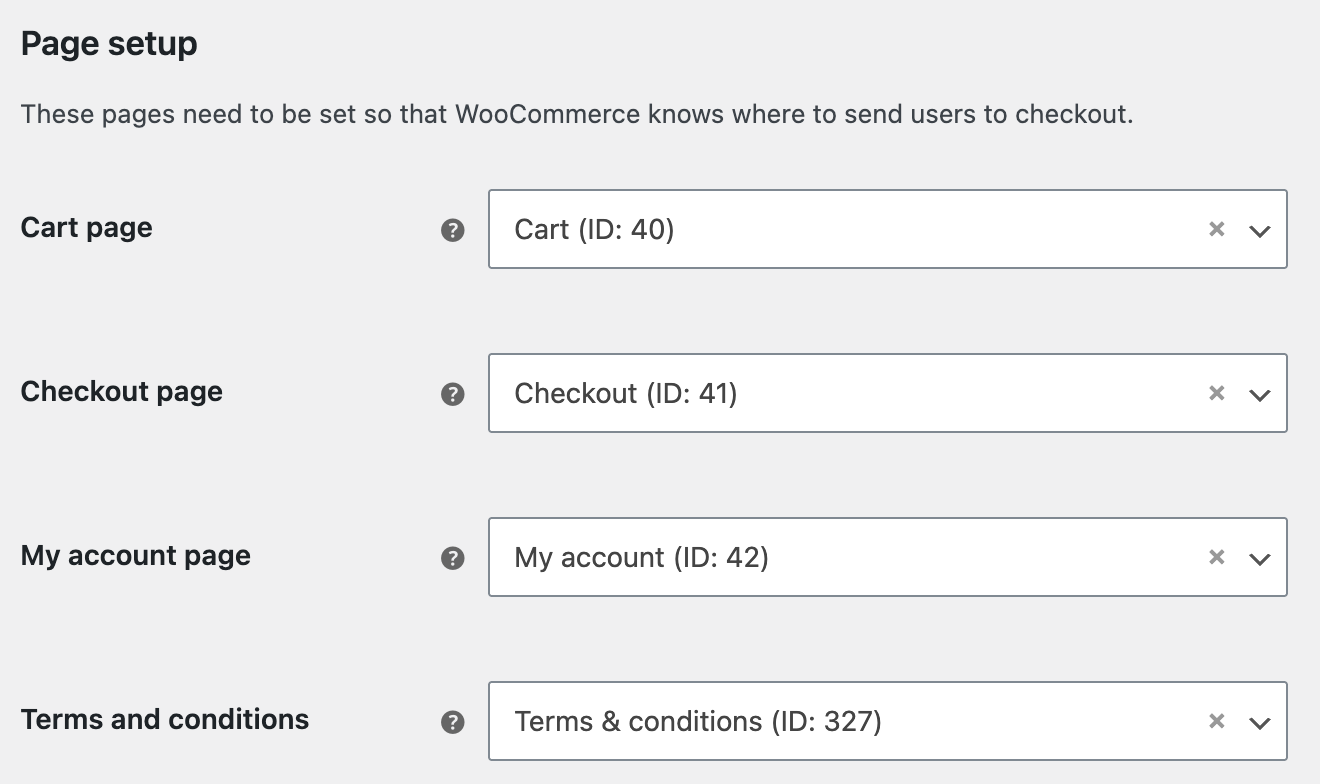
On WooCommerce, a landing page must never take over the store’s own pages. WooCommerce’s documentation warns that assigning Cart, Checkout and My Account to the same page can cause incorrect redirects and broken payment gateways. Check the assignments under WooCommerce > Settings > Advanced > Page setup. Then put a real product through the cart and checkout, including the payment redirect. A visual preview doesn’t test any of that.
Use URL Inspection in Search Console. Remove any noindex you didn’t intend. If you want a page kept out of search, use noindex, not robots.txt. Google’s documentation explains that blocking a URL in robots.txt can stop Google from ever seeing its noindex tag. Also check the form: every field needs a real label, not just placeholder text. A polished builder layout can hide that problem.
The first page is the cheap part. Three costs come later.
Renewals. Introductory prices are common, and renewal prices are higher. SeedProd’s pricing page, for example, says renewals are charged at the full price. When you budget, use the renewal figure, not the launch offer.
Drift. Practitioners describe a familiar pattern. Someone imports a demo, tweaks it and ships it. A few months later the offer on the page is out of date, the mobile layout has drifted and a plugin update has broken a section. Nobody gets round to fixing it, because every small edit means opening the builder again.
Lock-in. Visual builders store layout in their own format. If you switch tools, you may have to rebuild the pages. People who converted Elementor pages to blocks report leftover HTML blocks and broken widgets. Before you put a whole campaign library into a tool, export one page, move it to staging, and see what is left after you deactivate the builder.
None of this decides whether the page converts. No source shows one builder producing higher conversion rates than another. A clear offer, one main action, proof near the form and a mobile layout someone actually checked do far more.
Most landing pages are small jobs: a headline, three sections, a form that already exists, a button. The process around them is not small. Someone has to open the editor, find the right template, wire up the form, remember the Reading setting, purge the cache and check the result. That coordination is what gets postponed, and it is why so many campaign pages go out late or never get updated.
SiteSelf is an AI agent that works on your existing WordPress site. You describe the page in chat or from Telegram, and the agent does the page edits on your live site itself.
Example request: “Make a landing page for the spring remodel offer at /spring-offer. Use the copy in this doc, no main menu, and put our existing quote form at the bottom. Keep it out of the navigation and don’t make it the homepage.”
Here is what the agent would do. It creates an ordinary Page in the block editor and applies your theme’s template without a header, if the theme has one. It adds the copy and the existing form, publishes at that slug and leaves Settings > Reading alone. Before the change, it tells you what is about to change and whether you can undo it. What it did is recorded.
To check the work, the agent fetches the published page and reports in chat whether the copy, the form and the status match what you asked for. That check is not a screenshot or a device test, so look at the page on your phone yourself.
The access depends on the task. The SiteSelf Connector plugin from the WordPress.org directory covers page content and settings. A new template file or theme CSS needs hosting (SSH) access.
There are limits. If the page is owned by Elementor, Divi or Beaver Builder, the agent refuses it at the moment of work and explains why. It won’t run A/B tests, write to your analytics or ad accounts, or keep an eye on the page afterwards. It works on request, so when the offer changes, you ask again.
Yes, through regular Pages. Elementor’s separate Landing Pages feature was deprecated in Pro 3.27. The supported approach is to save your design as a template and insert it into an ordinary WordPress Page. That Page can also be set as the homepage.
For a basic page, usually yes. The limits tend to show up in forms, marketing integrations and larger template libraries, which are often paid features. If your site already has a form plugin, check whether you need the builder’s form at all.
Choose a blank or no-header template in the page’s Template panel, if your theme provides one. In a block theme you can create one under Appearance > Editor > Templates. Builders have their own canvas or blank layout setting. To hide just the title, see our guide on hiding page titles safely.
It depends on the builder, and the content is often left as unstyled or unreadable markup. Test it on a staging copy before you rely on the builder for many pages. Don’t run that test on the live site.
Use one if you run many short campaigns and A/B test constantly. Expect another subscription and another tool to manage. For occasional or evergreen pages that need your site’s existing forms and plugins, building on WordPress is usually simpler.
You are probably logged in. Private, draft and password-protected pages show to logged-in admins, and so do uncached versions of pages. Test in a private window while logged out, then purge your caches.
Explainers
An SEO friendly URL is a readable address that describes the page, and in WordPress you get one by choosing Post name permalinks before you publish. Picking the structure is the easy part. Most of the damage comes later, when someone changes URLs on a live site without a redirect for every old address.
Read article ›Explainers
A WordPress slug is the short, editable part of a URL that names one post, page, product or category, like about-us in example.com/about-us/. Choosing a good slug before you publish costs nothing. Changing it after the page is live is a URL change, and it needs a redirect.
Read article ›Explainers
A WordPress template gives a business site its design and setup to start from. It is not a finished site. Choose one based on the pages you need, the person who will edit the site and the builder the template depends on, then install it on a fresh copy before it touches anything live.
Read article ›Connect the site you already have, add your agent to Slack or Telegram, and tell it what you need.
Connect your siteStart with 500 free credits. No credit card needed.