Give your WordPress site its first task.
Connect the site you already have, add your agent to Slack or Telegram, and tell it what you need.
Connect your siteStart with 500 free credits. No credit card needed.
A WordPress slug is the short, editable part of a URL that names one post, page, product or category, like about-us in example.com/about-us/. Choosing a good slug before you publish costs nothing. Changing it after the page is live is a URL change, and it needs a redirect.
Your page is called “Emergency Plumbing Services” and its address ends in /emergency-plumbing-services/. That last segment is the slug. It looks like a small text field. It is also the public address that bookmarks, emails, ads and search results point to.
The definition takes one sentence. The trouble starts around it: a stray -2, a page that returns 404 after a rename, or a “quick” permalink change that breaks every link on the site. This article covers what a slug is, how WordPress makes one, and how to change one without losing traffic.
A slug is the readable, URL-friendly name of one item on your site. It is usually the last part of the URL. In example.com/about-us/, the slug is about-us. Posts, pages, WooCommerce products, categories, tags, custom post types and authors all have one.
Child pages build on their parent’s slug. In example.com/services/consulting/, consulting is the child page’s slug and services is the parent’s. If you change the parent’s slug, the child’s URL changes too.
The word means other things in WordPress as well. A plugin slug is the folder name a plugin uses in the directory. An author slug is the public name in an author archive URL. This article is about content slugs, the ones you see in the editor. If you are still setting up your site’s structure, our guide to adding pages in WordPress explains why the slug is worth deciding before launch.
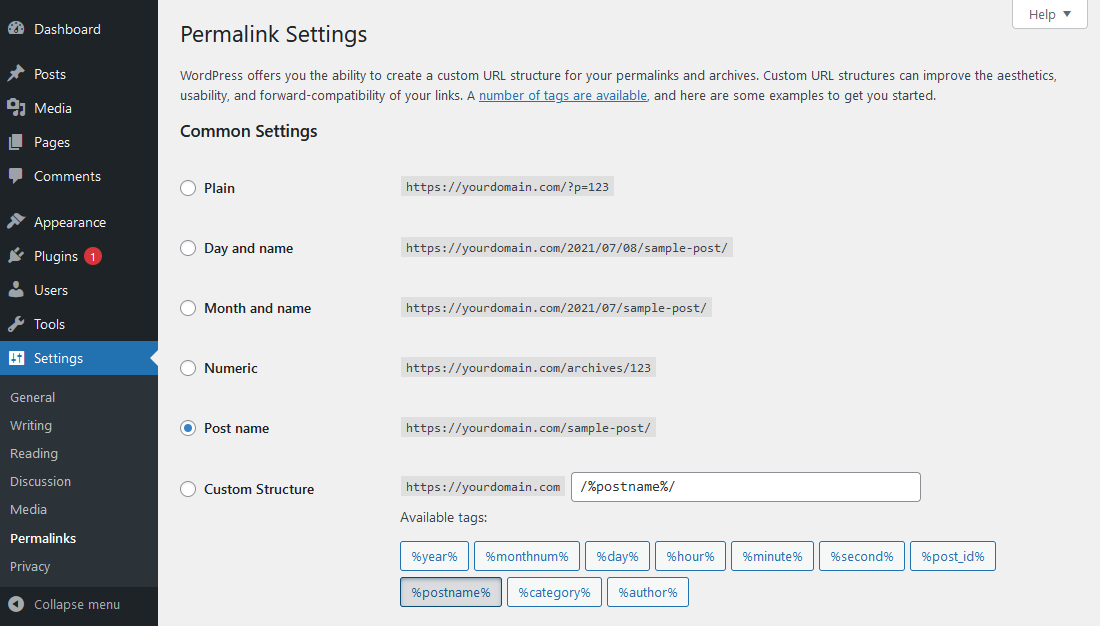
The slug names one item. The permalink is that item’s full address. The permalink structure is the site-wide pattern that decides where the slug sits in the address. WordPress’s permalink documentation describes permalinks as the permanent URLs of your posts and pages, and you set the structure under Settings > Permalinks.
| Permalink structure | Example URL | Where the slug appears |
|---|---|---|
| Plain | example.com/?p=123 | Not in the URL at all |
| Post name | example.com/first-post/ | The whole path |
| Day and name | example.com/2026/10/15/first-post/ | After the date |
| Custom | example.com/blog/first-post/ | After a fixed base |
Keep the difference in mind, because the two changes carry very different risks. Editing one slug changes one URL. Changing the structure changes every post URL on the site at once.
WordPress builds the slug from the title when you first save. It lowercases the text, turns spaces into hyphens and strips punctuation and characters that are not allowed in a URL. The core function that does this, sanitize_title(), also converts accented letters to plain ASCII where it can. “Café Menu” becomes cafe-menu.
Non-Latin titles are where the automatic slug lets people down. Developers often complain that slug tools handle umlauts, apostrophes and Cyrillic badly. If you publish in Chinese, Russian or Hebrew, look at the generated slug before you publish and decide whether you want a transliteration, a translation or the original script.
One behaviour surprises a lot of people. Once an item is published, changing its title does not change its slug. WooCommerce’s product editor documentation says the same for existing products. That works in your favour: you can retitle a page as often as you like, and its URL stays put until you edit the slug yourself.
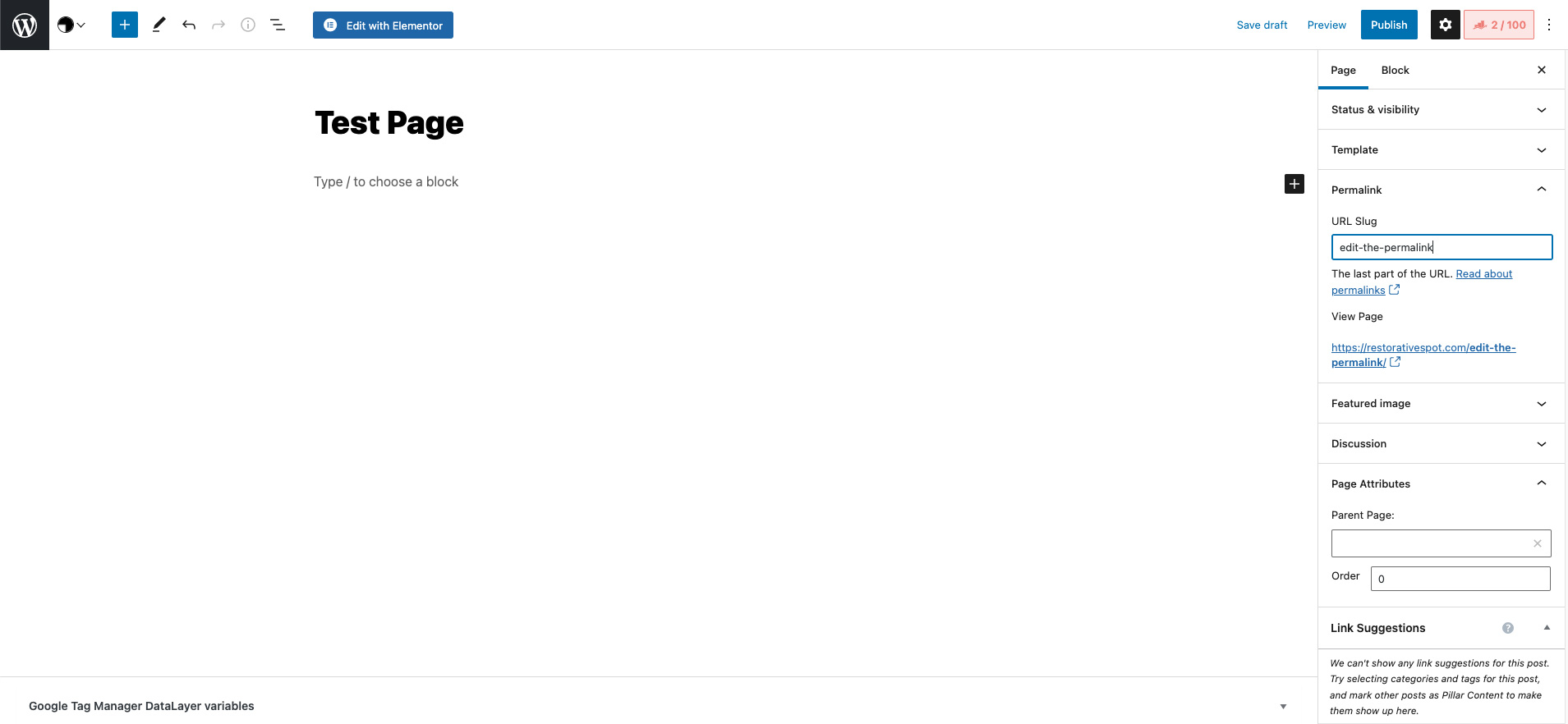
Where the field sits depends on the editor and the content type. The job is always the same: open the item, find the URL or slug field, change it, save, then load the new URL.
/product/, are set separately under Settings > Permalinks > Product permalinks.Save a draft before you publish, so you can check the slug before any visitor or crawler sees the URL.
Something else already uses that slug. WordPress won’t give two items the same address, so it appends a number. The suffix is a symptom, not an error, and the item causing it is usually one you have forgotten about.
Check these places in order:
pricing.jpg can give the attachment the slug pricing, and then your Pricing page becomes pricing-2.2026, can get a suffix too, because WordPress may read it as an ID or a date.Once you have found the item, delete it permanently or change its slug. Then go back to your page and type the slug you want into the field. WordPress will not rename the -2 page for you when the original goes. Clear your cache and load the URL.
That same moderator also warns against deleting database rows to clear a hidden conflict. Use the admin screens first. Some cases stay stuck. One WooCommerce store owner on Reddit reported -8 suffixes on variable products coming back after hours of cleanup, and nobody posted a confirmed fix. If you reach that point, it is a job for a developer.
The old URL can stop working. Every link pointing at it, from your menu, other sites, old emails or Google’s index, can then land on a 404. A published slug change is a URL migration, however small the edit looks.
WordPress gives you some cover, but not everywhere. It remembers old post slugs and often redirects them. WPBeginner’s redirect guide says this covers posts but not pages. Plugins and server rules can also get in the way. Don’t trust it. Test the old URL every time.
To change a live slug safely:
Don’t point old URLs at the homepage. Google’s site move guidance says redirects to irrelevant pages may be treated as soft 404s. If nothing replaces the old page, a useful 404 page is the honest answer.
Changing the whole permalink structure is a much bigger job. In a Rank Math support thread, a user switched structures and found old links sent to the homepage. Support explained that the plugin’s auto-redirect covers changes to individual slugs, not structure changes, and pointed to the Permalink Migration option in the Redirection plugin. On an established site, plan per-URL redirects before you touch that setting.
If you would rather not do this by hand, SiteSelf can make the slug change, add the 301 and fetch the old URL to confirm it lands on the new page, all from a chat request. That is part of its WordPress SEO and redirect work.
A little, mostly through clarity. Google’s URL structure guidelines ask for simple, readable URLs, hyphens rather than underscores, and words in your audience’s language. A slug like /wedding-photography/ tells a searcher what is behind the link before they click.
No source we found measures a ranking gain from the words in a slug. Yoast suggests three to five words, roughly 30 to 50 characters. That is editorial advice, not a measured threshold. Use the main term if it fits naturally, keep the slug close to the page’s title, and stop there.
The bigger SEO risk is breaking URLs, not choosing imperfect ones. Rewording a working slug to squeeze in a keyword trades a known-good URL for a redirect and a recrawl. Our guide on how to do SEO on WordPress puts slugs alongside the titles, links and content work that make more difference.
If one old URL is broken, it is missing a redirect. If many pretty URLs break at once, the cause is usually routing. WordPress’s common errors handbook gives the order to work in:
mod_rewrite and a correct .htaccess file. If saving does nothing, ask your host to check both.Saving permalinks again and again will not fix a real collision. Once the save has failed and the host has checked the server, deactivate plugins one at a time on a staging copy. If the cause still won’t show, get a developer.
The text can match when the full URLs differ, for example when posts use a date-based structure. Under the Post name structure both would want the same address, so WordPress adds a number to one of them. Pages and custom post types that share a path can also collide and return 404s.
No official limit is documented for everyday use, and we would not trust anecdotal numbers. Long slugs are hard to read and share, so keep yours to the few words that describe the page.
Most practitioners recommend Post name, set before you publish real content. Avoid Plain, which gives URLs like ?p=123. If the site already has traffic, keep the structure you have unless you have a redirect plan for every URL.
Not from the standard profile screen. The author slug is stored separately from the display name, and changing it needs a plugin or code. Changing it moves the author archive URL, so redirect the old one.
Not directly. WCAG’s link-purpose guidance is about link text, not URL format. A clear slug won’t fix a “click here” link, and accessible link text doesn’t need any particular slug.
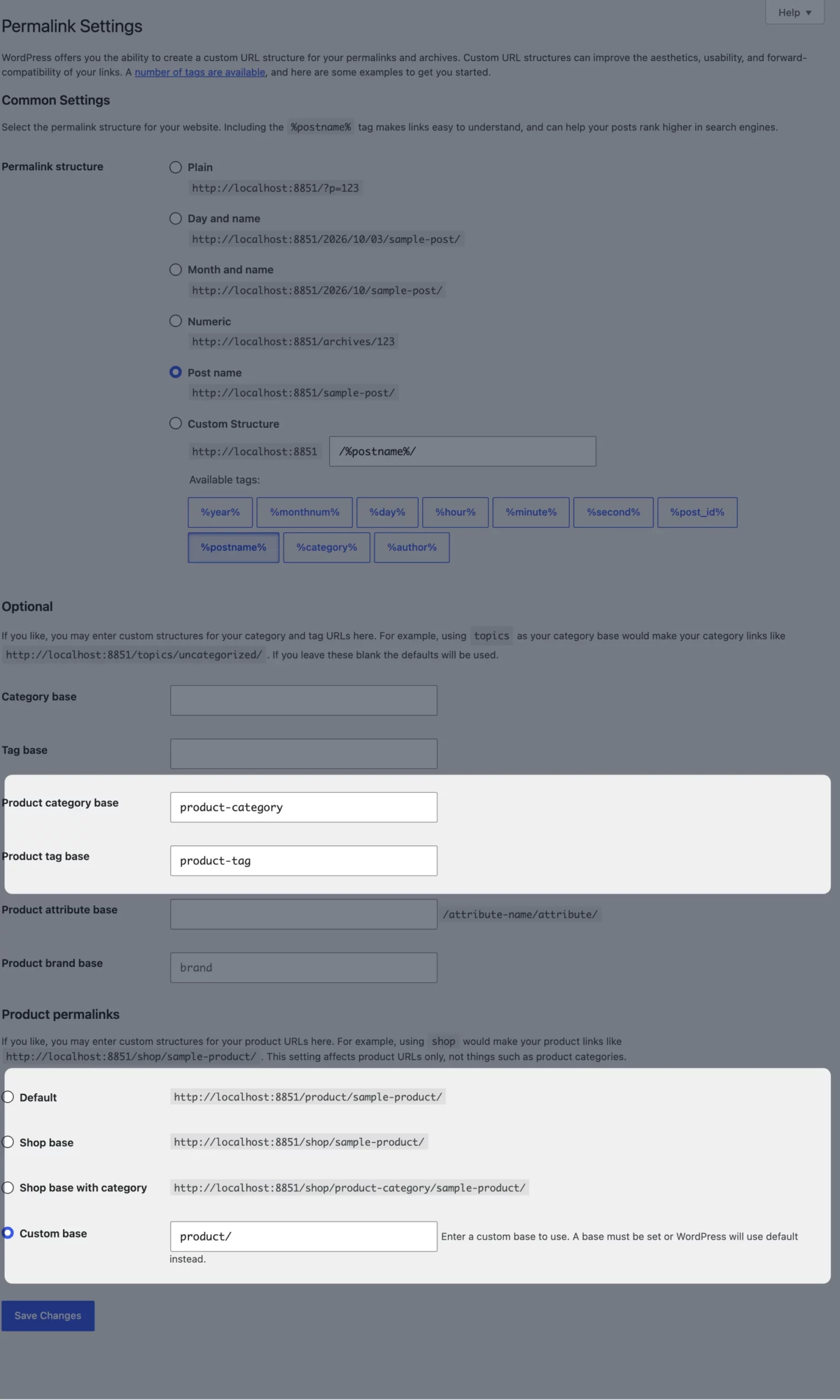
Only if you understand the tradeoff. WooCommerce’s permalink docs say the product and category bases must not conflict, and removing the base raises the risk of collisions in large catalogs. If you shorten it, redirect the old category URLs.
Explainers
Every WordPress theme can be customised. What changes from theme to theme is how much you can do without code, and where you have to do it. Find out whether you have a block or a classic theme, put each change in the layer that survives updates, and check that it reached the live site.
Read article ›Explainers
A WordPress template gives a business site its design and setup to start from. It is not a finished site. Choose one based on the pages you need, the person who will edit the site and the builder the template depends on, then install it on a fresh copy before it touches anything live.
Read article ›Explainers
On WordPress, a site’s layout and design don’t live in one setting. What you see comes from the theme, global Styles, templates, page content, any page builder and the caches in front of them. Good layouts come from clear structure that works on a phone. Most layout trouble comes from editing the wrong layer or from stale CSS.
Read article ›Connect the site you already have, add your agent to Slack or Telegram, and tell it what you need.
Connect your siteStart with 500 free credits. No credit card needed.