Give your WordPress site its first task.
Connect the site you already have, add your agent to Slack or Telegram, and tell it what you need.
Connect your siteStart with 500 free credits. No credit card needed.
WordPress has no feature called a redirect page. What most people need is a rule that sends an old URL to a new one with the right status code, set in the right place on the site. Most redirect problems come from two of those places disagreeing, and adding another rule rarely fixes them.
You renamed a page, deleted a product or moved the site to a new domain. The old URL still sits in Google, in old emails and on other people’s sites, and right now it leads to a 404. A redirect sends that old address to the right new one and tells search engines whether the move is permanent.
Most sites need one plugin, a few minutes and a careful test. What goes wrong is rarely the rule itself. It is a second rule, somewhere else, that disagrees with it.
Usually they mean a URL redirect, and that is what this guide covers. The phrase also gets used for four other things, and each one has a different fix:
If you are changing URLs as part of a wider cleanup, the redirect decisions belong inside your WordPress SEO basics. Change a URL only once you have its redirect ready.
Use a 301 when the move is permanent and a 302 when the original URL will come back. Google’s documentation on redirects treats 301 and 308 as permanent and 302 as temporary. Google uses a permanent redirect as a strong signal that the new URL is the one to show.
Renamed pages, merged posts, HTTPS moves and domain changes are all 301s. A seasonal promotion that takes over a URL for a month is a 302.
There is one practical exception. Browsers cache 301s, so a visitor who has followed one may never ask your server again. If you print a QR code or run a campaign link whose destination you will keep changing, use a 302 so a change actually reaches people. WooCommerce follows the same logic: its Product 404 Redirects extension sends trashed or private products through a 302 and permanently deleted ones through a 301.
On most single sites, put it in a plugin. Redirects can be set in WordPress, on the server, in the host’s dashboard or at a CDN such as Cloudflare. Each layer has a job it does best:
| Layer | Good for | Watch out for |
|---|---|---|
| A redirect plugin | Individual pages, 404 logs, importing a spreadsheet of old and new URLs | It only sees requests that reach WordPress. A PDF the server delivers directly never reaches the plugin. |
| .htaccess | Server-level rules on Apache or LiteSpeed | Nginx ignores it. A typo can give you a 500 error across the whole site. |
| Host redirect tool or Nginx config | Managed hosts and Nginx servers | Every host does it differently. Read their docs. |
| Cloudflare or DNS-level rules | Whole domains, especially an old domain after a rebrand | It is easy to forget a rule here when you are debugging WordPress. |
Check your host before you write server rules. WP Engine, for example, has deprecated .htaccess and points customers to its portal rules, Nginx configuration or a plugin. If you are on Apache and want rules outside WordPress, our guide to writing .htaccess 301 redirects has the syntax.
For an old domain after a rebrand, keep the domain registered and redirect each page to its matching new page. Something still has to answer requests on the old domain. A Cloudflare or server rule is usually cheaper and simpler than keeping a second WordPress install running just to send visitors on.
Redirection is the plugin most people recommend for this. It is free, it has no paid version, and its WordPress.org listing shows more than 2 million active installations. You need an administrator login, the old URL and the new URL.
/old-services-page/.https://example.com/services/.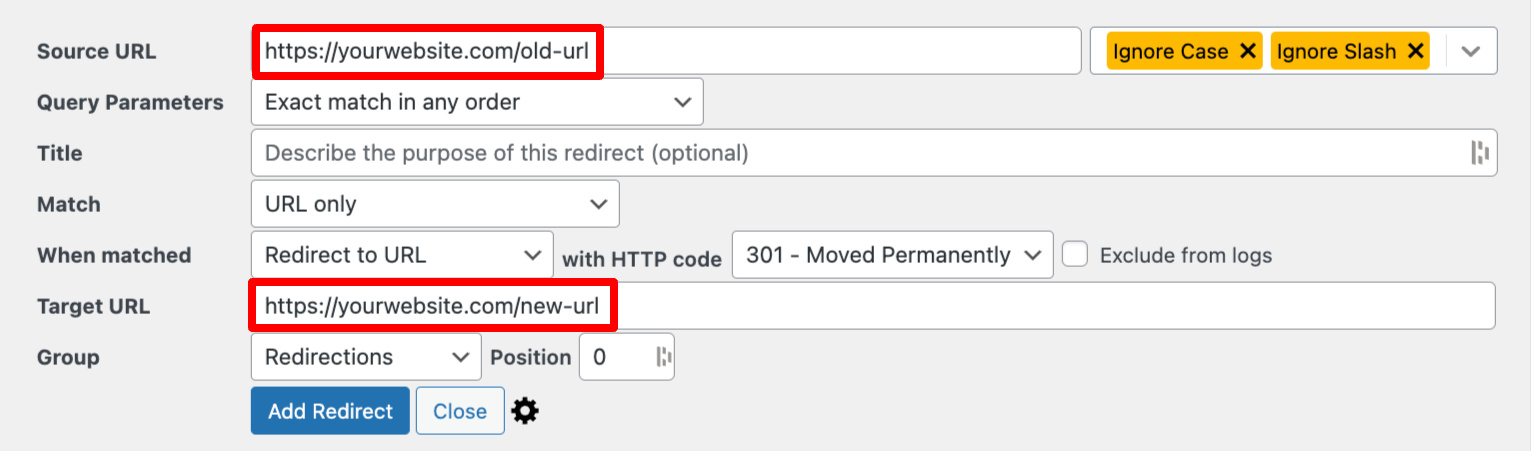
Moving more than a handful of pages? Build the list in a spreadsheet with one row per old URL, then use Redirection’s import. For a redesign or migration, crawl the old site first so the list contains every URL, not just the ones you remember. If you would rather describe the change in chat and have it made and checked for you, that work is covered on our SEO and redirects page.
Point it at the page that does the same job as the old one. An old product goes to its replacement or, failing that, its category. An outdated guide goes to the guide that replaced it. Someone who clicked a link about blue running shoes and lands on your homepage has hit a dead end that just looks nicer.
That is why blanket “send every 404 to the homepage” plugins are a poor shortcut, popular as some of them are. If nothing replaces the old page, let it return a proper 404 with good navigation.
Two more rules from Google’s guidance on site moves:
Open the old URL in a private window, logged out. You should land on the new page in one step. Your admin session and cached pages can hide problems that a new visitor would see.
Then check the status code. A redirect checker shows each hop. From a terminal, this does the same:
curl -sI https://example.com/old-services-page/A correct result shows HTTP/2 301 (or 302 if you chose that) and a location: line with your new URL. Running the same command on the new URL should return 200. If you see a second 301, you have a chain.
The Redirection plugin’s support page lists the usual reasons, and they apply to most tools:
The opposite problem catches people too: a redirect you never created. WordPress sometimes redirects an old post slug on its own, and it guesses at mistyped URLs. If a visitor ends up on an old post, check whether a rule exists at all before you hunt for it. Unexpected redirects that only happen to logged-out mobile visitors arriving from Google are a common malware symptom. Our malware removal guide covers that.
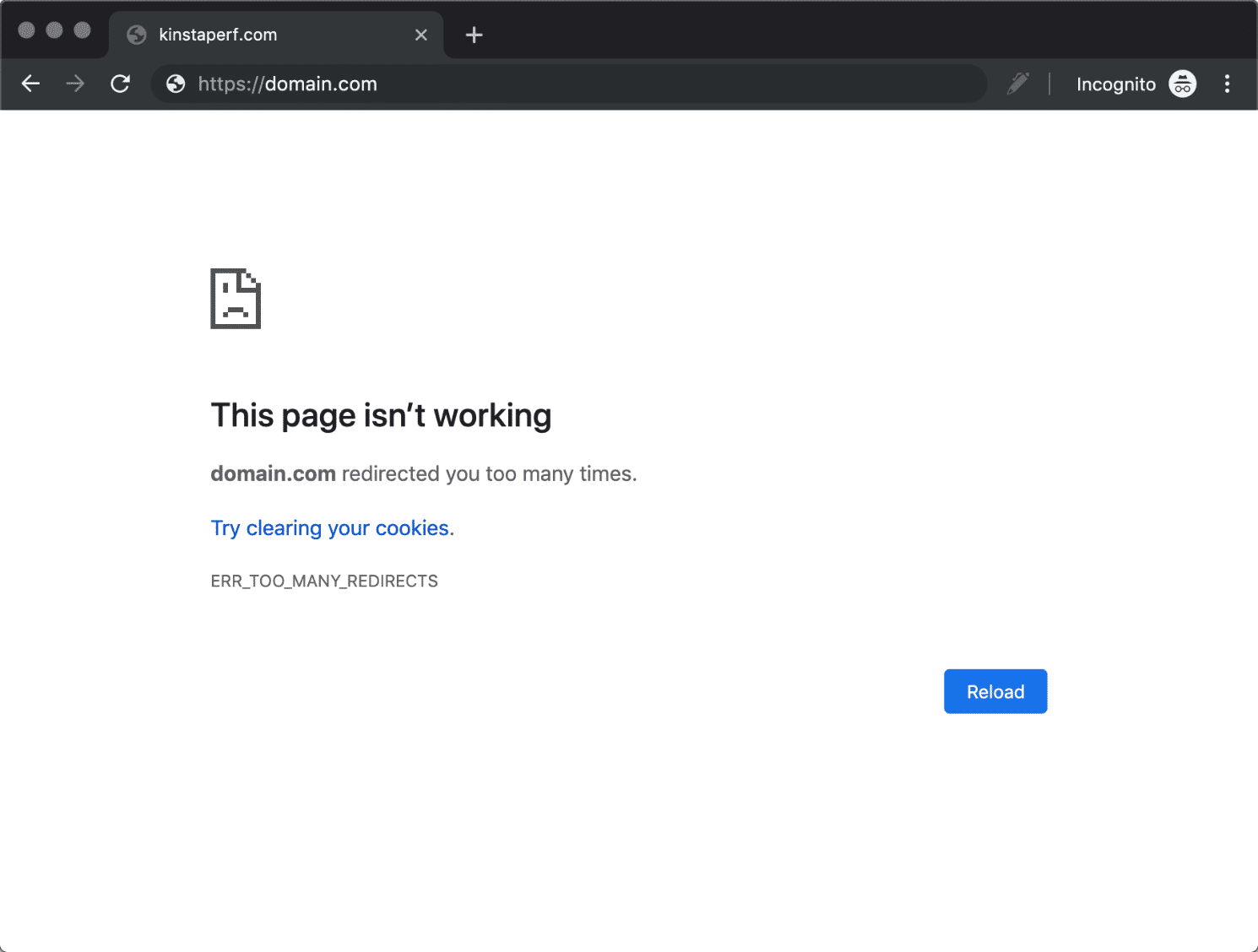
A redirect loop means two rules are sending the request back and forth. Chrome shows ERR_TOO_MANY_REDIRECTS, Firefox says “The page isn’t redirecting properly”, and Safari says “Too many redirects occurred”. The fix is to find the pair of rules and remove one. Adding another redirect makes it worse.
These are the usual pairs:
WP_HOME and WP_SITEURL in wp-config.php override the Site Address and WordPress Address in Settings > General, according to the wp-config.php handbook. One using http and the other https is enough to loop, especially after a migration./shop/.* that redirects to /shop/new/ matches its own destination. Anchor the pattern with ^ and make sure the target falls outside it. Never put the same URL in both fields.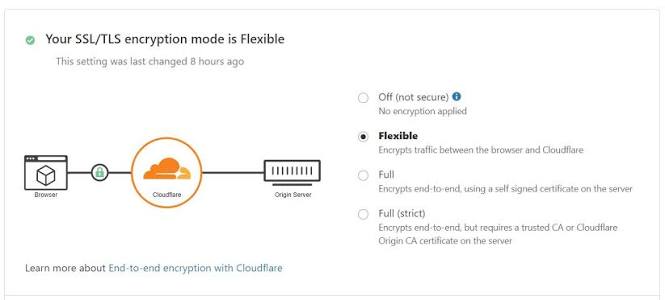
Work from the cheapest check to the most invasive one. Try a private window and clear the site’s cookies. Purge every cache. Compare the four URL values. Check the Cloudflare SSL mode. Rename wp-content/plugins to test whether a plugin is responsible, then restore the folder and reactivate plugins one at a time. As a last step, back up .htaccess, rename it, and save Settings > Permalinks to regenerate WordPress’s own rules. Inner pages return 404 until you do. Also, deactivating a plugin does not always remove rules it already wrote to .htaccess.
When to stop and get help: if the loop is in wp-admin and you cannot reach the database or the server files, if you are on Nginx and the rules live in server config, or if redirects appeared without anyone adding them. Ask your host for the first two. The third needs a security cleanup.
Developers adding a redirect in a theme or plugin should run it on the template_redirect hook, before any output. Redirect after output and you get “headers already sent”. wp_safe_redirect() defaults to a 302, sends unapproved external hosts to the admin URL instead, and does not stop execution. Always follow it with exit:
add_action( 'template_redirect', function () {
    if ( is_page( 'old-services-page' ) ) {
        wp_safe_redirect( home_url( '/services/' ), 301 );
        exit;
    }
} );
Prefer a server-side redirect like this over a timed meta refresh or JavaScript redirect. Those confuse visitors, screen reader users in particular, and search engines read them less reliably.
Sometimes, for posts. WordPress remembers some old post slugs and forwards them, but you should not rely on it for pages, products, category changes or domain moves. Test the specific old URL after any change, and add an explicit rule if it returns a 404.
No. Visitors who wanted something specific land on a page that does not answer them, and Google may treat those redirects as soft 404s. Redirect URLs that have a real replacement, and let the rest return a useful 404 page.
Google advises at least a year where possible. Many site owners keep them permanently because they cost little and old backlinks keep working. If the old domain stops being registered or served, every redirect on it stops too.
Each hop adds a round trip, so chains are what hurt. A single, direct redirect is a small cost and spares visitors a 404. Measure your own pages rather than trusting general figures, because there is little solid data on this.
That is a destination setting, not a URL redirect. Login redirects come from a login plugin or your membership tool. WooCommerce checkout pages come from WooCommerce > Settings > Advanced > Page setup. If checkout sends people somewhere strange, look for a forgotten plugin setting or a stray .htaccess rule before you blame WooCommerce.
Use a maintained one with a recent update date and a real install base, and remove redirect plugins you no longer use. A redirect plugin can send any visitor anywhere, which makes it attractive to attackers. Keep one tool in charge of redirects so you always know where a rule lives.
How-to Tutorials
You can install a WordPress plugin in under a minute from Plugins, then Add New Plugin, then Install Now and Activate. When it goes wrong, the cause is usually the setup around the plugin: the wrong ZIP, file ownership, an upload limit, a leftover folder, or an account that is not allowed to install. Check the plugin before you install it, and check the site after you activate it.
Read article ›How-to Tutorials
In WordPress the favicon is called the Site Icon. On WordPress 6.5 and later you set it under Settings → General, and you don’t need a plugin or any code. Setting it is the easy part. Most of the time goes into getting browsers, caches and Google to show the new icon, and that goes faster when you find the cause before you start clearing things.
Read article ›How-to Tutorials
An “icon in WordPress” is usually one of two things: the site icon in the browser tab, or an icon inside your pages and menus. The site icon is a core setting that takes two minutes. Content icons fail quietly, usually because of a Font Awesome version conflict, and fixing them can mean a single toggle or a change to the server.
Read article ›Connect the site you already have, add your agent to Slack or Telegram, and tell it what you need.
Connect your siteStart with 500 free credits. No credit card needed.