Give your WordPress site its first task.
Connect the site you already have, add your agent to Slack or Telegram, and tell it what you need.
Connect your siteStart with 500 free credits. No credit card needed.
An .htaccess 301 redirect is one line of Apache config. It shares a file with WordPress’s permalink rules, and it only works on servers that read that file. Check the server first, put your rules above the WordPress block, test with a 302, and let one layer handle HTTPS and www.
You changed a URL, and now the old one returns a 404. Bookmarks, backlinks and Google’s index all still point to the old address. A 301 redirect in .htaccess tells the server to send every request for the old address to the new one, and it tells search engines the move is permanent.
Writing the rule is the easy part. The real risk is the file it lives in, because WordPress keeps its permalink rules there too. A misplaced line can do nothing at all, start a redirect loop or take the whole site down. This guide covers the safe order of work. If you are changing URLs as part of wider search work, our guide to doing SEO on WordPress explains where redirects fit.
Check this first. .htaccess is an Apache configuration file. Nginx ignores it. Kinsta’s documentation says its WordPress sites have no .htaccess file and points users to its MyKinsta redirect tools instead. WP Engine has deprecated .htaccess and recommends its own alternatives. On hosts like these, a perfectly valid rule does nothing, and nothing tells you so.
If your host’s control panel or documentation doesn’t say Apache, ask support which web server runs the site and whether it reads .htaccess rewrite rules. This matters most when staging and production run on different hosts: a rule that works on Apache staging can be dead weight on an Nginx production server. If the answer is no, use the host’s redirect tool, a redirect plugin or your CDN’s redirect rules. The patterns below won’t apply.
Put them above the # BEGIN WordPress line, never between the BEGIN and END markers. WordPress owns that block and rewrites it whenever you save Settings > Permalinks, so anything you add inside it can disappear. Its last rule is a catch-all that hands every request that isn’t a real file to index.php. A RewriteRule placed below that catch-all may never run.
Before you edit:
public_html) over SFTP or in your host’s file manager. Turn on “Show hidden files”, because names that start with a dot are often hidden. A missing-looking .htaccess is usually just hidden.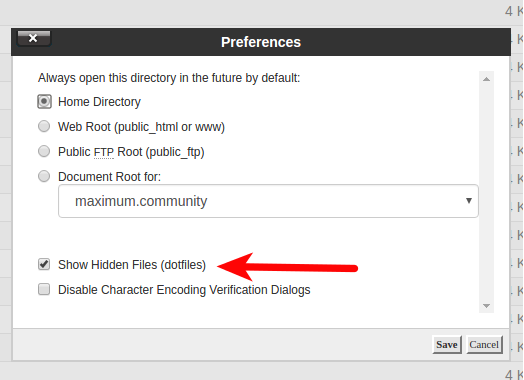
A working layout looks like this:
# BEGIN Custom redirects
<IfModule mod_rewrite.c>
RewriteEngine On
RewriteRule ^old-page/?$ /new-page/ [R=301,L]
</IfModule>
# END Custom redirects

# BEGIN WordPress
# (WordPress-generated rules, leave untouched)
# END WordPress
Practitioners disagree on one detail. A Webmasters Stack Exchange answer argues that the simpler Redirect directive (mod_alias) is processed by a different module from WordPress’s RewriteRule lines (mod_rewrite), so its position in the file matters differently. The practical answer is to pick one module for your redirects. RewriteRule above the WordPress block is the most predictable choice, and you still test the result.
Use Redirect for a quick one-off. Use RewriteRule when you need patterns, conditions on the host or protocol, or query strings. Two details catch people out. In .htaccess, Apache strips the leading slash before matching a RewriteRule, so patterns start with ^old-page, not ^/old-page. And literal dots in a pattern need escaping, as in \..
Redirect 301 /old-page/ https://example.com/new-page/Redirect matches a prefix and adds whatever follows it to the target. That means this rule also sends /old-page/child/ to /new-page/child/. If you want an exact match, use the RewriteRule version from the layout above. Include the trailing slash on the target too, or WordPress adds one with a second redirect.
RewriteRule ^category/guides/(.*)$ /resources/$1 [R=301,L](.*) captures the rest of the path, and $1 puts it back in the new location. Rules for specific pages that should go somewhere else must sit above this one. Apache works through the rules in order, so a broad rule placed first catches those pages before their own rules get a turn.
RewriteCond %{HTTP_HOST} ^(www\.)?old-example\.com$ [NC]
RewriteRule ^(.*)$ https://new-example.com/$1 [R=301,L]
This works only if the paths stay the same on the new domain. If /shop/product-a/ has become /catalog/product-a/, add specific rules above this one. Keep the old domain registered and pointing at the server, or every one of these redirects stops.
RewriteCond %{HTTPS} off [OR]
RewriteCond %{HTTP_HOST} ^www\. [NC]
RewriteRule ^(.*)$ https://example.com/$1 [R=301,L]
Separate rules for protocol and host stack into two redirects: http://www goes to https://www, then to https://. This combined rule does it in one response. Add it only after HTTPS works at the host. If the site sits behind a proxy or CDN that handles SSL, the origin may see every request as HTTP, and this rule loops. See the loop section below.
RewriteCond %{QUERY_STRING} ^p=123$
RewriteRule ^$ /new-post/ [R=301,L,QSD]
RewriteRule never sees the query string, so you match it with a condition. QSD drops the old ?p=123 from the target, so it isn’t carried over to the new URL.
Write the rule as R=302 first. Apache’s per-directory rewrite guide recommends a temporary redirect while you debug, because browsers cache 301s. A wrong 301 can keep firing in your own browser even after you fix the file. Switch to 301 once every destination checks out.
Test from the command line, not only in a browser:
curl -sIL http://www.example.com/old-page/This prints each response in order. You want one 301 (or 302 while testing) with the correct Location, then a 200. Check the old URL, the new URL, and the http, https, www and non-www versions of each. If you prefer a browser, use a private window.
Two or more 301s in that output is a chain. Google’s site-move documentation says Googlebot follows up to 10 hops but recommends redirecting straight to the final URL. If a chain can’t be avoided, Google says ideally no more than three hops and fewer than five. Point old rules straight at the final URL, and update your internal links so your own menus and posts skip the redirect entirely.
Check where each redirect lands, too. Google warns that a redirect to an unrelated page, like sending everything to the homepage, can be treated as a soft 404. If a page has no real replacement, a useful custom 404 page serves visitors better than a homepage redirect.
These are the common causes, roughly from most to least frequent:
.htaccess off. Ask the host.# BEGIN WordPress.^/. Remove the slash..htaccess.Not every unexpected 301 comes from your file. WordPress issues its own canonical redirects, for example adding a trailing slash, and a redirect plugin may also be acting on the same URL. Pick one place to manage each redirect and check both.
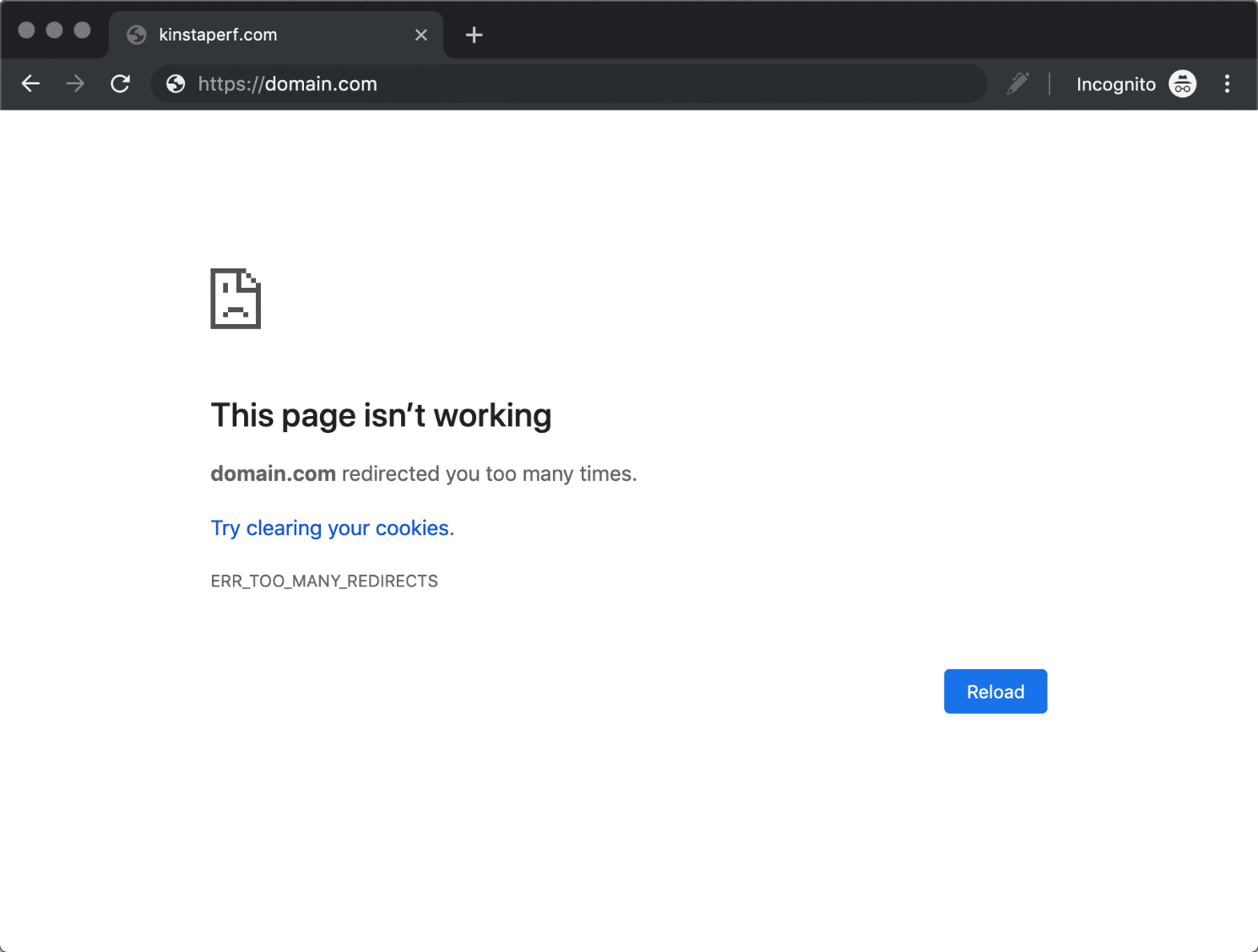
Chrome shows ERR_TOO_MANY_REDIRECTS. Firefox says “The page isn’t redirecting properly”. The usual cause is two layers both trying to set the canonical address. WordPress’s Logging In handbook lists mismatched site URL settings, mixed HTTP and HTTPS values, and conflicting SSL or redirect settings at the CDN, proxy, host or server.
Work through the layers in order:
WP_HOME or WP_SITEURL is set in wp-config.php, those values win..htaccess: comment out your HTTPS and www rules and test again.X-Forwarded-Proto header.Clear cookies and caches after each change, or you will be testing an old response.
A syntax error in .htaccess can stop every request. Upload your backup copy straight away. If you don’t have one, follow WordPress’s Common Errors handbook: rename the file to .htaccess_old, load the site, then go to Settings > Permalinks and click Save Changes to rebuild the default rules. Add your custom rules back one at a time, testing after each. Our guide to fixing a WordPress white screen covers the other causes if renaming the file doesn’t help.
If pretty permalinks then return 404 everywhere except the homepage, the WordPress block is missing or mod_rewrite is off. This is a different problem from a bad 301. Save permalinks again, then ask the host to enable mod_rewrite.
A handful of rules is a 20-minute job. A site migration is not. If you are moving hundreds of URLs, changing URL case, or consolidating sites, build a spreadsheet that maps each old URL to its closest live replacement first, and test a sample after launch. Get help if a loop persists across the CDN and host, if you can’t read the server error log, or if the whole site is down and the rename didn’t fix it. For WooCommerce product and category URL changes, turn on WooCommerce’s own 301 redirect option before you edit the permalinks. It avoids most of this.
If you’d rather not edit server files at all, SiteSelf can add and check 301 redirects on request through chat. Editing .htaccess needs hosting (SSH) access, and the agent reports what changed and what it checked.
Yes. Edit or delete the rule and the server stops sending it. Browsers that already cached the 301 may keep following it for a while, though. That’s why you test with a 302 until the destination is final.
Add it to your own block anyway. It costs nothing, and your rules keep working if the WordPress block is removed or rebuilt. Repeating it does no harm.
No. Google says redirects to irrelevant pages can be treated as soft 404s, and visitors get confused. Redirect old URLs to their nearest real equivalent, and let pages with no replacement return a proper 404.
For a normal site with dozens or a few hundred redirects, the difference is too small to drive the decision. Choose by who maintains the redirects. A plugin suits people who don’t want to touch server files. .htaccess suits pattern rules and domain-wide moves on Apache.
They were inside the WordPress block, or a plugin rewrote the file. Keep custom rules in their own commented section above # BEGIN WordPress. Check the file again after you save permalinks or update security and SSL plugins.
How-to Tutorials
How you customize a WordPress template depends on which kind of template is drawing the page: a block template in the Site Editor, a PHP file in a classic theme, a WooCommerce override or a page builder layout. Find out which one you have before you edit anything. Then make the change in a layer that theme updates won’t overwrite, and check the result as a logged-out visitor.
Read article ›How-to Tutorials
To add an internal link in WordPress, select the words, press Ctrl+K and pick the page. Most links fail for other reasons: a URL copied from the admin screen, a slug that changed later, an anchor that doesn’t match. Get the destination right and test the link on the live page. That is most of the job.
Read article ›How-to Tutorials
For one “find us” location, a Google Maps embed pasted into a Custom HTML block needs no plugin and no API key. Plugins earn their place when you need several markers, a store locator or a map in a classic widget area. When a Google-powered plugin map shows a grey box, the cause is almost always the API key, the Google Cloud project, billing or the referrer settings. The theme is rarely the problem.
Read article ›Connect the site you already have, add your agent to Slack or Telegram, and tell it what you need.
Connect your siteStart with 500 free credits. No credit card needed.