Give your WordPress site its first task.
Connect the site you already have, add your agent to Slack or Telegram, and tell it what you need.
Connect your siteStart with 500 free credits. No credit card needed.
Adding a page in WordPress takes a minute: Pages, Add New Page, a title, some blocks, Publish. Getting visitors to it is a separate job. You have to add it to the menu, pick the right template, and on a store, assign it in WooCommerce. Each of those is its own step, and publishing does none of them for you.
Almost nobody gets stuck on the part where you create the page. They get stuck after pressing Publish, when the page doesn’t show up in the menu, has no header, or returns a 404. Those are four separate systems: the page itself, the navigation, the template and the URL rules. Each one needs its own step, and fixing one doesn’t fix the others.
This guide covers both jobs: creating the page, then making it reachable and getting it to display correctly. To change a page that already exists, see how to edit pages in WordPress.
You need an account that can publish pages. Administrators and Editors can. If you log in and there is no Pages item in the left-hand admin menu, your role doesn’t include page permissions, and an administrator has to change it.
Next, find out which kind of theme you have, because the menu steps depend on it. Open the Appearance menu in the dashboard. If it has an Editor item, you’re on a block theme and navigation lives in the Site Editor. If it has Menus and Customize, you’re on a classic theme. Many tutorials were written for classic themes. Readers on block themes follow them, can’t find Appearance > Menus, and conclude WordPress is broken. It isn’t. The setting has moved.
Finally, check that you actually want a page. WordPress.org’s documentation puts it this way: pages are for non-chronological content, such as About, Contact, Services and legal notices. Posts are dated entries that show up in the blog and its feed. If the content will still be true next year and visitors will look for it in the navigation, make it a page.
This is the standard workflow in the block editor, and it works the same on classic and block themes:
/our-services/.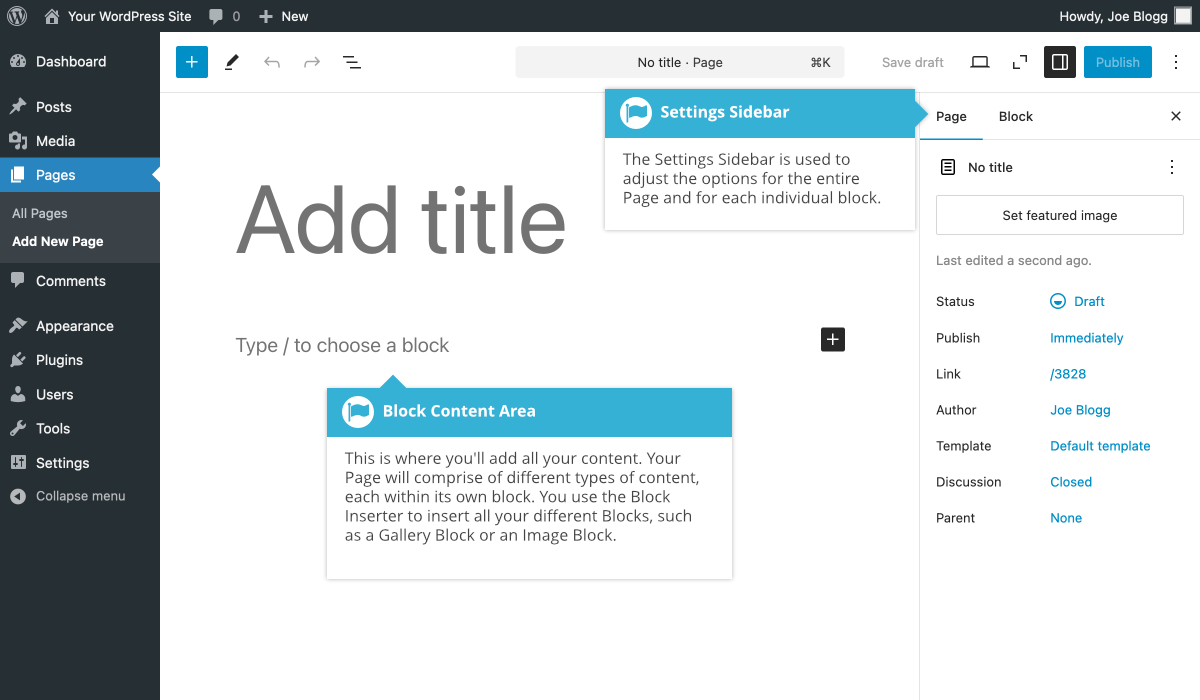
Five settings in the Page tab decide how the page behaves once it’s live:
/about/board/. It doesn’t put the page into any menu.Yes, on a block theme. WordPress.org’s Site Editor documentation describes Appearance > Editor > Pages, where the plus icon creates a draft. The benefit is that you edit the page inside its real template rather than on a blank canvas. The risk is that the header, footer and title belong to the template, not the page. WordPress locks those blocks and shows “Edit your template to edit this block.” If you unlock and change them, the change applies to every page that uses the template.
You add it yourself. The menu doesn’t pick up new pages, and this is the most common “my page is missing” report on the WordPress.org forums and Reddit.
The same screen has an “Automatically add new top-level pages to this menu” checkbox. It only covers top-level pages and only works with classic menus, and it adds every new page, including ones you didn’t mean to show. Most sites are better off adding pages by hand.
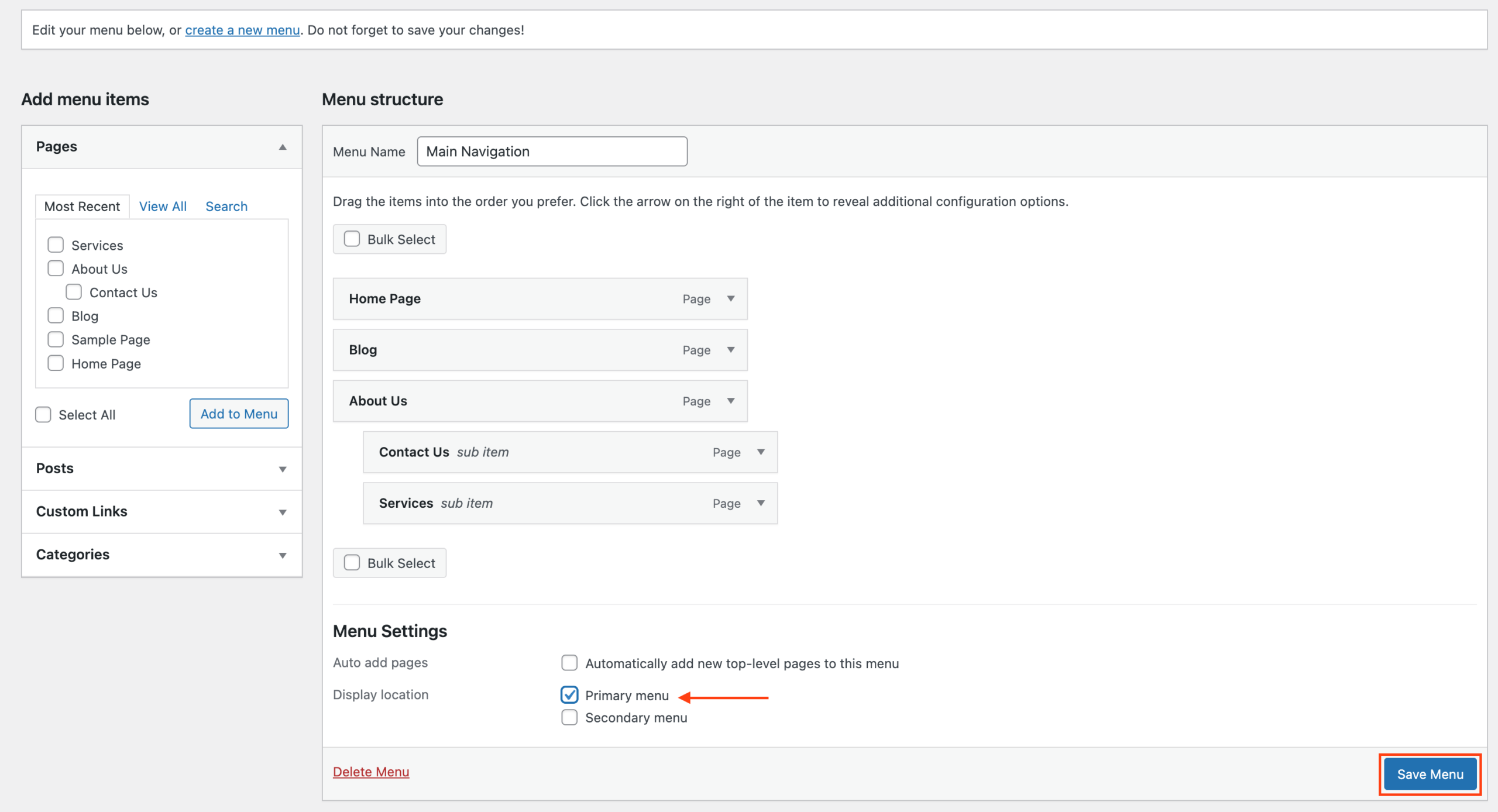
Go to Appearance > Editor, open Navigation (or open the header template and select the Navigation block), click the plus icon and add a Page Link to your page. Then save. One Reddit user described getting there by trial and error: “I had to access the template editor, edit the navigation element, and then I could add, reorder, and delete page links.” The Site Editor shows each menu item as a block, and you drag Page Links into one another to build a submenu. For more complex dropdowns, see our guide to building a WordPress drop down list.
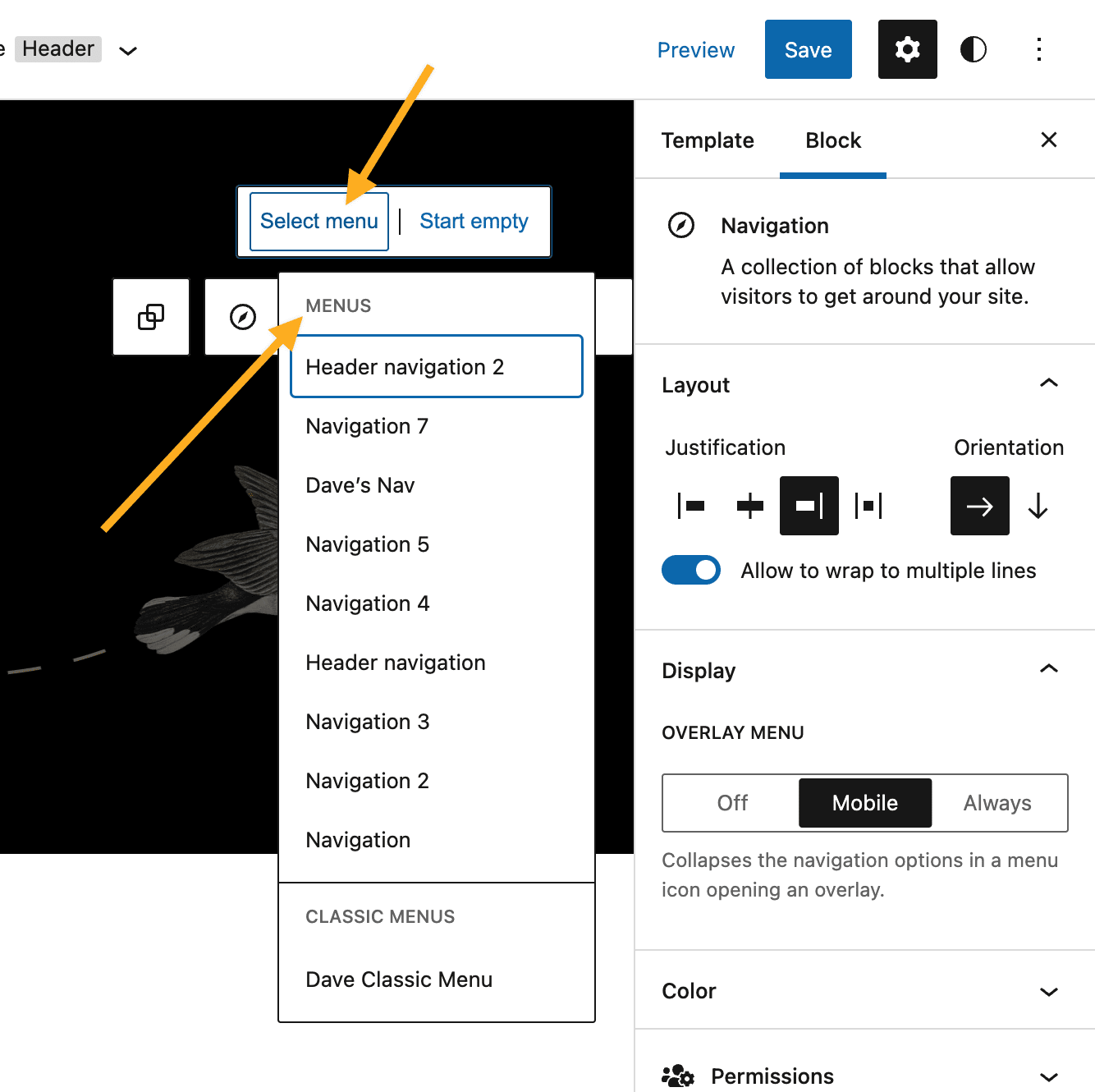
One trap applies to both theme types. In a resolved WordPress.org thread, a site owner deleted their pages and recreated them under the same names, and the menu stayed empty. Deleting a page removes its menu item. A new page with the same title is a different page, so you have to add it to the menu again.
Go to Settings > Reading, choose “A static page”, pick your page under Homepage and save. If you also want a blog, create an empty page called Blog, choose it as the Posts page, and WordPress will list your posts there. Only published pages appear in these dropdowns. If yours is missing, it’s probably still a draft.
The page has the wrong template. Many themes include a Landing, Blank or Canvas template that deliberately removes the header, footer and menu, which suits a campaign page and nothing else. In a WordPress.org support thread, a site owner getting ready for a promotion published a new page and found it had no menu. The page was using a Landing template, and switching it to Default fixed the problem. Check the Template field in the sidebar before you change anything else.
If the template is right and the page still looks wrong, the problem is probably in the template itself: its width, spacing, sidebar or header. This is where adding a page turns into design work, and a change made there affects every page that uses the same template. If you’d rather hand that work off, SiteSelf’s page on design changes to an existing site describes the agent editing the styles and templates on your live site from a request you write in chat. If you want to do it yourself, theme customization that survives updates covers which layer to edit.
Create the WordPress page first, then open it in the builder. With Elementor, that means Pages > Add New Page and then the “Edit with Elementor” button. Builders are common. HTTP Archive’s 2025 Web Almanac found that about 60% of WordPress sites use some form of page builder. Builders often have their own template and header settings, so the WordPress Template field may have no effect on what visitors see. If the builder won’t load or save, the problem is in the builder, not in page creation. Creating the page again usually just leaves you with duplicates.
They are ordinary WordPress pages, but WooCommerce ignores them until they’re assigned. A page called Cart does nothing until WooCommerce knows it’s the cart page. WooCommerce’s pages documentation sets out the process:
[woocommerce_cart], [woocommerce_checkout], [woocommerce_my_account]) in a Shortcode block. Pasted into a Paragraph block, the shortcode may not run.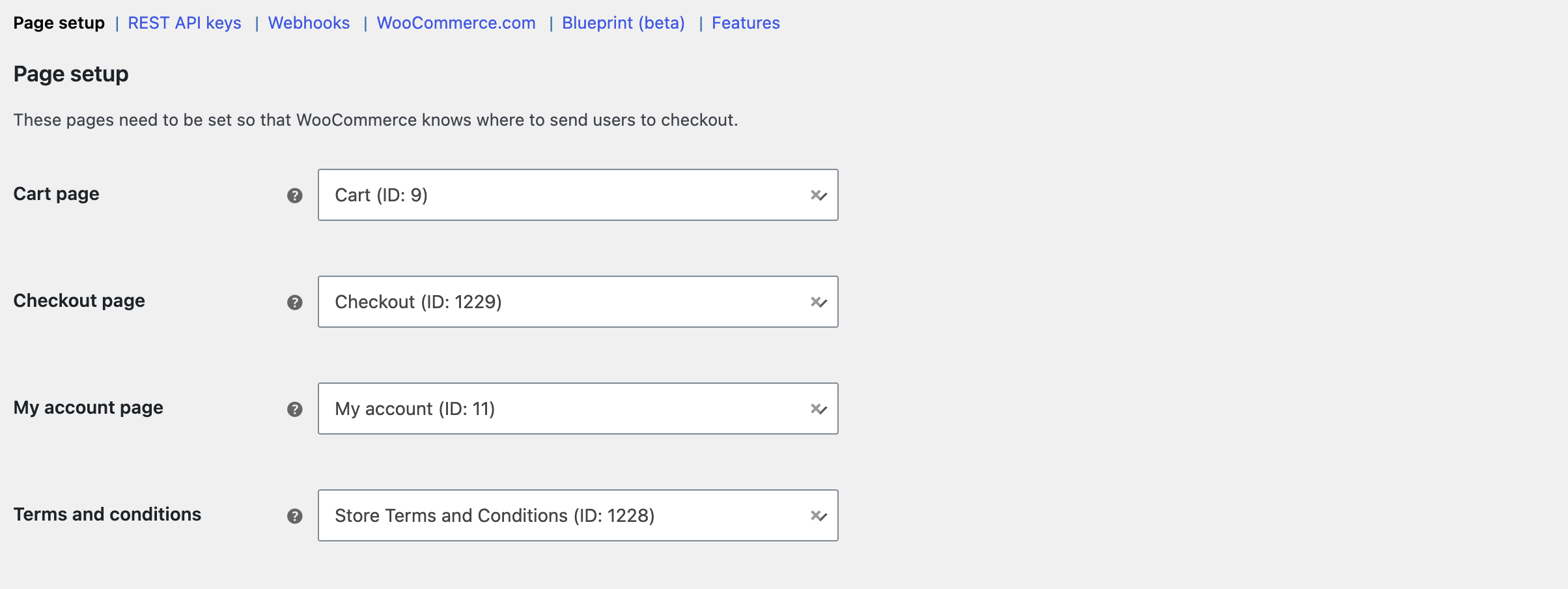
Themes don’t come with these pages. The theme’s demo content can make it look as if they exist, which is what confused one store owner on r/woocommerce until they ran the Status tool and assigned the pages.
Open a private or incognito window, where you’re logged out, and check four things. The page loads at its URL. It appears in the menu on desktop and inside the collapsed mobile menu. It has the same header and footer as the rest of the site. Its links, buttons and forms work. Checking while logged in as an administrator doesn’t count, because you can see drafts and private pages that visitors can’t.
Work through the layers in this order. It goes from the cheapest check to the most invasive:
AllowOverride None had to become AllowOverride All.Stop and get help once a fix means changing server configuration, .htaccess or wp-config.php, or when you’ve switched to a default theme with all plugins off and the error is still there. At that point the problem is in hosting, not in WordPress. Host support can often fix a server-level error quickly. If your checkout is failing, don’t wait: get help straight away.
Set the parent in the page’s sidebar so the URL is right, then nest the menu item under the parent in Appearance > Menus or in the Navigation block. The parent setting and the menu are separate, so you have to do both. Setting a parent never puts a page into a menu.
Yes. In the block Navigation editor you can type a name that doesn’t exist yet and create the page there. It still has to be published before it shows up. It’s easy to end up with a blank published page this way, so add the content before you leave.
WordPress core has no Duplicate link in the page list. You can open the page, use the editor’s options menu to copy all blocks, and paste them into a new page. A duplicator plugin does the same in one step. Either way, give the copy its own slug and title.
Publishing doesn’t tell search engines anything. They find pages by crawling, which takes time and speeds up when the page is linked from your menu, footer or other pages. Also check that your SEO plugin hasn’t set the page to noindex.
No. Page content belongs in the database, created in wp-admin or with WP-CLI’s wp post create --post_type=page. Theme files hold templates, which are the layout that wraps the content, not the content itself.
The dashboard creates one page at a time. WP-CLI, importers and some builders can create them in bulk. Bulk-created pages that are nearly identical give visitors nothing new and tend to do poorly in search, so only make pages that each have their own purpose.
How-to Tutorials
You can embed a public PDF in WordPress without a plugin: use the File block, turn on “Show inline embed”, set a height and keep the download link. When an embed fails, the cause is usually the file URL, a cache, the page layout or a mobile browser, not the embed tool. Check the raw PDF URL before you switch plugins.
Read article ›How-to Tutorials
Editing WordPress in HTML starts with finding which layer owns the markup: post content, a block, a theme template, a WooCommerce template or a page builder. Content HTML is a five-minute job in the Custom HTML block. Template, store and file HTML have their own override paths, and editing in the wrong place gets you edits that vanish, get stripped or break the editor.
Read article ›How-to Tutorials
Editing a page in WordPress is four clicks until it isn’t. The hard part is knowing whether the thing you want to change lives in the page, in a template, in a pattern, in a page builder’s own data, or in WooCommerce. This walks through the edit itself, then the checks that tell you whether your change actually reached the live site.
Read article ›Connect the site you already have, add your agent to Slack or Telegram, and tell it what you need.
Connect your siteStart with 500 free credits. No credit card needed.