Give your WordPress site its first task.
Connect the site you already have, add your agent to Slack or Telegram, and tell it what you need.
Connect your siteStart with 500 free credits. No credit card needed.
An SEO friendly URL is a readable address that describes the page, and in WordPress you get one by choosing Post name permalinks before you publish. Picking the structure is the easy part. Most of the damage comes later, when someone changes URLs on a live site without a redirect for every old address.
A fresh WordPress install gives posts addresses like example.com/?p=123. WordPress’s own documentation calls this Plain structure reliable on any server but not user-friendly or optimized for search. Fixing it takes one setting and about ten seconds, as long as you do it before the site has a few hundred indexed pages.
That timing is the whole story. Choosing a good URL structure is a one-time decision with almost no risk. Changing an existing structure is a migration: every old address needs to send people and search engines to its new one. URLs are one item on a longer list. The rest is in our guide to doing SEO on WordPress.
An SEO friendly URL tells a person and a crawler what the page is about before they open it. /services/web-design/ does that. /page?id=8472 doesn’t. Google’s URL structure guidance asks for descriptive words instead of long IDs, hyphens between words, as few unnecessary parameters as possible, and consistent casing. Google treats /APPLE and /apple as two different URLs.
Google does not set a character limit. It does not say that shorter URLs, extra keywords or a missing /category/ segment rank better. Rank Math, which sells a feature for removing the category base, says in its own documentation that doing so is not guaranteed to improve rankings. Clean URLs are hygiene. They help people read and trust a link, and they keep your site consistent. They will not lift a weak page.
What does hurt is instability. Practitioner threads on Reddit and X rarely report a URL cleanup that boosted traffic. They often report a relaunch where addresses quietly changed and pages started returning 404s.
Post name, for nearly every site. It produces example.com/your-post-title/ and stays accurate however your categories change later. To set it:
/%postname%/.?p=.If you write a custom structure, use structure tags such as %postname% and leave the domain out of the field. WordPress adds it. The same screen holds the Category base and Tag base fields. Leave them empty unless you have a reason to change them.
Category plus post name (/%category%/%postname%/) works when your categories are few, short and unlikely to change. The cost: moving a post to another category changes its URL, and that needs a redirect. Dates suit news sites, where readers care when a story was published. On evergreen guides, a date keeps showing the original year long after you’ve updated the article.
The slug is the last part of the URL, and it is separate from the title. WordPress builds it from the title when you first save. You can edit it in the post’s settings panel before you publish. Our explainer on what a WordPress slug is covers where to find it. Rules that work in practice:
/small-business-accounting/, not /accounting-services-for-every-small-business-owner-2026/./how-to-fix-a-leaking-tap/ reads better than /fix-leaking-tap/, and WPBeginner notes that keeping stop words can help readability.The common “under 60 characters” or “three to five words” rules are editorial habits, not Google requirements. A slug that could be shorter but is accurate is fine. Leave it alone.
Each changed URL is a new address. That applies whether you switch the permalink structure, rename a WooCommerce base, drop trailing slashes in a redesign, or lowercase addresses during a move. Unless each old URL redirects to its new one, links, bookmarks and search results all lead to 404s. WP Engine’s support docs warn that changing an established site’s structure can cause widespread 404s and affect SEO. WordPress.com notes that posts may not redirect automatically when the structure changes.
A common mistake: people assume Save Changes on the Permalinks screen handles this. It doesn’t. Saving rebuilds WordPress’s rewrite rules, which fixes stale routing. It creates no redirects for addresses that have actually moved.
Before changing an established structure, ask whether you have a concrete reason. One example from Reddit: a long-running news site wanted category data in its URLs for analytics. Commenters suggested tracking the category in GA4 instead of moving thousands of articles. If the change is still worth it, Google’s site move documentation describes the method:
Even a clean migration can cause rankings to move for a while as Google recrawls. Use one redirect layer, either a plugin, server rules or your host’s tool, not several. Overlapping layers are how sites end up with ERR_TOO_MANY_REDIRECTS. For single pages, see how to redirect a WordPress page. For server rules, see htaccess 301 redirects in WordPress. If you would rather hand off the redirect map and the checking, SiteSelf handles 301 redirects and SEO settings through chat. Plugin-level redirects need the connector plugin, and rules in .htaccess need hosting access.
On redirect plugins: Yoast’s redirect manager, including automatic redirects when a slug changes, is part of Yoast SEO Premium, not the free plugin. It uses PHP redirects by default. Whichever tool creates the redirects, open a few old URLs yourself and confirm where they land.
WooCommerce adds its own fields under Settings > Permalinks. Product URLs can use /product/name, /shop/name, /shop/category/name or a custom base, and category and tag bases are set separately. WooCommerce’s permalink documentation makes three points worth knowing before you touch them:
shop, for products and product categories. WordPress may no longer be able to tell them apart.Putting the category in product URLs looks tidy until a product sits in two categories. Then it can have two addresses, and you have to manage canonicals for both. On an existing store, the safest choice is usually to keep the defaults.
Only if you understand the trade. Rank Math’s Strip Category Base setting (Rank Math SEO > General Settings > Links, visible in Advanced mode) removes /category/ and redirects existing category URLs. Rank Math warns that a category slug matching a post, page or product slug can cause unexpected results. WooCommerce support has advised against removing the product category base for the same reason. A middle path Reddit store owners suggest is a short, unique base like /c/, which keeps the URL short without the collision risk.
The classic symptom is that the homepage loads but every post and page returns 404. Work through these causes, most frequent first:
.htaccess file WordPress can’t write to. On Apache, the Permalinks screen then shows “You should update your .htaccess file now.” along with the rules to add. Back up the file first, then paste the rules into the # BEGIN WordPress block, keeping your own custom rules above it.mod_rewrite and permission for .htaccess overrides. Nginx ignores .htaccess completely and needs its server block configured. Resaving can’t fix either problem. Your host has to.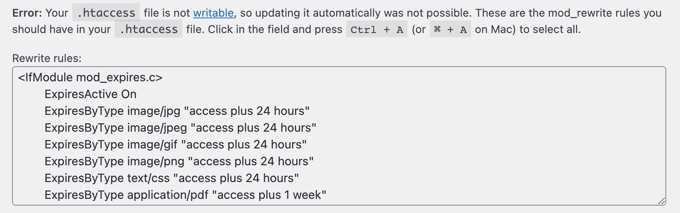
Stop and get help when inner pages still return 404 after a resave and a clean .htaccess, when you’re on Nginx and don’t have access to the server config, or when the 404s started right after a URL change and you have no list of the old addresses. The first two are hosting problems. The third needs someone to rebuild the redirect map from crawl data and Search Console before more traffic leaks away.
Store filters, sort orders, tracking tags and variant parameters can give one page dozens of addresses. Google’s guidance on consolidating duplicate URLs treats redirects and rel="canonical" as strong signals and sitemap inclusion as a weaker one. A canonical is a signal Google weighs, not an order it must follow. In practice: redirect when an old URL is gone for good, use a canonical when both versions have to stay live, and link to the same preferred URL everywhere, in menus, internal links and the sitemap. For product variants passed as optional parameters, point the canonical at the clean product URL.
No. WordPress core sets the permalink structure under Settings > Permalinks, and you edit slugs in the editor. SEO plugins add extras such as redirect managers and category base removal, but the readable URL itself comes from WordPress.
No. The title and the slug are separate, and editing the title after publishing leaves the URL as it was. Changing the category does change the URL if your structure includes %category%, so that move needs a redirect.
For posts, WordPress often remembers the old slug and redirects it. Pages and structure-wide changes are not reliably covered. Treat it as a bonus, open the old URL to check, and add a proper 301 if it doesn’t redirect.
There’s little reason to. Yoast has long described the SEO benefit as negligible. On an existing site, switching to or from .html changes every URL and needs a full redirect map.
Not in any way you would notice. The one public test, by developer Eric Mann, timed only request parsing in milliseconds, and the fastest structure changed between a clean install and a plugin-heavy one. Choose the structure for readability and stability.
No. W3C’s WCAG technique G91 says a bare URL is generally not descriptive enough as link text. Write anchors that say what’s on the other end, even when the URL itself is clean.
Explainers
Every WordPress theme can be customised. What changes from theme to theme is how much you can do without code, and where you have to do it. Find out whether you have a block or a classic theme, put each change in the layer that survives updates, and check that it reached the live site.
Read article ›Explainers
A WordPress slug is the short, editable part of a URL that names one post, page, product or category, like about-us in example.com/about-us/. Choosing a good slug before you publish costs nothing. Changing it after the page is live is a URL change, and it needs a redirect.
Read article ›Explainers
A WordPress template gives a business site its design and setup to start from. It is not a finished site. Choose one based on the pages you need, the person who will edit the site and the builder the template depends on, then install it on a fresh copy before it touches anything live.
Read article ›Connect the site you already have, add your agent to Slack or Telegram, and tell it what you need.
Connect your siteStart with 500 free credits. No credit card needed.