Key takeaways
- Layout comes from a template, not from a special page type. Elementor’s Canvas layout removes the header and footer on purpose, Full Width keeps them, and Elementor’s separate Landing Pages feature is deprecated as of Pro 3.27.
- A thank-you message does not prove a lead arrived. Elementor sends form email through WordPress’s wp_mail and leaves delivery to your host, so check the stored entry and the inbox as two separate things.
- WordPress’s ‘Discourage search engines from indexing this site’ setting adds noindex to every page. Blocking a page in robots.txt can stop Google from ever seeing a noindex tag.
- HubSpot’s 5.89% average conversion rate comes from a survey of 101 marketers who reported their own numbers. Use it for context, not as a target.
- Do every check on the published page: logged out, in a private window, on a real phone, with a real form submission.
A landing page can look perfect in the editor and still lose every lead it gets. The form shows its thank-you message, but the notification email never arrives. The call to action is set to hide on phones. Or the whole site still has “discourage search engines” switched on from launch week. Nobody spots it until the campaign report comes in.
Most lists of landing page features cover the visible parts and stop there. Those parts matter. But the features most likely to cost you money are the ones you can only check on the live page.
What counts as a landing page feature?
A landing page is a focused page with one job: get the visitor to take one action, such as signing up, asking for a quote or buying. Its features come in two layers.
The persuasion layer is what the visitor reads: a headline that matches the promise that brought them, one specific call to action, proof, a short form and answers to objections. The operational layer is what makes that work: the page template, form submission and email delivery, the mobile layout, the cache, indexing, accessible form markup and, for stores, a working checkout.
The evidence behind each layer is different. WordPress, Elementor, WooCommerce, Google and W3C document the operational layer in detail. The persuasion layer rests on surveys, vendor benchmarks and practitioner experience. Treat the first as a checklist and the second as ideas to test. For the persuasion side in depth, see what makes a landing page convert.
Which persuasion features do practitioners agree on?
The common ground is short. Write a headline that names the offer and who it is for. “Same-day emergency plumbing in Bristol” beats a slogan about quality. Make the headline match the ad, email or search result that sent the visitor, so they know straight away they are in the right place.
Use one main call to action that says what happens next: “Request a quote”, not “Submit”. Repeat it lower down the page, pointing to the same place. Put proof next to the decision it supports: a testimonial about meeting deadlines belongs beside the booking button, and return terms belong beside the buy button. Ask only for the form fields your team needs in order to reply. The usual order is hero, problem, solution, proof, then the call to action again.
Beyond that, the numbers are thin. In HubSpot’s survey of 101 US marketers, 38.6% named video as the element with the biggest effect on conversion, and 30.7% said four form questions was ideal. Those are opinions, not test results. Removing navigation is also debated. One wordpress.org thread shows a theme author hiding the menu, social icons and related posts on a single PPC page with page-specific CSS. Other practitioners find that pages which keep navigation convert fine. Test it against your own traffic source rather than following either rule.
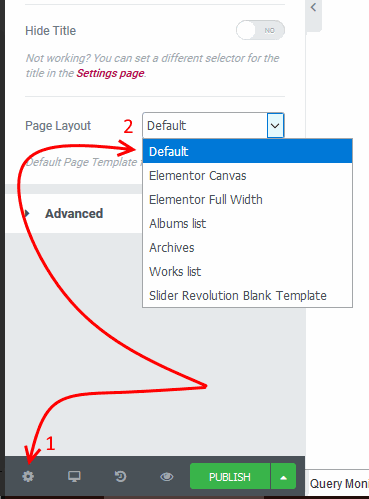
Why the layout is a template decision, not a page type
WordPress has no landing page content type. A landing page is an ordinary Page, and its template controls the layout, separately from the content. On a block theme you can create a custom template with no header and assign it to that one page. Remember that editing a shared template changes every page that uses it.
In Elementor, open Page Settings and find Page Layout. Canvas removes the site header, footer and sidebars on purpose. Full Width stretches the content but keeps them. Many “my header disappeared” reports are just Canvas doing what it is designed to do. If a header appears where you did not want one, check the display conditions in your theme or in Elementor’s Theme Builder.
Ignore older tutorials that send you to Templates, then Landing Pages. Elementor marks that feature as deprecated as of Pro 3.27. The supported route is Pages, then Add New, then Edit with Elementor. Our guide to building a landing page in WordPress walks through both the block editor route and the builder route.
Why a working form is really two features
Submission and delivery are separate. A form can accept an entry, show the success message and still send no email.
Elementor’s help center lists blank or duplicate field IDs, broken integrations and wrong field mapping as causes of an “invalid” form. Delivery is a different problem. Elementor sends notifications through WordPress’s wp_mail, and your host handles the outgoing mail. Elementor can store the entry under its form submissions even when no email goes out. Check there first: if the entry is stored, the form works and the problem is mail delivery.
Practitioners add two cases the docs do not cover. In one wordpress.org thread, a Forminator form failed to load for logged-out visitors until the owner changed its AJAX setting and turned on “Prevent page caching on form pages”. In other reports, adding SMTP alone did not fix delivery. The real causes were a wrong notification address and two CAPTCHAs running on one form. If you see “Sorry! your form was not submitted properly” or “An error occurred while processing the form”, start with those checks. The full sequence is in our guide to fixing a contact form that sends nothing.
Why the live page can differ from the editor
Two things explain most of the gap. The first is responsive settings. Elementor’s mobile and tablet values copy the desktop values unless you change them. Any element can also be set to Hide on Mobile. If the call to action is missing on phones, check that setting before you assume something is broken.
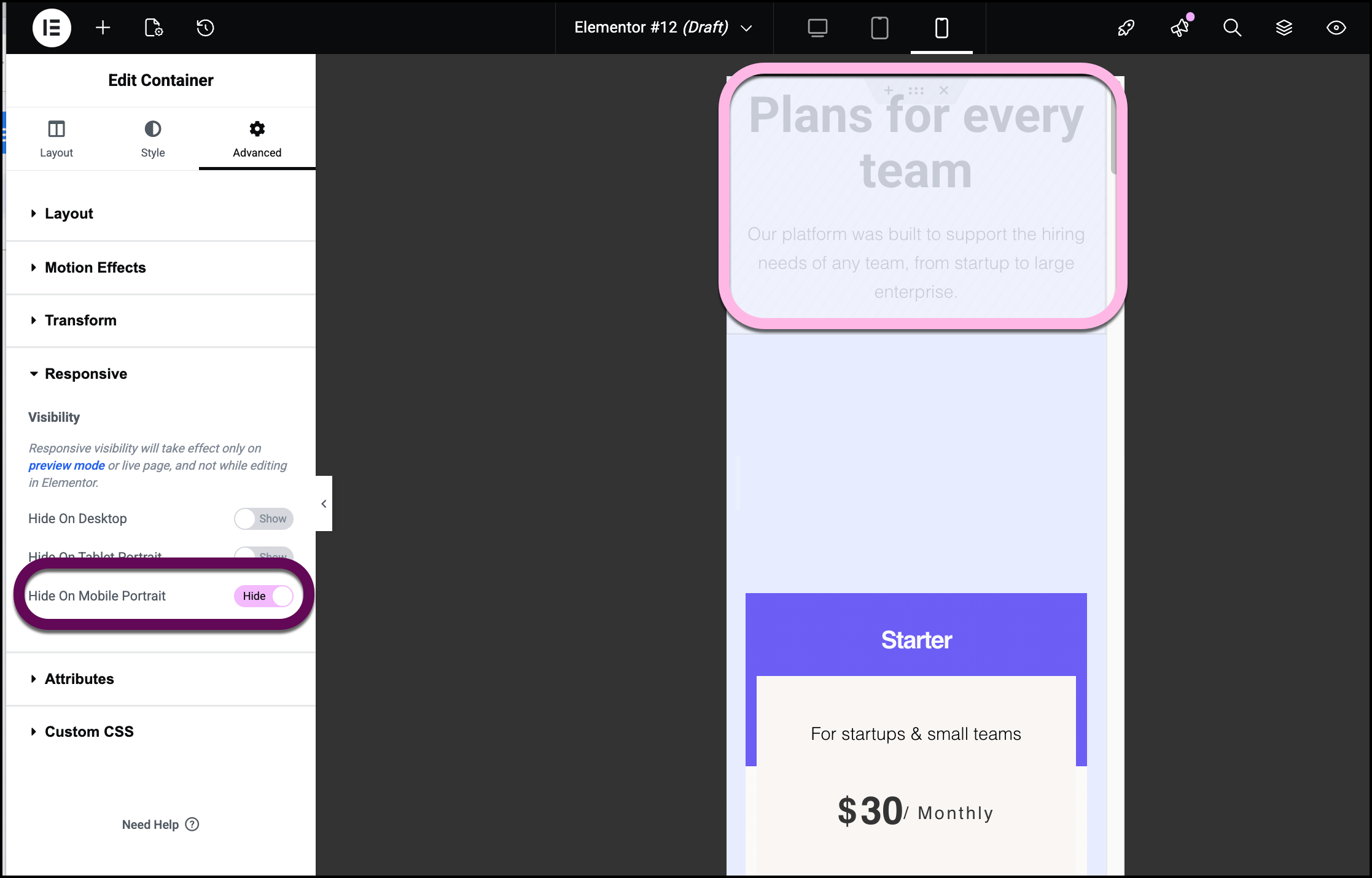
The other cause is caching. Your browser, your caching plugin, your host and your CDN can each keep their own copy of the page. Clearing only one of them leaves the others serving the old version. When a builder layout keeps breaking, regenerate Elementor’s files under Tools (Clear Files & Data, called Regenerate CSS & Data in older versions). Then review any minify and combine settings in your optimisation plugin. Our guide to a page that will not update covers the cache layers one at a time.
Why “rank” is not a landing page feature
Many campaign pages never need search traffic. If yours does, the feature to check is whether Google can index it at all. WordPress’s “Discourage search engines from indexing this site” setting, under Settings, then Reading, adds noindex across the whole site. Google’s documentation warns that if robots.txt blocks a page, Google cannot read the page’s noindex tag. Blocking a page in robots.txt is therefore not a reliable way to keep it out of results.
Google also says good Core Web Vitals are recommended but do not guarantee high rankings on their own. A fast page that matches its query is a page Google can rank. Being fast does not mean it will rank. Use Search Console’s URL Inspection to see what Google actually fetched, and our guide to checking a page’s Google ranking for the next steps.
Why accessible forms belong on the list
Every field needs a real label tied to it. W3C’s Web Accessibility Initiative is clear that placeholder text is not a reliable replacement. Mark which fields are required and what format they expect. When something goes wrong, WCAG 2.2’s Error Identification criterion requires the error to be described in text. A red border with no message does not meet it.
Check keyboard use too. Tab through the form on the live page. You should always see where the focus is, and you should be able to reach the submit button without a mouse.
What a WooCommerce sales page needs underneath
Before a product can sell from a landing page, WooCommerce needs its Cart and Checkout pages assigned under WooCommerce, then Settings, then Advanced, then Page setup. To show one product on an ordinary page, use a product block or the shortcode [product_page id="123"]. This is also the usual workaround when the product template is too rigid for a sales-letter layout.
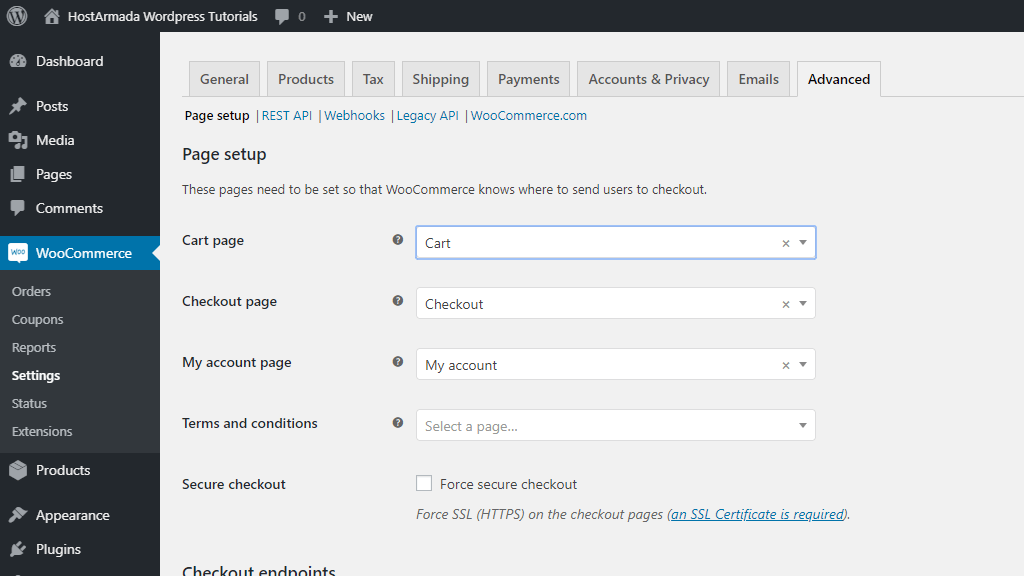
New installs have used the Cart and Checkout blocks by default since WooCommerce 8.3, so guides written for the older shortcodes may not match your screens. If a shortcode shows up as plain text, WooCommerce’s troubleshooting docs list two causes: it sits inside <pre> tags, or it was pasted with curly quotes.
How to check every feature on the published page
Run this after every significant edit, not just at launch:
- Open the page in a private window, logged out, so you see what visitors get rather than the uncached copy shown to admins.
- Open it on a real phone. Confirm that the headline, call to action and form appear without scrolling sideways.
- Submit the form with a real address. Confirm the entry is stored and the email reaches the right inbox.
- If you sell, place a test order through to the confirmation page.
- Tab through the form with the keyboard, then submit it empty and read the error messages.
- If the page should be found in search, run URL Inspection in Search Console.
- Confirm your analytics records the conversion event, not just the page view.
Fix broken operational features before you test persuasion ones. A form that drops leads makes every headline test meaningless. Once the page works, our guide to measuring landing page conversion rate covers what to track. If you would rather describe the change than make it, SiteSelf can make landing page edits through chat and fetch the changed page to check the result, though pages owned by Elementor, Divi or Beaver Builder are refused, with the reason.