Key takeaways
- In WordPress a landing page is a regular Page. It becomes your homepage only through Settings, then Reading, and a theme’s Front Page template can override that setting.
- Elementor’s separate Landing Pages feature is deprecated as of Elementor Pro 3.27. Those pages are a custom post type and can’t be chosen as the homepage, so tutorials that send you to Templates, then Landing Pages are out of date.
- Whether a page should be indexed depends on where its traffic comes from. A noindex tag only works if Google can crawl the page, so blocking the page in robots.txt does not replace it.
- Unbounce’s 2024 report puts the median landing page conversion rate at 6.6% across more than 41,000 pages. Industry medians run from 3.8% to 12.3%, so your own baseline tells you more than any benchmark.
- Before you redesign a page that isn’t converting, test the form logged out and check that the page delivers what the ad promised.
The link in your ad, email or social bio has to point somewhere. If it points at your homepage, visitors land on a page built to introduce everything you do, and they have to find the one thing you promised them. A landing page fixes that. It is a page built for the people arriving from that link, and it gives them one thing to do.
This article explains what a landing page is, how it fits into a WordPress site, and where people usually get it wrong. If you already know you want one, our guide on how to build a landing page in WordPress walks through the build.
What a landing page actually is
A landing page is a page with one job. It speaks to one audience, makes one offer and asks for one action: a signup, a quote request, a registration or a purchase.
The term has two meanings, and they get mixed up. In analytics tools, a “landing page” is simply the first page a visitor saw in a session, whatever that page was. In marketing, it means a page built for campaign traffic. Learn WordPress’s lesson on landing pages uses the second meaning: a dedicated page that visitors arrive at from an external source such as a social post, an ad or an email, with the header navigation removed so nothing distracts from the call to action.
A page doesn’t become a landing page just because people land on it. It becomes one when it is designed around a single next step.
How a landing page differs from your homepage
Your homepage points visitors to everything you offer. A landing page has one way forward. The difference shows up in almost every design decision.
| Page | Main job | Navigation | Where visitors come from | How you judge it |
|---|---|---|---|---|
| Landing page | One action: form, quote, registration or purchase | Minimal or none | Ads, email, campaign links, sometimes search | Share of visitors who take the action |
| Homepage | Explain who you are and send people onward | Full menu | Brand searches, direct visits, mixed | Where visitors go next |
| Product page | Help someone decide on one product | Store menus, cart | Search, category pages | Add-to-cart and sales |
| Blog post | Inform and build trust | Menus, related posts | Search, social | Reading, return visits, signups |
A one-page business site can use its landing page as its homepage. A larger site usually keeps the homepage and adds landing pages next to it, one for each campaign or audience.
Why WordPress has no landing page type, and why that matters
WordPress has no special landing page object. You create a normal Page, design it around one action, and publish it. Most of the confusion comes from three places.
The homepage setting, and what overrides it
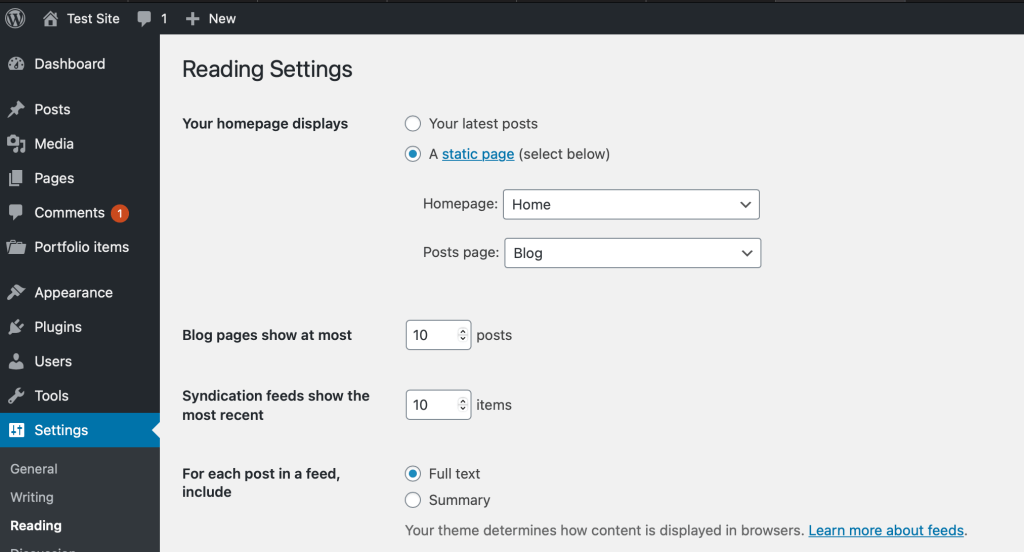
Calling a page “Home” does not make it your homepage. WordPress.org’s documentation on static front pages says WordPress shows your latest posts on the front page by default. To use a page instead, go to Settings, then Reading, choose “A static page”, select it as the Homepage and save.
Some block themes include a Front Page template. WordPress.org’s Site Editor guide explains that what the homepage displays depends on the templates in your theme, so the Reading setting can look right while the front page shows something else. Our guide to setting a page as the front page covers both cases.
Elementor’s old Landing Pages feature
Elementor used to offer a separate Landing Pages feature. Elementor’s help center says it is deprecated as of Elementor Pro 3.27, and its changelog shows it was switched off for new sites in 3.22 and hidden in 3.28 on sites that have no landing pages. Those pages were a custom post type, not regular pages, so they never appeared in the homepage dropdown under Settings, then Reading.
If a tutorial sends you to Templates, then Landing Pages, it is out of date. Build a regular page instead. Our explainer on whether you need a landing page builder covers the tradeoffs between page builders and the block editor.
Hiding the header and footer
Removing your site’s menu is a layout choice, and every tool handles it differently. Block themes often include a blank template or one without a header. Elementor’s Canvas layout removes the header, footer and sidebars completely. People who pick Canvas from a “blank landing page” tutorial sometimes think their theme broke, when the layout is doing exactly what it was designed to do.
Which job is your landing page doing?
Marketers name landing pages after the job they do. The names are labels, not templates, and no source shows one type converting better than another. They help you decide what the page asks for and how you will measure it.
- Lead generation. Collects contact details, such as a free consultation request. Judge it on form submissions and on whether those leads turn into customers. A “squeeze page” is a narrow version that asks only for an email address.
- Click-through. Explains an offer, then sends the visitor to checkout or a signup flow. Judge it on how many visitors reach the next step.
- Sales page. Sells one product or course in full detail on the page itself. Judge it on purchases.
- Event registration. Fills a webinar or event. Registrations are the first result, and attendance tells you whether the right people signed up.
- Launch or waitlist. Builds demand before a release. Say exactly what subscribers will hear about, and don’t suggest that joining the list reserves stock unless it does.
If you can’t name the job in one line, you probably have two pages’ worth of goals. Don’t ask the same visitor to join a newsletter and buy an unrelated product with equal emphasis.
What goes on the page, in the order visitors need it
Learn WordPress lists the usual parts: a hero section with a title, subtitle, visual and call to action, followed by benefits, social proof, and optionally an FAQ for common doubts. The order follows what a visitor thinks on arrival: am I in the right place, what do I get, why should I believe it, and what do I do now.
The headline has to match whatever sent the visitor. Someone who clicked an ad for emergency plumbing expects to see emergency availability, your service area and a way to call. A good page about bathroom renovations is the wrong page for that visitor. Practitioners call this message match, and it comes up more often than any layout advice when people ask why a page isn’t converting.

For the form, ask only for what you need to take the next step, and judge any change by lead quality as well as volume. The W3C’s guidance on labeling controls says every field needs a label that stays visible, which placeholder text can’t do because it disappears as soon as someone starts typing. The form also needs clear error and success messages. Our landing page design best practices go further into layout and hierarchy.
Removing the menu is common advice, but treat it as something to test. Experienced marketers say to compare a version with navigation against one without, rather than follow a rule.
Should a landing page appear in Google?
It depends on where the traffic comes from. A page built to rank for a search phrase should be indexed. A page built only for one ad campaign or one email often shouldn’t be, so it doesn’t compete with your main pages or show up out of context.
For a page you want found, check two things. First, the “Discourage search engines from indexing this site” box under Settings, then Reading. WordPress.org’s documentation says it adds a noindex, nofollow instruction across the whole site. Second, your SEO plugin’s setting for that page.
For a page you want hidden, use noindex and leave the page crawlable. Google’s documentation on blocking indexing explains that Google has to crawl a page to see its noindex tag. If you block the URL in robots.txt, Google never sees the tag, and the URL can still appear in results. If you run several near-identical versions of a page for different ads, use a redirect or a canonical tag to point at the main version rather than noindexing the copies. Our guide to doing SEO on WordPress covers these settings in more depth.
What counts as a good conversion rate?
Unbounce’s 2024 Conversion Benchmark Report puts the median at 6.6%, measured across more than 41,000 landing pages, 464 million visitors and 57 million conversions. Medians for individual industries ranged from 3.8% to 12.3%, and 83% of the visits were on mobile.
Keep in mind that this is one platform’s sample, made up of pages hosted on Unbounce. Your traffic source, offer and device mix will matter more to your number than any industry average. Record your page’s baseline before you change anything, then compare like with like. Our guide to measuring landing page conversion rate shows how to calculate the rate and read the result.
Where landing pages usually go wrong
Most failed landing pages have a working design and a broken setup or a mismatched message. Check these before you redesign anything.
The page doesn’t match the ad. When store owners post about getting plenty of clicks and almost no sales, the replies usually point to the ad’s promise, unclear price or shipping, missing trust signals and checkout friction. The layout rarely comes up. A new design won’t fix an offer that doesn’t match what the ad said.
The form misreports what happened. In one wordpress.org support thread, a Gutena Forms user’s visitors saw “Sorry! your form was not submitted properly, Please try again later.” Their answers were still being saved in the admin, and a plugin update fixed it. The opposite also happens: the thank-you page loads but the email or CRM entry never arrives. Submit the form yourself, logged out, and confirm the entry shows up wherever you actually read it.
Your edits don’t show. This is usually caching. A caching plugin, your host’s server cache, a CDN and your browser can each serve an old copy, and clearing one doesn’t clear the others. Purge each layer, then check the page in a private window.
The wrong page loads at the root URL. Check Settings, then Reading, and then check whether your theme has a Front Page template.
If you’d rather describe the page and have the work done for you, SiteSelf can make page edits on your site from chat. It works on block-editor pages and refuses pages owned by Elementor, Divi or Beaver Builder, telling you why when it does.