Give your WordPress site its first task.
Connect the site you already have, add your agent to Slack or Telegram, and tell it what you need.
Connect your siteStart with 500 free credits. No credit card needed.
A 301 tells Google a URL has moved for good. Google says the redirect itself costs no PageRank. Traffic drops after a URL change usually come from how the redirects were done: old URLs nobody redirected, redirects that send visitors to the wrong page, and rules that chain or loop.
You rename a service page, tidy up a product category, or move the site to HTTPS. The new URL works. But Google still has the old one indexed, other sites still link to it, and customers still have it bookmarked. A 301 redirect connects those old requests to the new address. Whether your search traffic makes it across depends almost entirely on how carefully you set up those redirects.
This article explains what a 301 does for search, when it’s the right response, and where WordPress sites usually get it wrong. For step-by-step setup, see our guide to redirecting a page in WordPress.
A 301 is a server response that says “this resource has moved permanently.” The new address goes in the Location header. Browsers and crawlers follow it automatically. Google’s redirect documentation treats a permanent redirect as a strong signal that the destination should become the canonical URL, the one shown in search results.
The old fear was that every 301 “leaked” a fixed share of link value. Google has since said the opposite. Its site moves and migrations guide says permanent redirects don’t cause a loss in PageRank. The same guide also warns that rankings can fluctuate while Google recrawls and reprocesses the moved URLs. Both statements are true. A 301 carries the signals over. It doesn’t guarantee the new page ranks where the old one did.
That gap matters most when the content changes too. If the new page drops the text, headings or offer that ranked the old one, the redirect carries signals to a weaker page. Change the URL and the content at the same time and you won’t be able to tell which change caused the drop.
Big moves can take a long time to settle. In a 2025 Search Engine Journal study of 892 domain migrations, estimated organic traffic took an average of 523 days to match the old domain. The sample was self-selected and limited to domain moves, and the study doesn’t separate the effect of redirects from everything else that changed. A single slug change on a small site is a much smaller event. Still, plan for some movement.
Use a 301 when the move is permanent and the new page is a real replacement for the old one. Google’s test is simple: if you expect to reverse the redirect later, it isn’t permanent, so use a 302 or 307 instead. A 308 is also permanent. The difference from a 301 is that it keeps the request method.
| Situation | Response | Where it should point |
|---|---|---|
| Slug or permalink structure changed | 301 | The same page at its new URL |
| HTTP to HTTPS, or www to non-www | 301 | Same path on the preferred protocol and host |
| Domain move | 301 | The matching page on the new domain, not its homepage |
| Two overlapping posts merged | 301 | The post you kept |
| Product discontinued, close successor exists | 301 | The successor, or a category that serves the same buyer |
| Product out of stock but coming back | 302, or no redirect | Temporary page, if you need one at all |
| Page deleted, nothing equivalent | 404 or 410 | Nowhere |
| Page refreshed at the same URL | No redirect | Keep the URL |
WooCommerce’s Product 404 Redirects documentation draws the same line for stores. It recommends a 301 for permanently deleted products and a 302 for products that are only temporarily unavailable. It also warns against choosing a destination that redirects back to the original URL.
The row people resist most is the last real one: deleted, nothing equivalent. Sending every dead URL to the homepage feels safer than a 404. Google’s migration guide says otherwise. Redirecting unrelated old URLs to the homepage can confuse visitors, and Google may treat those redirects as soft 404s. If a page has no real replacement, a clear 404 is the honest answer, and you can make it a useful one with a custom 404 page.
Most redirect problems on WordPress start with a URL that changed and nobody added a redirect for it. WordPress makes these changes easy and covers them only partly.
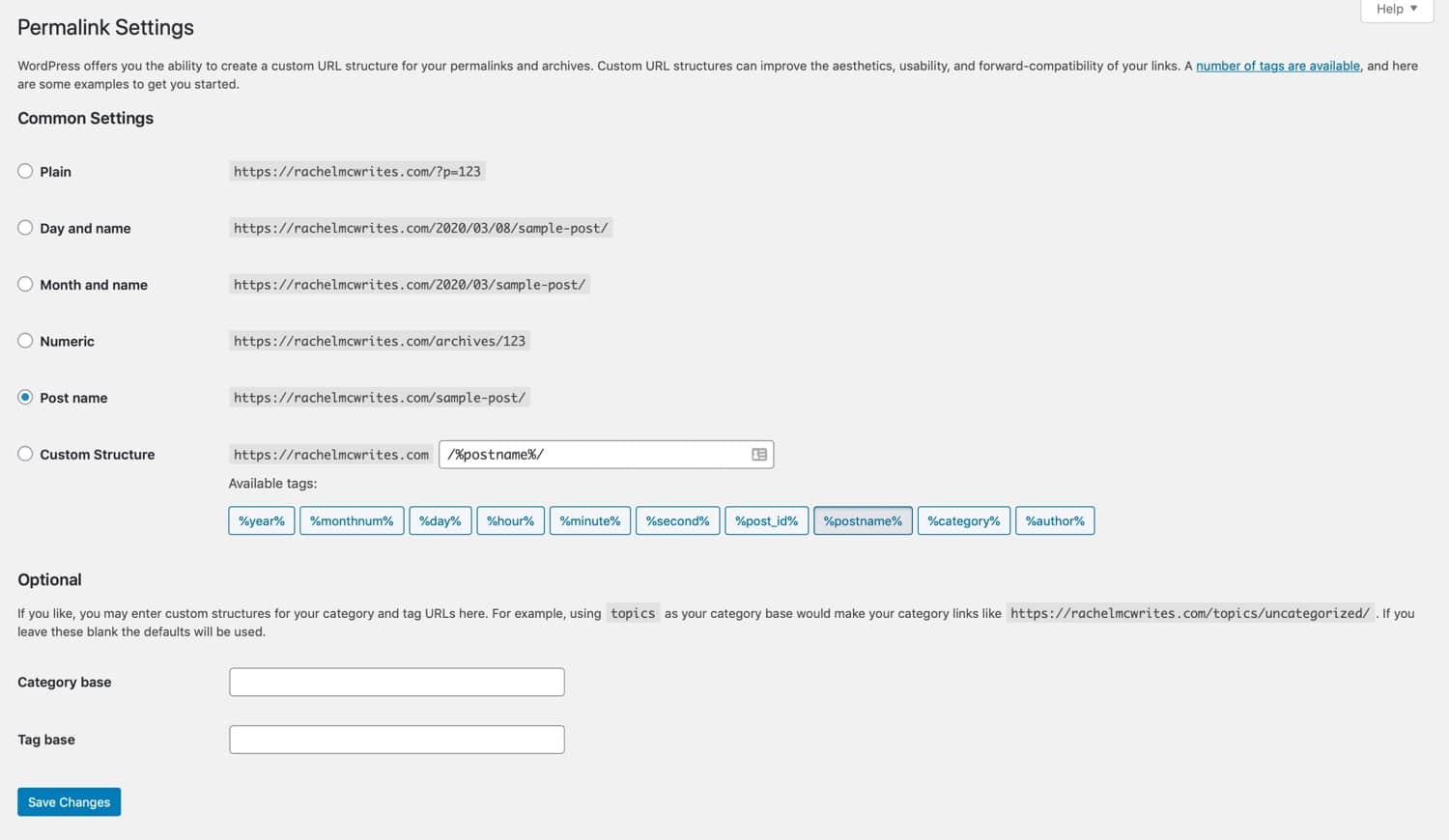
Changing permalinks redirects nothing. When you click Save under Settings > Permalinks, WordPress applies the new structure and flushes its rewrite rules. Old URLs aren’t mapped to new ones. Switch from /2024/05/post-name/ to /post-name/ and every dated URL that Google has indexed can start returning 404s. WooCommerce’s permalinks documentation gives the same warning for product and category bases.
Old-slug redirects cover only some cases. WordPress core has wp_old_slug_redirect(), which looks up a post’s past slugs when a request would otherwise 404. It’s useful. But it doesn’t cover structure changes, and you shouldn’t assume it caught a particular URL. Test the old address itself. Our explainer on what a WordPress slug is covers where the slug ends and the rest of the permalink begins.
Canonical redirects aren’t bugs. redirect_canonical() sends requests to the URL WordPress considers correct, based on host, HTTPS and trailing slash. Owners sometimes see an unexpected 301 from it and switch it off. That can leave duplicate versions of the same page reachable, which is the problem it exists to solve.
Custom code defaults to temporary. In WordPress developer resources, wp_redirect() takes a status of 302 by default and doesn’t stop execution. For a permanent move in a theme or must-use plugin:
wp_safe_redirect( home_url( '/new-page/' ), 301 );
exit;
Leave off the 301 and you’ve told Google the old URL is coming back.
A WordPress request can be redirected by WordPress core, a redirect plugin, an SEO plugin’s redirect manager, .htaccess or Nginx rules, your host’s dashboard, and Cloudflare. Any of these layers works. The trouble starts when two of them handle the same URL. Pick one owner for each rule and write down which one it is.
Google prefers server-side redirects when you can use them. A plugin like Redirection still returns a real 301 from PHP, so it’s a sound choice for owners without server access. Server rules handle the request before WordPress loads, which suits large rule sets. A mistake in a server rule, though, can break more than the page you meant to move. Our guide to htaccess 301 redirects shows where custom rules go so WordPress doesn’t overwrite them.
Two host differences catch people after a migration:
.htaccess redirects may simply stop working after a move.^, and with $ for exact matches, or a rule can match its own destination and loop. Kinsta also says the tool can’t redirect query strings, and asks you to contact support for those.If you’d rather hand off the map and the checks, SiteSelf handles 301 redirects and SEO settings through chat. It uses its connector plugin for plugin-level redirects and hosting access for server rules, and it reports what each old URL returns afterwards.
When practitioners on r/Wordpress, r/webdev and the wordpress.org forums describe a traffic collapse after a rebuild, the cause is rarely the 301 status code. It’s usually one of four things, roughly in this order of how often they come up.
A rebuild changes the URL structure, someone redirects the pages in the main menu, and hundreds of old posts, product URLs and PDFs end up returning 404s. Fix this before launch. Export every URL from your sitemap, Search Console’s indexing and performance reports, analytics landing pages and your backlink tool. Then map each one to its closest real equivalent. A poster on r/webdev who migrated 3,100 URLs from a 14-year-old WordPress site said starting that spreadsheet late was the biggest regret of the project.
For large catalogues, the approach practitioners defend most often is a hybrid. Map your high-value URLs one to one. Send low-value ones to the closest category or brand page that genuinely fits. Return a 404 or 410 where nothing fits. Plugins that redirect every 404 to the homepage are popular, but the Redirection plugin’s own FAQ advises against redirecting all 404s.
A chain happens when site moves pile up: http:// goes to https://, then to www, then to the new slug. Google’s redirect documentation says Googlebot follows up to 10 hops but advises avoiding chains, ideally keeping them to 3 or fewer and always under 5. Point every old URL directly at the final page. Then update your menus, internal links, canonical tags and sitemap so your own site never goes through a redirect at all. Our guide to updating internal links in WordPress covers the editor side.
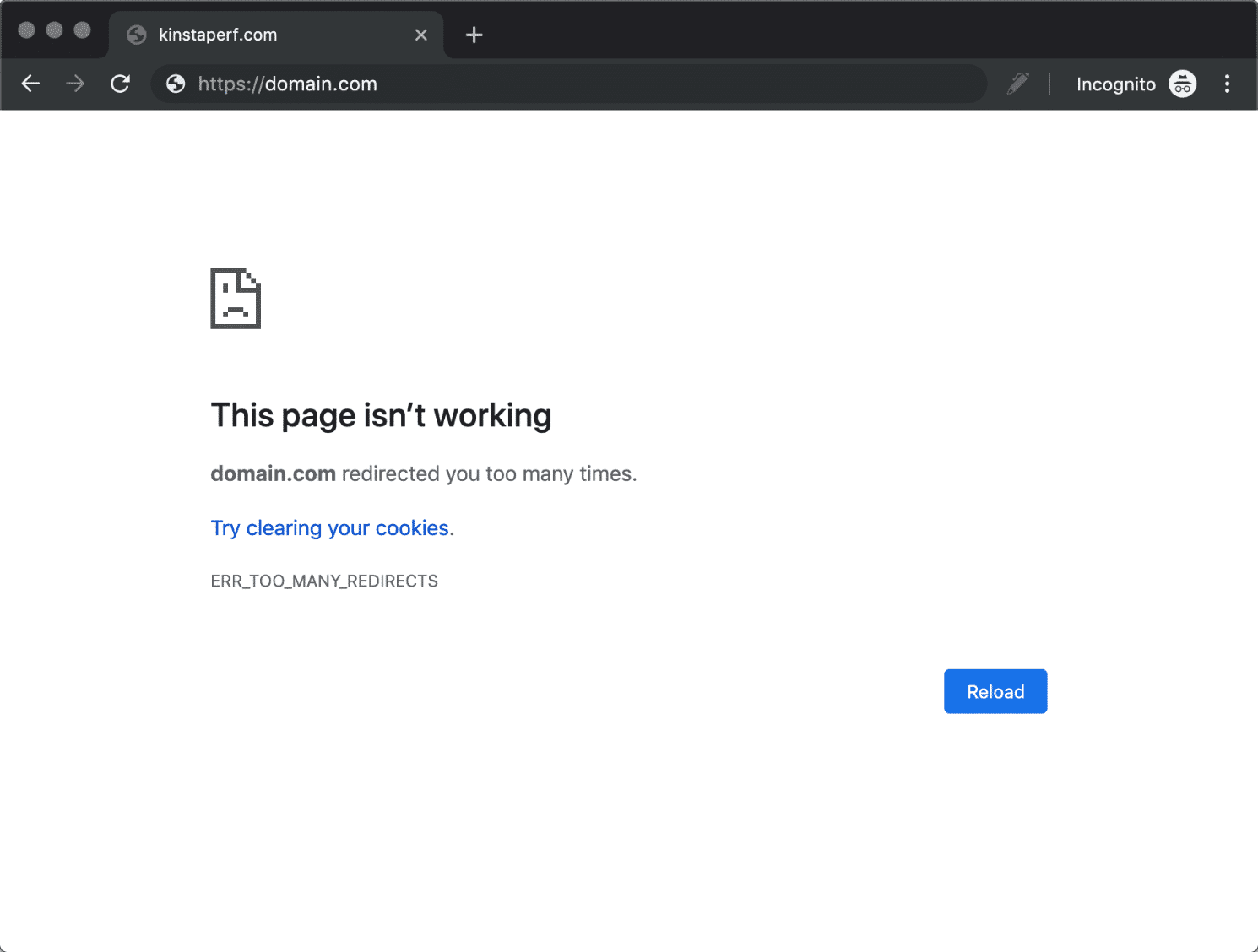
ERR_TOO_MANY_REDIRECTS means two layers disagree. A common case is documented by Cloudflare: in Flexible SSL mode, Cloudflare talks to your server over HTTP. If the server also redirects HTTP to HTTPS, the request bounces between them forever. Cloudflare’s fix is Full mode or higher, which needs a certificate on the origin server. Other causes are a force-HTTPS plugin turned on before HTTPS actually works, www and non-www settings that disagree, and regex rules with no anchors. SSL errors behind Cloudflare often show up alongside loops. Trace the chain before you clear caches or disable plugins. Those steps can hide the problem without telling you which rule caused it.
Check the actual HTTP response, logged out, after clearing your page cache. A browser alone won’t tell you much. Browsers cache 301s, so your browser may keep following a rule you’ve already changed. From a terminal:
curl -sIL https://example.com/old-page/Each HTTP/ line is one hop. A good result shows one 301, a Location header with the final URL, and then a 200. Two or more 3xx lines mean a chain. A 302 where you expected a 301 means the wrong status. Repeating URLs mean a loop. The Redirection plugin also has an HTTP checker that shows each hop, if you’d rather stay in wp-admin.
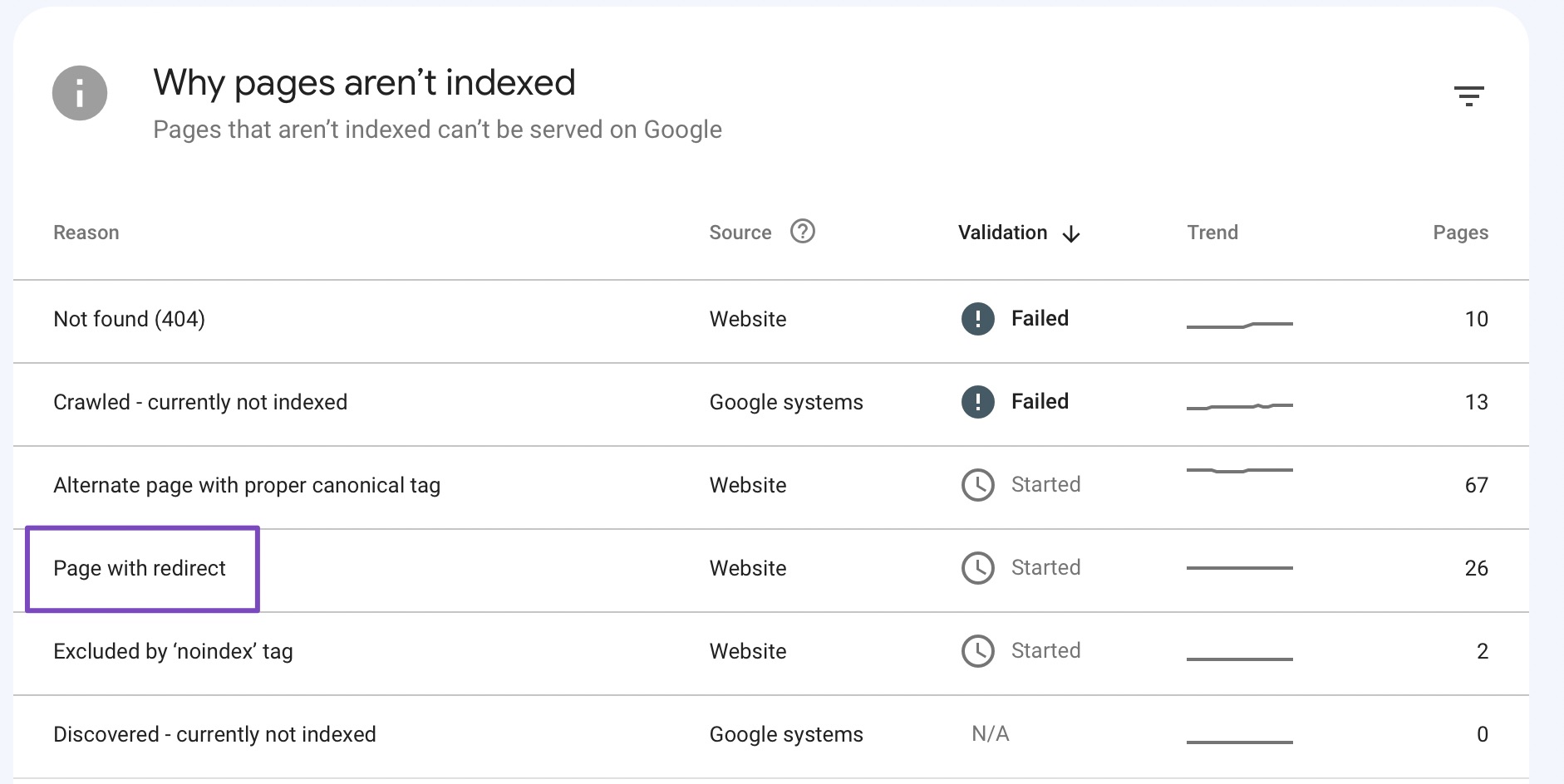
Then check the destination like a visitor would. Does the page load, answer the same question, and still let people buy or get in touch? In Search Console, “Page with redirect” is the expected status for a URL that redirects on purpose. A “Not found (404)” report that suddenly fills with old URLs means pages were missed.
Keep the redirects. Google’s migration guide says to keep them for at least a year and to consider keeping them indefinitely, because people will keep clicking old links long after Google has updated its index. If you moved domains, keep the old domain registered so its redirects keep working.
Yes. Google says permanent redirects don’t cause a PageRank loss, which replaces older advice about a fixed percentage lost per redirect. What a 301 can’t do is make the new page as relevant as the old one if its content got thinner.
Google treats both as permanent. A 308 keeps the request method, which matters for form submissions and API endpoints. For normal pages, a 301 is the usual choice, and most WordPress plugins offer it by default.
The number of redirects across the site is rarely the issue. Hops per URL are. Keep each old URL one step from its final page. A thousand single-hop redirects are healthier than ten five-hop chains.
Not if the domain and every path stay the same. Still, test a sample of URLs after the move. Hosts handle rules differently, and redirects that lived in .htaccess won’t run on a host that ignores that file.
Usually it’s core doing its job. redirect_canonical() normalises host, HTTPS and trailing slashes, and wp_old_slug_redirect() forwards some old post slugs. Find the layer sending the redirect before you change anything, and don’t turn off canonical redirects to make the redirect go away.
Visitors are redirected the moment the rule goes live. Google’s recrawl runs on its own, slower schedule. Compare the affected pages against their numbers from before the change over several weeks, rather than reacting to the first few days.
Explainers
On WordPress, a landing page builder is a choice between four kinds of tools, and for a single campaign page the block editor you already have is often enough. Whichever builder you pick, it will matter less than what happens after you publish: the Reading setting, caches, store pages, indexing, and who keeps the page up to date.
Read article ›Explainers
An SEO friendly URL is a readable address that describes the page, and in WordPress you get one by choosing Post name permalinks before you publish. Picking the structure is the easy part. Most of the damage comes later, when someone changes URLs on a live site without a redirect for every old address.
Read article ›Explainers
A WordPress slug is the short, editable part of a URL that names one post, page, product or category, like about-us in example.com/about-us/. Choosing a good slug before you publish costs nothing. Changing it after the page is live is a URL change, and it needs a redirect.
Read article ›Connect the site you already have, add your agent to Slack or Telegram, and tell it what you need.
Connect your siteStart with 500 free credits. No credit card needed.