Key takeaways
- Core covers more than people expect: the Audio block embeds one file, and the Playlist block plays a collection of tracks in a single player with a track list, shuffle and a waveform visualization.
- Check the vulnerability record before the feature list. Patchstack shows 16 patched issues for MP3 Audio Player by Sonaar (20,000 installs), including an unauthenticated IDOR affecting 4.0 to 5.10 and broken access control up to 5.12.
- A patched record is a good sign, not a bad one. The problem is a site sitting three versions behind, because none of these failures show on the front end.
- Ranked by how often they happen: broken file URLs after a migration, JavaScript killed by minification, players missing because the track is still a draft, and waveforms blanked by a CDN that blocks the XHR fetch.
- Continuous playback across page loads has no clean plugin answer. Frames break mobile, AJAX page loaders break other scripts, and going single-page is a rebuild.
WordPress plays audio with no plugin at all. The Audio block embeds a music file, a podcast episode or any other sound file directly in a post or page, with the browser’s own controls. The Playlist block goes further: WordPress’s documentation describes it as a collection of audio tracks played in a single player, where visitors browse the track list, play in order or on shuffle, and follow the current track in an interactive waveform visualization.
So the question is not “which music player WordPress plugin is best”. It is narrower: what does a plugin add that core does not, and what does it cost you three months later. The cost is usually one of four things going wrong, and those four are the same for every plugin in the category. If yours has already stopped working, the general method in our guide to WordPress plugins that are not working applies here too.
What core already covers, and where it stops
The Audio block handles one file per block. Its toolbar includes a Replace control, which matters more than it sounds: the URL of the file you chose is written into the post content, so swapping the MP3 in the Media Library does nothing to blocks you already published. You change the block, not the library.
The Playlist block is the bigger change to the calculation. Multi-track playback with a waveform was the main reason to install a plugin for years. Its documentation opens with a requirements section, so check it against the WordPress version you actually run before you plan around it. Sites on older releases will not have the block, and a page built on a newer staging install will not render it when you copy it down.
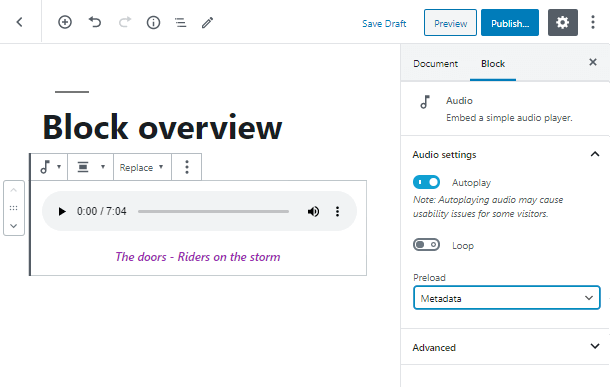
If you need one track in a post, or an album on a release page, you may already be finished. Everything past that point is what the plugin market exists for.
What a plugin adds that core does not
Six things, and most sites need one or two of them:
- Page-builder placement. Music Player for Elementor ships a dedicated Elementor widget, so the player is a layout component rather than a shortcode dropped in a text box.
- Product previews. Music Player for WooCommerce puts a player on products and supports OGA, MP3, WAV and WMA files plus M3U and M3U8 playlists, with Dokan, WCFM Marketplace and MultivendorX support for marketplace setups.
- Podcast and radio sources. AudioIgniter’s listing covers building playlists from standard WordPress media uploads and streaming a radio show. MP3 Audio Player by Sonaar is written for music, beat makers and podcasters, with players on posts, WooCommerce products or custom post types.
- Format breadth. HTML5 Audio Player by bPlugins lists .mp3, .wav, .ogg and more.
- Sticky and floating players that stay visible while the visitor scrolls.
- Skins and branding, where the player is part of the page design rather than a grey bar.
If your list of needs is empty, do not install anything. A player is JavaScript, and JavaScript on a WordPress site has a maintenance cost that a block does not.
How to read a plugin listing before you install it
Install counts in this category are small. The leaders sit around 10,000 to 20,000 active installs, not the hundreds of thousands you see in forms or SEO. That means abandonment risk is real in the long tail, and it also means a high install count is not proof of much on its own.
Four signals are worth more than the feature list:
- Tested up to. A plugin lagging a full WordPress release behind its peers is a mild staleness signal, not a disqualification. Two releases behind, with no update in a year, is a different conversation.
- Does it ship a block or a widget, or only a shortcode? Shortcodes are where the support tickets come from, because attribute names get typed by hand.
- Builder lock-in. An Elementor-only player means the audio implementation gets rebuilt if the site ever leaves Elementor. Prefer something with a block and a shortcode as an escape route.
- The description itself. Compact WP Audio Player’s listing still describes the plugin as an HTML5 and Flash hybrid supporting .mp3 and .ogg files. Flash has been dead since 2020. Copy that old tells you how much attention the listing gets.
The signal almost nobody checks is the vulnerability record, and in this category it is the one that matters most.
Why audio players need update discipline more than most plugins
Patchstack’s entry for MP3 Audio Player by Sonaar, the most installed plugin in the category at 20,000 installations, lists 16 patched vulnerabilities and none currently present, against a latest version of 5.14.2. The recent run reads: cross site scripting up to 5.13.1, broken access control up to 5.12, an unauthenticated insecure direct object reference exposing sensitive information in versions 4.0 to 5.10, a server side request forgery up to 5.11, and an author-level server side request forgery in 5.3 to 5.10.
It is not only that plugin. Patchstack lists two patched issues for Music Player for WooCommerce, including cross site scripting up to 1.8.9, and one for AudioIgniter, an unauthenticated insecure direct object reference on the audioigniter_playlist_id parameter up to 2.0.2.
Read that the right way. A plugin with 16 patched issues and zero present is a plugin whose maintainer is fixing things. The danger is the site sitting on 5.9, sounding perfect, with private post content readable by anyone who knows the AJAX endpoint. None of this is visible from the front end. There is no broken layout, no error message, no dead play button. The only remedy on offer for each of these entries is the same: be on a version past the affected range.
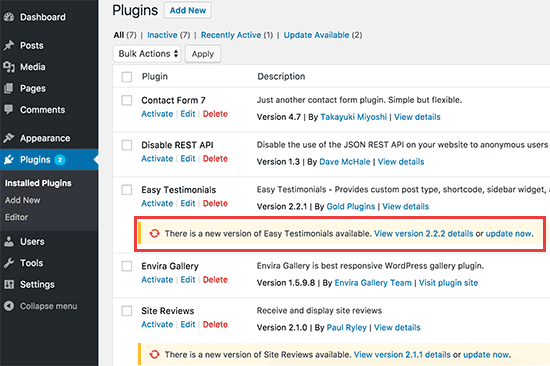
The awkward part is that media plugins are also the ones most likely to break on update, because updates change the markup and the enqueued scripts. So the answer is not automatic updates applied blind, and it is not leaving the plugin alone. It is updating on purpose and then loading a page with a player on it and pressing play.
Example request
“Our audio player plugin is three versions behind. Read the changelog, update it, and check the players on the releases pages still render.”
SiteSelf reads the changelog and the plugin’s current version, tells you what is about to change and whether it can be undone, applies the update, then fetches the pages you named and reports what it found. Plugin and settings work runs through the SiteSelf Connector plugin from the WordPress.org directory; if the fix turns into a template or theme-file change, it needs hosting access over SSH. Handing routine plugin updates to your agent is most useful in exactly this category, where the version number is the whole security story.
The limits are worth stating plainly. Verification today is a fetch of the changed page and a plain-language report in chat, so it can confirm the player markup and the script are on the page. It cannot listen to the audio, and it is not a device test. If the release page is owned by Elementor, Divi or Beaver Builder, that page is refused at the moment of work, with the reason. Nothing runs unattended; the work happens when you ask, and what was done is recorded.
The four things that break, in the order they happen
The file URL. Most “audio is broken” tickets are a 404. Open the audio file’s URL directly in a browser tab. If it does not load there, no plugin setting will help. This is also what a domain change or an HTTP to HTTPS migration does: the URL is stored in the post content, changing the Site URL setting does not rewrite it, and mixed-content rules then block the old asset silently. Migrate with a proper search and replace across post content, not just the setting. Format matters too: a 24-bit WAV will not play in Firefox, and a server configured to send audio as text/plain or with forced download headers breaks in-browser playback whatever the plugin does.
The player renders but play does nothing. Open DevTools and look for Uncaught TypeError. This is almost always JavaScript aggregation, deferral or minification in a caching plugin. Turn JS and HTML minification off, clear every cache layer, retest. If playback returns, add targeted exclusions for the player’s script and for the core media scripts wp-mediaelement.min.js and mediaelement-migrate.min.js rather than leaving optimisation off site-wide. Keep that exclusion list with the rest of your WordPress speed work, so the next performance pass does not undo it.
No player at all. Check in this order: is the track published rather than draft or private, is the plugin activated and not merely uploaded, does the page source show the shortcode rendered or printed as literal text, and are the attribute names exactly as documented. Copy shortcodes from the plugin’s own management screen instead of typing IDs by hand, or use its block or widget and remove the opportunity for the mistake.
The waveform is blank but the plain player works. Waveform players fetch the audio file over XHR to draw the waveform, which a plain <audio> element never does. A CDN that blocks XHR or omits an Access-Control-Allow-Origin header breaks one and not the other. Fix the CDN headers, serve that file from the main server, or fall back to the plugin’s simple player for that instance. This is the one case where offloading media to a CDN, normally good practice, is the cause.
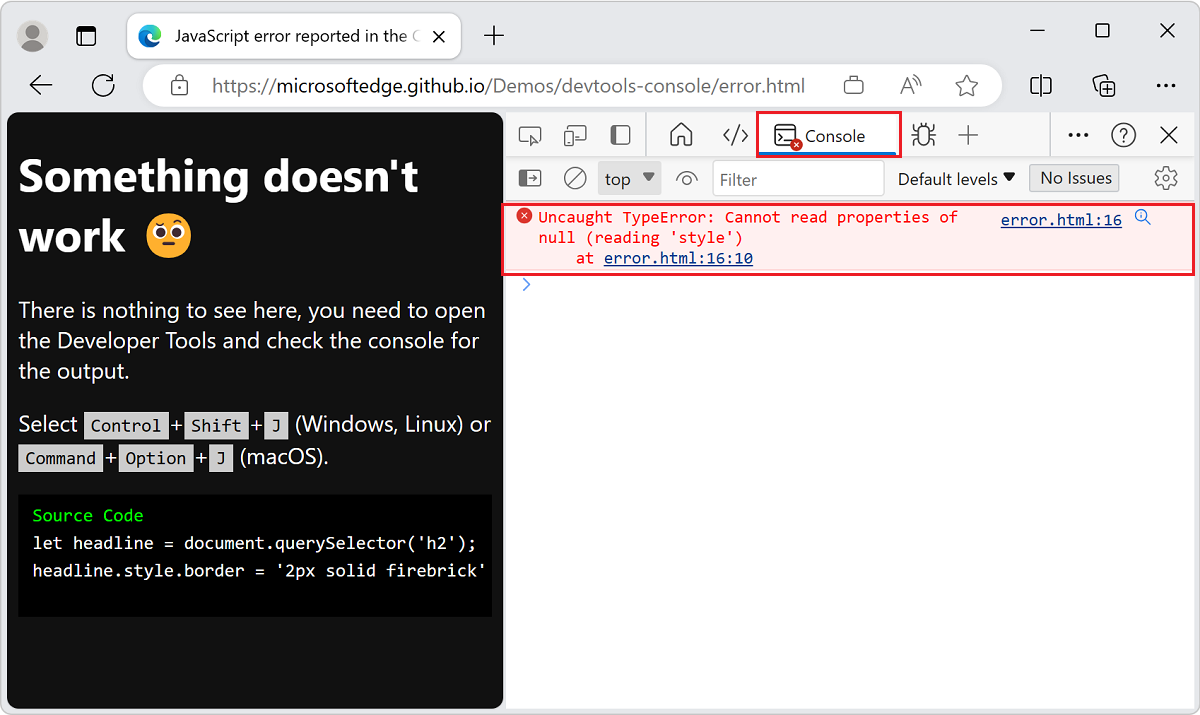
Stop and get help when the console is clean, the file loads directly, minification is off and the player still does nothing. At that point you are looking at a theme or plugin conflict, and the isolation work is worth doing in staging rather than live.
The one thing no plugin solves properly
People want music to keep playing while visitors browse. A normal WordPress page load replaces the document, which stops playback. Every workaround trades one problem for another: frames keep the audio alive and break mobile rendering, AJAX page loaders keep the audio alive and interfere with other scripts on the site, a single-page or headless front end solves it and is a rebuild, and a pop-out player window solves it at the cost of an extra window most visitors will close.
Sticky and floating players are not the same thing. They keep controls visible while the visitor scrolls one page. They still stop at the next page load, and a vendor describing the feature as continuous playback is usually describing that.