Key takeaways
- “Your connection is not private” happens during the TLS handshake, before WordPress runs. Deactivating plugins, switching themes or clearing caches cannot fix it.
- If the certificate is valid but the padlock is missing, the cause is almost always mixed content: http:// URLs stored in the database, theme or CSS. Back up, then preview the fix with wp search-replace –dry-run.
- ERR_TOO_MANY_REDIRECTS after switching to HTTPS usually means two layers are redirecting, or Cloudflare is in Flexible mode. Keep one server-side redirect and use Full or Full (strict).
- cURL error 60 during updates is about your server trusting other sites, not visitors trusting yours. Update WordPress and ask the host to update the server’s CA certificates.
- Let’s Encrypt’s standard certificates last 90 days, so renewal has to be automatic and someone has to own checking that it worked.
A certificate warning on your site looks like one problem. It is usually one of four, each in a different place and fixed by a different person. Most of the lost time goes on fixing the wrong layer: deactivating plugins when the host issued a certificate for the wrong hostname, or buying a new certificate for a page that loads one image over http://.
Match what you see to the table below before changing anything. If your exact error is a protocol or handshake failure, our guides to fixing ERR_SSL_PROTOCOL_ERROR and fixing SSL handshake failed cover those in more depth.
Which kind of SSL error do you have?
Read the exact message. The browser tells you which check failed, and that points to the layer.
| What you see | Where the problem is | Who usually fixes it |
|---|---|---|
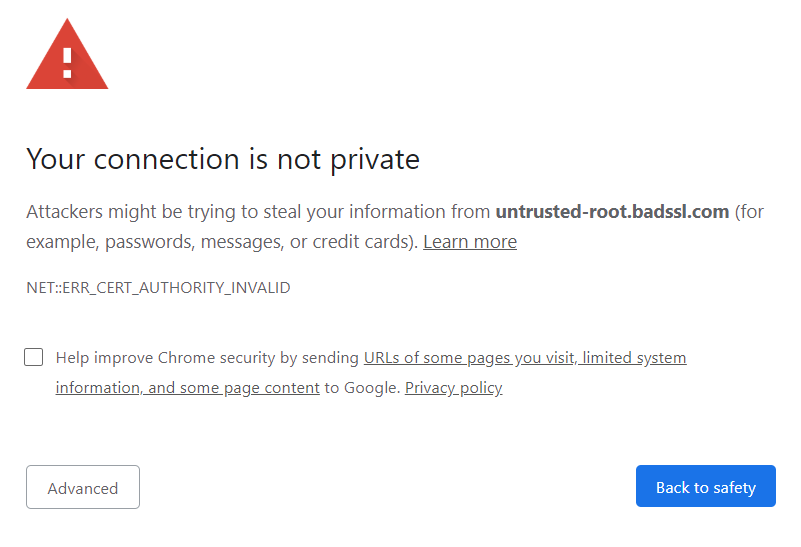
| Full-page “Your connection is not private”, NET::ERR_CERT_* | The certificate the server sends | Your host, or whoever runs DNS or the CDN |
| ssl_error_rx_record_too_long, ERR_SSL_PROTOCOL_ERROR | The server’s TLS setup on port 443 | Your host |
| Page loads, but the padlock is missing or it says “Not secure” | Mixed content in your content, theme or CSS | You, in WordPress |
| ERR_TOO_MANY_REDIRECTS | Redirect rules, or the CDN’s SSL mode | You, plus whoever controls the CDN |
| cURL error 60, “could not establish a secure connection to WordPress.org” | Your server’s trust in other sites | Your host, plus a WordPress update |
| WooCommerce or a payment gateway says SSL is missing | Checkout setup, plugins or the certificate chain | You first, then your host |
Why “Your connection is not private” can’t be fixed from wp-admin
The browser checks the certificate during the TLS handshake, before it sends any request to WordPress. When the check fails, WordPress never runs. So plugins, themes, caching and settings in wp-admin play no part in the error.
One WordPress.org support thread shows the usual pattern. The owner’s host said the problem was probably a plugin or WordPress, so the owner deactivated every plugin, and nothing changed. The real cause was DNS: the nameservers pointed to Cloudflare while the A record pointed to the host, so visitors were getting a certificate issued for a different domain.
Rule out the visitor’s device first
Open the same URL on a phone using mobile data, not the office Wi-Fi. If it loads cleanly there, check the failing device before you touch the site:
- Clock. The browser checks the certificate’s dates against the device’s time. A wrong clock produces a date error on a healthy certificate.
- Antivirus HTTPS scanning. Some security software swaps in its own certificate so it can inspect traffic. Pause that one feature to test, then turn it back on.
- Captive portals and company proxies. Hotel and guest networks may need a sign-in first. On a managed laptop, ask the administrator. Don’t remove the company’s trust settings yourself.
If the warning shows up on different browsers and different networks, the problem is on the site side.
Read the certificate the server actually sends
A hosting dashboard showing “active” doesn’t prove visitors receive that certificate. Click the warning’s Advanced link or the site information icon and open the certificate details. If you have a terminal, this shows the dates and the names the certificate covers:
openssl s_client -connect example.com:443 -servername example.com </dev/null 2>/dev/null | openssl x509 -noout -dates -subject -ext subjectAltNameRun it once for example.com and once for www.example.com. They are separate names. Then match the error code:
| Error | Meaning | Fix |
|---|---|---|
| NET::ERR_CERT_DATE_INVALID | Expired, not yet valid, or the device clock is wrong | Host renews it, then finds out why auto-renewal failed |
| NET::ERR_CERT_COMMON_NAME_INVALID (Firefox: SSL_ERROR_BAD_CERT_DOMAIN) | The hostname isn’t listed on the certificate | Reissue it to cover every name in use: bare domain, www, subdomains |
| NET::ERR_CERT_AUTHORITY_INVALID | Self-signed, unknown issuer or incomplete chain | Install the certificate with its full intermediate chain |
| ssl_error_rx_record_too_long | Port 443 is answering with plain HTTP, or the wrong virtual host | Host fixes the server configuration |
Two details catch people out. First, a redirect can’t rescue a hostname the certificate doesn’t cover, because the browser rejects the connection before it reads the redirect. Second, a browser may load a site whose server leaves out the intermediate certificate, while other software doesn’t. WooCommerce’s documentation lists a missing intermediate as one cause of secure-connection verification errors. So run an online SSL test as well as checking in the browser.
Why the padlock is missing when the certificate is valid
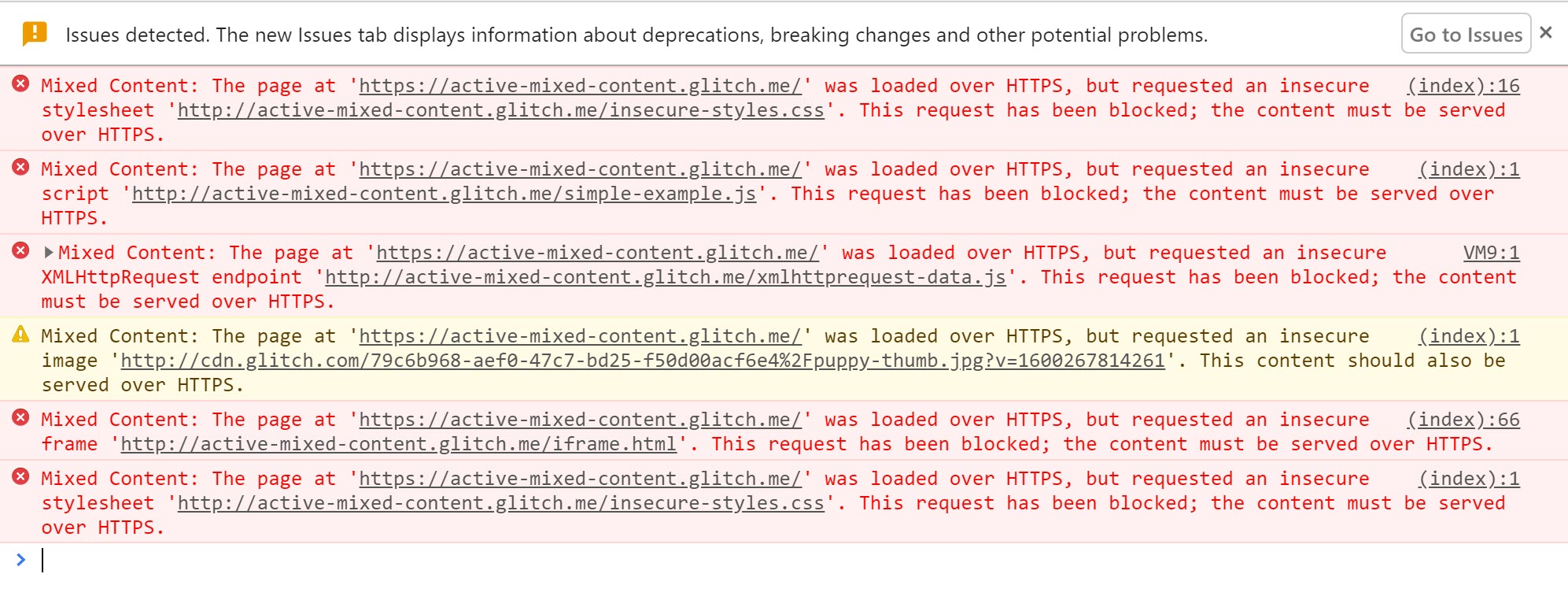
The cause is almost always mixed content. The page loads over HTTPS, but some images, scripts, fonts or stylesheets still load over http://. The certificate is fine. The URLs inside your site are the problem, and they usually date from before the switch to HTTPS.
- Find the exact URLs. Open the browser’s developer tools (F12), reload, and read the Console. Each mixed-content warning names the insecure file.
- Back up the database. The next step rewrites it.
- Preview a scoped replacement. With WP-CLI, run a dry run first:
Check the count, then run it again withoutwp search-replace 'http://example.com' 'https://example.com' --skip-columns=guid --dry-run--dry-run. Better Search Replace does the same job from wp-admin. Both handle serialized data, which a raw SQL replace breaks. - Fix what the database doesn’t hold. Theme files, custom CSS and hard-coded links in plugins need editing where they live.
- Replace third-party files that have no HTTPS version. Only replace your own domain. Changing every http:// to https:// breaks external resources that don’t serve HTTPS.
- Clear every cache. That means the plugin cache, the host cache, the CDN cache and the browser. Then test in a private window.
Plugins such as Really Simple Security, which has more than 3 million active installs according to WordPress.org, can rewrite http:// references as each page is generated. That is a quick way to contain the problem. But it changes the output, not the stored data, and it can’t fix a third-party stylesheet that loads its own insecure fonts. Fixing the source lasts longer.
WordPress 5.7 added its own HTTPS migration, which rewrites old references to your home URL. According to the core team’s announcement, it only works when the site is already on HTTPS and the WordPress Address and Site Address use the same domain.
How to stop ERR_TOO_MANY_REDIRECTS after switching to HTTPS
A loop means two layers disagree about where a request should go. The most common causes:
- Several redirect layers. An SSL plugin, a caching plugin’s “Force SSL” option,
.htaccessand the host panel all force HTTPS or www, sometimes in opposite directions. - Cloudflare in Flexible mode. Cloudflare talks to your server over plain HTTP, your server redirects to HTTPS, and the loop begins. Kinsta’s Cloudflare documentation recommends Full or Full (strict).
- A proxy that hides HTTPS. If a load balancer or proxy handles HTTPS and passes plain HTTP to WordPress, WordPress thinks every request is insecure and keeps redirecting.
The fix is one canonical address, such as https://www.example.com, with one permanent server-side redirect to it. Then remove the others. Our guide to htaccess 301 redirects shows the rule. For the proxy case, WordPress’s Advanced Administration Handbook says to make WordPress read the forwarded scheme. Add this to wp-config.php above the “stop editing” line:
if ( isset( $_SERVER['HTTP_X_FORWARDED_PROTO'] ) && strpos( $_SERVER['HTTP_X_FORWARDED_PROTO'], 'https' ) !== false ) {
    $_SERVER['HTTPS'] = 'on';
}
Only add it if a proxy you control actually sets that header. Otherwise any visitor could send it.
What cURL error 60 means when your certificate is fine
This error is about outgoing connections. When WordPress contacts WordPress.org for updates, a payment gateway or an API, your server checks their certificate against a list of trusted authorities. If that list is out of date, the check fails, even though your own certificate is valid.
In one WordPress.org thread, a podcaster saw “certificate has expired” when adding an MP3 URL, and updating WordPress to a version with a newer bundled certificate list fixed it. The usual fixes are to update WordPress core, then ask the host to update the server’s CA certificates and PHP’s cURL. If the error only appears for WordPress.org, also check DNS and the server’s /etc/hosts file. Don’t switch the site back to HTTP. That has nothing to do with this error.
Why WooCommerce says SSL is missing on an HTTPS site
An HTTPS homepage doesn’t prove checkout is set up correctly. WooCommerce recommends HTTPS across the whole store, not just checkout. Its older Force SSL setting is unavailable once the site URL already uses HTTPS. When a gateway reports missing SSL, check these in order: the checkout page loads over HTTPS without mixed content, only one gateway plugin is handling that payment method, and an SSL test shows a complete certificate chain. A server that leaves out the intermediate can pass in a browser and fail the gateway’s check.
The order that keeps you from locking yourself out
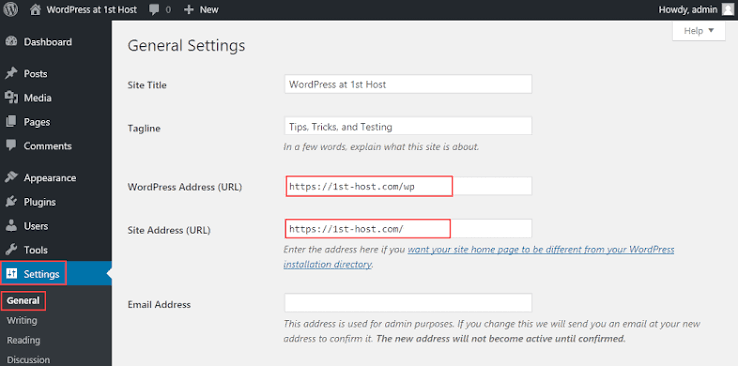
Most lockouts come from forcing HTTPS before the certificate works. Changing the WordPress URLs doesn’t install a certificate, and WordPress’s handbook says HTTPS has to work on the server before you enable FORCE_SSL_ADMIN.
- Get a valid certificate from your host and confirm
https://loads for every hostname. - Change the WordPress Address and Site Address under Settings, then General, to
https://. - Add one permanent server-side redirect from HTTP to the canonical HTTPS address.
- Clean up mixed content.
- Clear every cache and test in a private window.
Why certificates expire even with auto-renewal
Let’s Encrypt’s standard certificates last 90 days, and it now offers six-day certificates as an option. Nobody renews either by hand. When renewal fails, it usually fails quietly. Common causes: someone removed a DNS validation record during a DNS cleanup, a CAA record allows only another certificate authority, a CDN blocks the host’s validation check, or DNS points somewhere new. The worst one is human: the person who set it up has left, and nobody knows which account issued the certificate.
Write down who controls the domain, DNS, hosting and certificate. Check the expiry date after each renewal is due, from outside the server. Put both in a written routine, such as a WordPress website care plan, so they don’t depend on someone’s inbox.
When to stop and get help
Stop when the fix is on the server: issuing, reissuing or installing a certificate, the port 443 configuration, or the server’s CA certificates. That is your host’s job. Send them the exact error code, the URL, the time, and the certificate details you read. Also stop if you’ve spent an hour on a redirect loop without finding which layer causes it, or if you can’t reach wp-admin.
If you’d rather not do the WordPress side yourself, SiteSelf handles this kind of troubleshooting on your live site through chat. The URL settings and redirect plugins need the connector plugin, search-replace and server checks need hosting (SSH) access, and issuing the certificate stays with your host or CDN.