Give your WordPress site its first task.
Connect the site you already have, add your agent to Slack or Telegram, and tell it what you need.
Connect your siteStart with 500 free credits. No credit card needed.
Adding a contact form to WordPress takes a plugin, a page and a few minutes. Making sure every message reaches you is the real job, because the form can say “sent” while your inbox never gets the email. Set the sender address correctly, send through authenticated SMTP, store every entry, and test from outside your own login.
Contact Form 7’s own FAQ says the green “Thank you for your message. It has been sent.” response only means WordPress’s mail function finished running. It does not mean the email arrived. That gap is how small businesses end up with a contact form that looks fine for weeks and catches nothing.
Putting a form on a page is the easy half. This guide covers that half quickly, then spends most of its time on the parts that decide whether you ever read the message: the sender address, how the mail gets sent, where entries are stored, spam, and testing.
You need administrator access to a self-hosted WordPress site, an email address on your own domain (such as hello@yourbusiness.com), and a way to change your domain’s DNS records, or the name of whoever can. Most delivery problems get fixed in DNS and mail settings, not inside the form.
If your site runs on WordPress.com rather than your own hosting, it has its own Form block and its own rules about plugins, so some of these steps will look different.
Pick the simplest tool that does what you need. WordPress doesn’t ship a contact form in core, and themes usually style forms without creating them, so you will be installing a plugin.
Contact Form 7 is free and shows 10+ million active installs on WordPress.org. You build forms by editing short tags rather than dragging fields around, and it doesn’t save submissions unless you add a plugin for that. It’s a good fit for a plain name, email and message form if you’re happy reading settings carefully.
Drag-and-drop builders such as WPForms Lite (5+ million active installs), Fluent Forms, Forminator and Ninja Forms are easier for a non-developer to check. Some keep entries and integrations behind a paid tier, so look at the free feature list for the things you need, like a phone field or saved entries, before you commit.
Whichever you choose, check its last update date, tested-up-to version and PHP requirement before you click Install. Our guide to installing a WordPress plugin safely covers what to look for on the listing.
The steps below use Contact Form 7 as the example. Other builders use different screen names for the same steps.
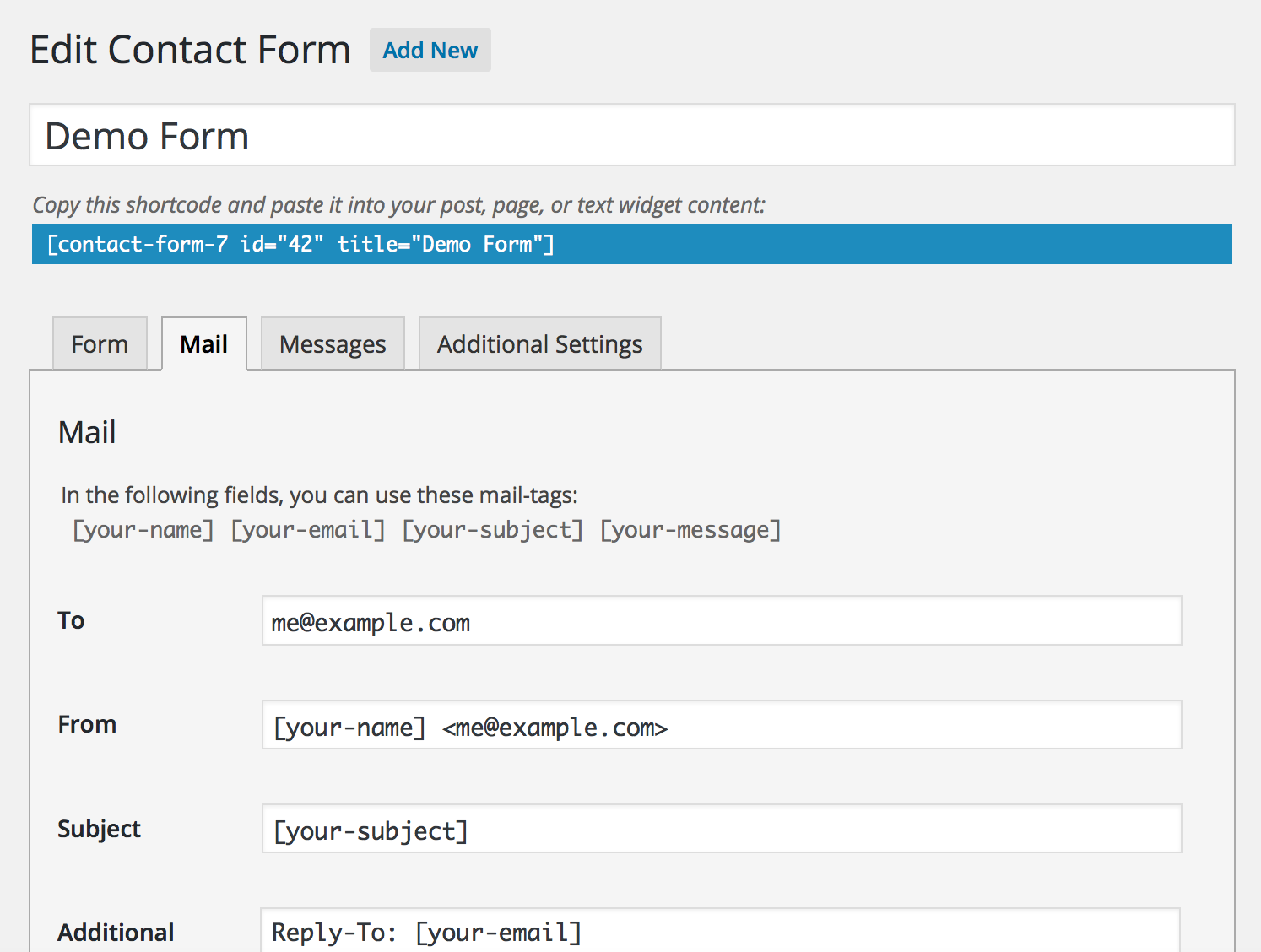
<label>, and placeholder text alone isn’t a reliable substitute. Placeholder text disappears as soon as someone starts typing. A label stays put.Contact Form 7’s mail documentation says the From address should be on the same domain as the website, and its best-practice guide says to put the visitor’s address in Reply-To instead. Your domain can’t legitimately send mail as someone’s Gmail account, and receiving servers know that.
To:       you@yourbusiness.com
From:     Website <hello@yourbusiness.com>
Subject:  New enquiry from [your-name]
Additional headers:
Reply-To: [your-email]

Message body:
From: [your-name] <[your-email]>
Subject: [your-subject]

[your-message]
Each word in square brackets is a mail-tag. It must match a field name in the form exactly. If you rename your-message in the form and forget to update the template, the email arrives with that field missing or with the raw tag in it. With Reply-To set, you can hit reply in your inbox and reach the visitor directly.
Because sending the email and receiving it are two separate steps. SiteGround’s knowledge base says WordPress commonly sends through PHP’s mail() function by default, and some mail providers mark those messages as spam. The form finishes its job and shows success. Then the message gets dropped, filtered or quarantined somewhere you can’t see.
The usual fix has three parts:
SMTP improves your chances. It doesn’t guarantee the inbox. A wordpress.org support thread from February 2026 makes the point that even an SMTP log saying “Success” only means the mail server accepted the message.
Don’t test while logged in as admin in the browser you built the form in. That session can hide caching and script problems your visitors will hit. Test like a stranger:
You’re done when a test from another device lands in the right inbox and you can reply to it. The success message doesn’t count.
Because email will fail eventually. A host changes something, a password expires or a DNS record gets edited. If every submission is also saved in your dashboard, a broken mail setup only delays your leads.
Contact Form 7 doesn’t store messages on its own. Flamingo, from the same developer, or CFDB7 saves them to the WordPress database, and CFDB7 can export them to CSV. Most drag-and-drop builders have an entries screen built in, though on some it’s a paid feature. Treat stored entries as untrusted input. Anyone can type anything into a public form.
Stack quiet defences first and keep a CAPTCHA in reserve. A honeypot field catches bots that fill in every field, and Akismet screens message content. Rate limiting slows down repeat senders. Each CAPTCHA you show a bot is also shown to a customer on a phone, so add one only when the quiet layers aren’t enough.
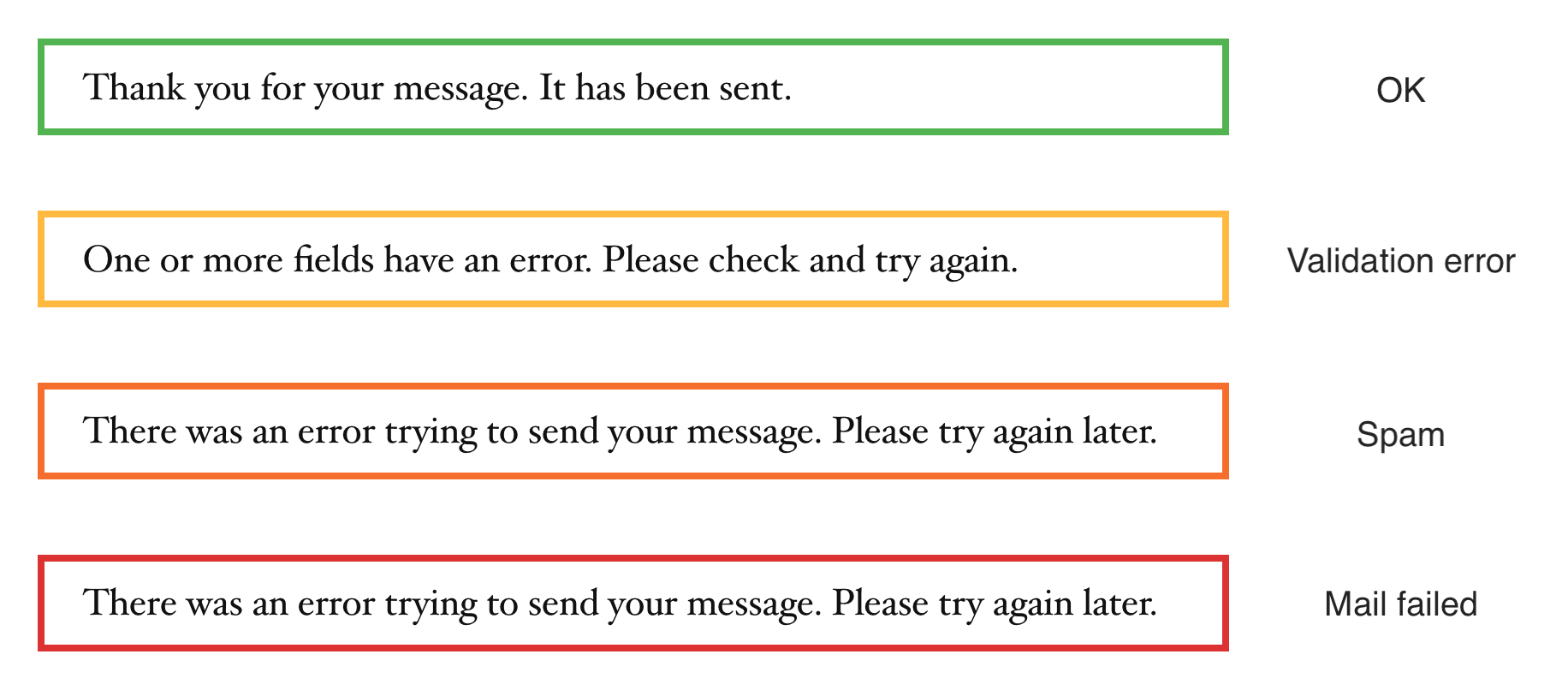
Filters can go too far, too. In Contact Form 7, an orange border around the error means a spam check rejected the submission. The FAQ explains how to turn on spam logging, which tells you whether Akismet, reCAPTCHA or the disallowed list blocked it. Test the form again after changing any spam setting.
Work out which step failed before you change anything. These causes are listed roughly in the order people run into them.
[contact-form-7 404 "Not Found"]. The shortcode points to a form ID that no longer exists. Insert the form again with the block.Don’t swap form plugins as the first fix. In one r/Wordpress thread, the owner was told a new builder wouldn’t fix delivery, and the real fix turned out to be SPF and DMARC records set up during a call with their host. Sometimes switching does help when a theme conflict won’t go away, but try it after you’ve checked the mail settings, not before.
Stop and contact your host when the SMTP plugin’s test email fails with the correct details, or when messages leave the site and still never arrive. The host can read the mail server logs. You can’t.
Off-the-shelf forms start to struggle with dynamic recipients (send to whichever branch the visitor picked), post data in the email (which property or product was this about), forms in several languages, CRM or webhook connections, and product enquiries in WooCommerce. WooCommerce’s own Product Enquiry Form extension is no longer available and won’t be updated.
You can build a form without a plugin, but you’d need more than HTML. You also need code that processes the submission, validates and sanitises every field, checks a nonce, filters spam and sends mail safely. That’s a development task. If you’d rather describe the form than build it, SiteSelf can write that code on your existing site through chat. That work is custom WordPress development and needs hosting access. Your DNS records and mail provider stay with you.
Self-hosted WordPress doesn’t include one in core, so you add a plugin. WordPress.com is a separate hosted product with its own Form block. Some themes offer a form button that installs a plugin in the background.
No. Receiving servers see your website claiming to be someone’s Gmail or Outlook account and treat it as spoofing. Use an address on your own domain as From, and put the visitor’s address in Reply-To.
By default, only to the email address in the form’s To field. Contact Form 7 keeps no copy unless you add Flamingo or CFDB7. Many other builders save entries in the dashboard, sometimes only on paid plans.
Most page builders have a shortcode widget that takes the form’s shortcode. In a PHP template file, Contact Form 7’s FAQ says to run the shortcode through apply_shortcodes(). Don’t put the form inside another <form> element.
Only if the bug is in the plugin. Updates don’t fix mail or DNS. Check the Requires PHP and Requires WordPress lines on the plugin listing before updating, because an update your server can’t run swaps a broken form for a broken site.
How-to Tutorials
The Update button is the easy part of upgrading a WordPress theme. Sites break because of what sits around it: code edited into the theme’s own files, a child theme that no longer fits the new parent, an old WooCommerce template, or a server that can’t write files. Find where your customizations live, take a fresh backup, test on a copy, and let the error message decide the fix.
Read article ›How-to Tutorials
Your WordPress homepage might come from a Page, a theme template, a page builder layout or your latest posts. To change it, first find out which one is in charge, then edit it with the tool that built it. Most “my edit didn’t show” problems happen because someone edited the wrong one or a cache is still serving the old page.
Read article ›How-to Tutorials
To make a page your WordPress homepage, use one built-in setting: Settings > Reading > A static page. When the homepage still looks wrong after you save, the setting is rarely the cause. The usual causes are a theme template, a cache, or a page that isn’t published.
Read article ›Connect the site you already have, add your agent to Slack or Telegram, and tell it what you need.
Connect your siteStart with 500 free credits. No credit card needed.